android 仿微信demo——注冊(cè)功能實(shí)現(xiàn)(移動(dòng)端)
微信的注冊(cè)界面每一個(gè)文本段都有下劃線且默認(rèn)顏色都是灰色,當(dāng)其中一個(gè)文本段獲取焦點(diǎn)會(huì)將下劃線的顏色變?yōu)榫G色,而且文本輸入框的光標(biāo)也是綠色的,還有在文本輸入框沒(méi)有全部輸入的情況下,按鈕是不能點(diǎn)擊的,只有當(dāng)文本輸入框全部輸入的情況下才能點(diǎn)擊且此時(shí)按鈕會(huì)變成綠色。除了這些UI功能外,當(dāng)點(diǎn)擊注冊(cè)按鈕是還會(huì)把表單數(shù)據(jù)發(fā)送給服務(wù)器
創(chuàng)建activity Reigister.java
activity Reigister.java
package com.example.wxchatdemo;import android.annotation.SuppressLint;import android.content.Intent;import android.graphics.Color;import android.os.Build;import android.os.Bundle;import android.os.Handler;import android.os.Message;import android.support.annotation.Nullable;import android.support.v7.app.ActionBar;import android.support.v7.app.AppCompatActivity;import android.util.Log;import android.view.View;import android.widget.Button;import android.widget.EditText;import android.widget.ImageView;import android.widget.Toast;import com.example.wxchatdemo.tools.IEditTextChangeListener;import com.example.wxchatdemo.tools.RandomUserName;import com.example.wxchatdemo.tools.WorksSizeCheckUtil;import org.json.JSONObject;import java.io.BufferedReader;import java.io.BufferedWriter;import java.io.InputStream;import java.io.InputStreamReader;import java.io.OutputStream;import java.io.OutputStreamWriter;import java.net.HttpURLConnection;import java.net.URL;import java.net.URLEncoder;import java.util.regex.Matcher;import java.util.regex.Pattern;public class Reigister extends AppCompatActivity { //聲明組件 private EditText username; private EditText phone; private EditText password; private Button button; //隨機(jī)微信號(hào) private String randomNumber; //自定義一個(gè)UI修改機(jī)制 private MyHander myhander = new MyHander(); @Override protected void onCreate(@Nullable Bundle savedInstanceState) {super.onCreate(savedInstanceState);setContentView(R.layout.register); //設(shè)置布局/* 隱藏自帶標(biāo)題*/ActionBar actionBar = getSupportActionBar();if (actionBar != null) { actionBar.hide();}if (Build.VERSION.SDK_INT >= 21) { View decorView = getWindow().getDecorView(); int option = View.SYSTEM_UI_FLAG_LAYOUT_FULLSCREEN //全屏顯示 | View.SYSTEM_UI_FLAG_LAYOUT_STABLE | View.SYSTEM_UI_FLAG_LIGHT_STATUS_BAR; //因?yàn)楸尘盀闇\色所以將狀態(tài)欄字體設(shè)置為黑色 decorView.setSystemUiVisibility(option); getWindow().setStatusBarColor(Color.TRANSPARENT);}initViews(); // 初始化布局元素// 設(shè)置注冊(cè)按鈕是否可點(diǎn)擊if (username.getText() + '' == '' || phone.getText() + '' == '' || password.getText() + '' == '') { button.setEnabled(false);} else { button.setEnabled(true);}inputFocus(); //監(jiān)聽EditView變色buttonChangeColor(); //監(jiān)聽登錄按鈕變色//button的點(diǎn)擊事件事件button.setOnClickListener(new View.OnClickListener() { @Override public void onClick(View v) {/*判斷輸入的手機(jī)號(hào)格式對(duì)不對(duì),對(duì)的話開一個(gè)線程完成網(wǎng)絡(luò)請(qǐng)求操作*/Pattern pattern = Pattern.compile('^(13[0-9]|15[0-9]|153|15[6-9]|180|18[23]|18[5-9])d{8}$');Matcher matcher = pattern.matcher(phone.getText());if (matcher.matches()) { // 開一個(gè)線程完成網(wǎng)絡(luò)請(qǐng)求操作 new Thread(new Runnable() {@Overridepublic void run() { httpUrlConnPost(Reigister.this.username.getText() + '', phone.getText() + '', password.getText() + '');} }).start();} else { Toast.makeText(getApplicationContext(), '手機(jī)格式錯(cuò)誤', Toast.LENGTH_LONG).show();} }}); } /*在這里面獲取到每個(gè)需要用到的控件的實(shí)例*/ @SuppressLint('NewApi') public void initViews() {// 得到所有的組件username = (EditText) this.findViewById(R.id.reg_name);phone = (EditText) this.findViewById(R.id.reg_phone);password = (EditText) this.findViewById(R.id.reg_passwd);button = (Button) this.findViewById(R.id.reg_button); } /*監(jiān)聽EditView變色*/ public void inputFocus() {username.setOnFocusChangeListener(new View.OnFocusChangeListener() { @Override public void onFocusChange(View v, boolean hasFocus) {if (hasFocus) { // 此處為得到焦點(diǎn)時(shí)的處理內(nèi)容 ImageView imageView = (ImageView) findViewById(R.id.reg_diver1); imageView.setBackgroundResource(R.color.input_dvier_focus);} else { // 此處為失去焦點(diǎn)時(shí)的處理內(nèi)容 ImageView imageView = (ImageView) findViewById(R.id.reg_diver1); imageView.setBackgroundResource(R.color.input_dvier);} }});phone.setOnFocusChangeListener(new View.OnFocusChangeListener() { @Override public void onFocusChange(View v, boolean hasFocus) {if (hasFocus) { // 此處為得到焦點(diǎn)時(shí)的處理內(nèi)容 ImageView imageView = (ImageView) findViewById(R.id.reg_diver2); imageView.setBackgroundResource(R.color.input_dvier_focus);} else { // 此處為失去焦點(diǎn)時(shí)的處理內(nèi)容 ImageView imageView = (ImageView) findViewById(R.id.reg_diver2); imageView.setBackgroundResource(R.color.input_dvier);} }});password.setOnFocusChangeListener(new View.OnFocusChangeListener() { @Override public void onFocusChange(View v, boolean hasFocus) {if (hasFocus) { // 此處為得到焦點(diǎn)時(shí)的處理內(nèi)容 ImageView imageView = (ImageView) findViewById(R.id.reg_diver3); imageView.setBackgroundResource(R.color.input_dvier_focus);} else { // 此處為失去焦點(diǎn)時(shí)的處理內(nèi)容 ImageView imageView = (ImageView) findViewById(R.id.reg_diver3); imageView.setBackgroundResource(R.color.input_dvier);} }}); } /*監(jiān)聽登錄按鈕變色*/ public void buttonChangeColor() {//創(chuàng)建工具類對(duì)象 把要改變顏色的Button先傳過(guò)去WorksSizeCheckUtil.textChangeListener textChangeListener = new WorksSizeCheckUtil.textChangeListener(button);textChangeListener.addAllEditText(username, phone, password);//把所有要監(jiān)聽的EditText都添加進(jìn)去//接口回調(diào) 在這里拿到boolean變量 根據(jù)isHasContent的值決定 Button應(yīng)該設(shè)置什么顏色WorksSizeCheckUtil.setChangeListener(new IEditTextChangeListener() { @Override public void textChange(boolean isHasContent) {if (isHasContent) { button.setBackgroundResource(R.drawable.login_button_focus); button.setTextColor(getResources().getColor(R.color.loginButtonTextFouse));} else { button.setBackgroundResource(R.drawable.login_button_shape); button.setTextColor(getResources().getColor(R.color.loginButtonText));} }}); } /*發(fā)送請(qǐng)求的主要方法*/ public void httpUrlConnPost(String name, String phone, String password) {/*使用工具類生成隨機(jī)的微信號(hào)*/RandomUserName ran = new RandomUserName();randomNumber = ran.generate();HttpURLConnection urlConnection = null;URL url;try { // 請(qǐng)求的URL地地址 url = new URL( 'http://100.2.178.10:8080/AndroidServer_war_exploded/Reigister'); urlConnection = (HttpURLConnection) url.openConnection();// 打開http連接 urlConnection.setConnectTimeout(3000);// 連接的超時(shí)時(shí)間 urlConnection.setUseCaches(false);// 不使用緩存 // urlConnection.setFollowRedirects(false);是static函數(shù),作用于所有的URLConnection對(duì)象。 urlConnection.setInstanceFollowRedirects(true);// 是成員函數(shù),僅作用于當(dāng)前函數(shù),設(shè)置這個(gè)連接是否可以被重定向 urlConnection.setReadTimeout(3000);// 響應(yīng)的超時(shí)時(shí)間 urlConnection.setDoInput(true);// 設(shè)置這個(gè)連接是否可以寫入數(shù)據(jù) urlConnection.setDoOutput(true);// 設(shè)置這個(gè)連接是否可以輸出數(shù)據(jù) urlConnection.setRequestMethod('POST');// 設(shè)置請(qǐng)求的方式 urlConnection.setRequestProperty('Content-Type', 'application/json;charset=UTF-8');// 設(shè)置消息的類型 urlConnection.connect();// 連接,從上述至此的配置必須要在connect之前完成,實(shí)際上它只是建立了一個(gè)與服務(wù)器的TCP連接 JSONObject json = new JSONObject();// 創(chuàng)建json對(duì)象 json.put('number', URLEncoder.encode(randomNumber, 'UTF-8'));// 使用URLEncoder.encode對(duì)特殊和不可見(jiàn)字符進(jìn)行編碼 json.put('name', URLEncoder.encode(name, 'UTF-8')); json.put('phone', URLEncoder.encode(phone, 'UTF-8')); json.put('password', URLEncoder.encode(password, 'UTF-8'));// 把數(shù)據(jù)put進(jìn)json對(duì)象中 String jsonstr = json.toString();// 把JSON對(duì)象按JSON的編碼格式轉(zhuǎn)換為字符串 // ------------字符流寫入數(shù)據(jù)------------ OutputStream out = urlConnection.getOutputStream();// 輸出流,用來(lái)發(fā)送請(qǐng)求,http請(qǐng)求實(shí)際上直到這個(gè)函數(shù)里面才正式發(fā)送出去 BufferedWriter bw = new BufferedWriter(new OutputStreamWriter(out));// 創(chuàng)建字符流對(duì)象并用高效緩沖流包裝它,便獲得最高的效率,發(fā)送的是字符串推薦用字符流,其它數(shù)據(jù)就用字節(jié)流 bw.write(jsonstr);// 把json字符串寫入緩沖區(qū)中 bw.flush();// 刷新緩沖區(qū),把數(shù)據(jù)發(fā)送出去,這步很重要 out.close(); bw.close();// 使用完關(guān)閉 Log.i('aa', urlConnection.getResponseCode() + ''); //以下判?嗍欠裨L??成功,如果返回的狀態(tài)碼是200則說(shuō)明訪問(wèn)成功 if (urlConnection.getResponseCode() == HttpURLConnection.HTTP_OK) {// 得到服務(wù)端的返回碼是否連接成功// ------------字符流讀取服務(wù)端返回的數(shù)據(jù)------------InputStream in = urlConnection.getInputStream();BufferedReader br = new BufferedReader(new InputStreamReader(in));String str = null;StringBuffer buffer = new StringBuffer();while ((str = br.readLine()) != null) {// BufferedReader特有功能,一次讀取一行數(shù)據(jù) buffer.append(str);}in.close();br.close();JSONObject rjson = new JSONObject(buffer.toString());Log.i('aa', 'rjson=' + rjson);// rjson={'json':true}boolean result = rjson.getBoolean('json');// 從rjson對(duì)象中得到key值為'json'的數(shù)據(jù),這里服務(wù)端返回的是一個(gè)boolean類型的數(shù)據(jù)System.out.println('json:===' + result);//如果服務(wù)器端返回的是true,則說(shuō)明注冊(cè)成功,否則注冊(cè)失敗if (result) {// 判斷結(jié)果是否正確 //在Android中http請(qǐng)求,必須放到線程中去作請(qǐng)求,但是在線程中不可以直接修改UI,只能通過(guò)hander機(jī)制來(lái)完成對(duì)UI的操作 myhander.sendEmptyMessage(1); Log.i('用戶:', '注冊(cè)成功');} else { myhander.sendEmptyMessage(2); Log.i('用戶:', '手機(jī)號(hào)已被注冊(cè)');} } else {myhander.sendEmptyMessage(2); }} catch (Exception e) { e.printStackTrace(); Log.i('aa', e.toString()); myhander.sendEmptyMessage(2);} finally { urlConnection.disconnect();// 使用完關(guān)閉TCP連接,釋放資源} } // 在Android中不可以在線程中直接修改UI,只能借助Handler機(jī)制來(lái)完成對(duì)UI的操作 class MyHander extends Handler {@Overridepublic void handleMessage(Message msg) { super.handleMessage(msg); //判斷hander的內(nèi)容是什么,如果是1則說(shuō)明注冊(cè)成功,如果是2說(shuō)明注冊(cè)失敗 switch (msg.what) {case 1: Log.i('aa', msg.what + ''); Toast.makeText(getApplicationContext(), '注冊(cè)成功', Toast.LENGTH_SHORT).show(); /*跳轉(zhuǎn)到登錄頁(yè)面并把微信號(hào)也傳過(guò)去*/ Intent intent = new Intent(); intent.putExtra('weixin_number', randomNumber); intent.setClass(com.example.wxchatdemo.Reigister.this, LoginUser.class); startActivity(intent); com.example.wxchatdemo.Reigister.this.finish(); //結(jié)束當(dāng)前activity break;case 2: Log.i('aa', msg.what + ''); //?是一??提示消息 Toast.makeText(getApplicationContext(), '手機(jī)號(hào)已被注冊(cè)', Toast.LENGTH_LONG).show(); }} } //返回按鈕處理事件 public void rigister_activity_back(View v) {/*跳轉(zhuǎn)到微信啟動(dòng)頁(yè)*/Intent intent = new Intent();intent.setClass(com.example.wxchatdemo.Reigister.this, Welcome.class);startActivity(intent);com.example.wxchatdemo.Reigister.this.finish(); //結(jié)束當(dāng)前activity }}
上面用到的兩個(gè)工具類和一個(gè)接口,其中一個(gè)工具類是監(jiān)聽按鈕變色的,是上面接口的實(shí)現(xiàn)類(用到面向接口編程思想,把接口作為自己的成員變量,實(shí)現(xiàn)接口回調(diào))另一個(gè)工具類是隨機(jī)生成微信號(hào),代碼就不全闡述了,注釋都有說(shuō)明,主要講一下生成微信號(hào)的工具類生成隨機(jī)微信號(hào)工具類:注冊(cè)微信時(shí)系統(tǒng)會(huì)給我們隨機(jī)生成一個(gè)微信號(hào)且不能重復(fù)的,所以上面用一個(gè)工具類RandomUserName(),通過(guò)調(diào)用generate()方法可以返回一個(gè)隨機(jī)的微信號(hào)(封裝的細(xì)節(jié)就不說(shuō)了,等下后面附上工具類代碼都有注釋。這個(gè)功能應(yīng)該是在服務(wù)端實(shí)現(xiàn)的,我懶,所以簡(jiǎn)單在移動(dòng)端搞了),然后和注冊(cè)表單一起發(fā)給服務(wù)器
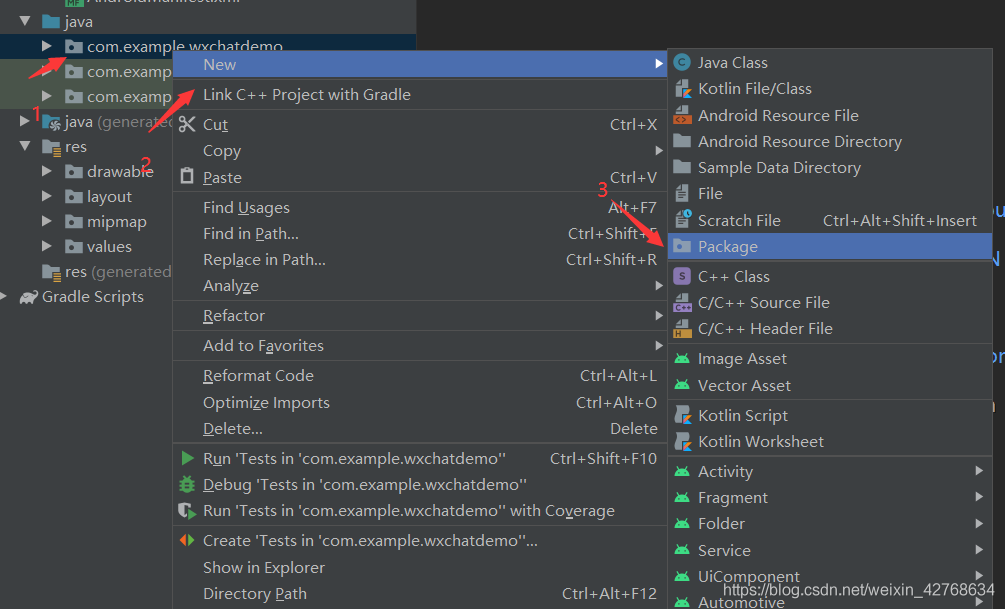
在創(chuàng)建工具類接口之前,可以先創(chuàng)建一個(gè)存放工具類和接口的包,因?yàn)楹竺鏁?huì)繼續(xù)完善微信功能時(shí)會(huì)創(chuàng)建很多工具類,方便管理
創(chuàng)建存放工具類和接口包

創(chuàng)建監(jiān)聽按鈕變色工具類WorksSizeCheckUtil.java
WorksSizeCheckUtil.java
package com.example.wxchatdemo.tools;import android.text.Editable;import android.text.TextUtils;import android.text.TextWatcher;import android.widget.Button;import android.widget.EditText;public class WorksSizeCheckUtil { static IEditTextChangeListener mChangeListener; public static void setChangeListener(IEditTextChangeListener changeListener) {mChangeListener = changeListener; } //檢測(cè)輸入框是否都輸入了內(nèi)容 從而改變按鈕的是否可點(diǎn)擊 public static class textChangeListener {private Button button;private EditText[] editTexts;public textChangeListener(Button button) { this.button = button;}public textChangeListener addAllEditText(EditText... editTexts) { this.editTexts = editTexts; initEditListener(); return this;}private void initEditListener() { //調(diào)用了遍歷editext的方法 for (EditText editText : editTexts) {editText.addTextChangedListener(new textChange()); }}// edit輸入的變化來(lái)改變按鈕的是否點(diǎn)擊private class textChange implements TextWatcher { @Override public void beforeTextChanged(CharSequence charSequence, int i, int i1, int i2) { } @Override public void onTextChanged(CharSequence charSequence, int i, int i1, int i2) {if (checkAllEdit()) { //所有EditText有值了 mChangeListener.textChange(true); button.setEnabled(true);} else { //所有EditText值為空 button.setEnabled(false); mChangeListener.textChange(false);} } @Override public void afterTextChanged(Editable editable) { }}//檢查所有的edit是否輸入了數(shù)據(jù)private boolean checkAllEdit() { for (EditText editText : editTexts) {if (!TextUtils.isEmpty(editText.getText() + '')) { continue;} else { return false;} } return true;} }}
創(chuàng)建對(duì)應(yīng)的接口IEditTextChangeListener.java
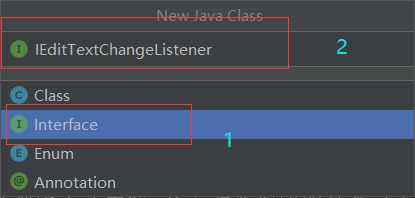
IEditTextChangeListener.java
package com.example.wxchatdemo.tools;public interface IEditTextChangeListener { void textChange(boolean isHasContent);}
創(chuàng)建隨機(jī)生成微信號(hào)的工具類RandomUserName.java
RandomUserName.java
package com.example.wxchatdemo.tools;import java.util.Random;public class RandomUserName { private static final char[] eng_char = new char[]{’a’,’b’,’c’,’d’,’e’,’f’,’g’,’h’,’i’,’j’,’k’,’l’,’m’,’n’,’o’,’p’,’q’,’r’,’s’,’t’,’u’,’v’,’w’,’x’,’y’,’z’}; private static final String[] first_name = new String[]{'zhao','qian','sun','li','zhou','wang','wu','zheng','feng','chen','chu','wei','jiang','shen','yang' ,'zhu','qin','you','xu','he','shi','zhan','kong','cao','xie','jin','shu','fang','yuan'}; private static final String[] tel_head = new String[]{'13','18','15'}; private static final String[] email_suffix = new String[]{'@gmail.com','@yahoo.com','@msn.com','@hotmail.com','@aol.com','@ask.com' ,'@live.com','@qq.com','@0355.net','@163.com','@163.net','@263.net' ,'@3721.net','@yeah.net','@googlemail.com','@126.com','@sina.com','@sohu.com','@yahoo.com.cn'}; private Random random = new Random(); public String generate(){StringBuilder uName = new StringBuilder();int randomType = random.nextInt(Integer.MAX_VALUE)%3;switch (randomType) { case 0: // firstName + randomSecName + birthdayuName.append(first_name[random.nextInt(Integer.MAX_VALUE)%first_name.length]).append(eng_char[random.nextInt(Integer.MAX_VALUE)%eng_char.length]);if(random.nextInt(Integer.MAX_VALUE)%2 == 0){ uName.append(eng_char[random.nextInt(Integer.MAX_VALUE)%eng_char.length]);}// birthdayif(random.nextInt(Integer.MAX_VALUE)%2 == 0){ uName.append(String.valueOf(2014 - (random.nextInt(Integer.MAX_VALUE)%(50-15) + 15))); // 大于15小于50歲}if(random.nextInt(Integer.MAX_VALUE)%2 == 0){ int month = random.nextInt(Integer.MAX_VALUE)%11 + 1; int day = random.nextInt(Integer.MAX_VALUE)%29 + 1; if(month < 10)uName.append('0'); uName.append(month); if(day < 10)uName.append('0'); uName.append(day);}if(random.nextInt(Integer.MAX_VALUE%4) == 0){// add email suffix , 1/4 rate uName.append(email_suffix[random.nextInt(Integer.MAX_VALUE)%email_suffix.length]);}break; case 1: // teluName.append(tel_head[random.nextInt(Integer.MAX_VALUE)%tel_head.length]).append(random.nextInt(Integer.MAX_VALUE)%10).append(random.nextInt(Integer.MAX_VALUE)%10).append(random.nextInt(Integer.MAX_VALUE)%10).append(random.nextInt(Integer.MAX_VALUE)%10).append(random.nextInt(Integer.MAX_VALUE)%10).append(random.nextInt(Integer.MAX_VALUE)%10).append(random.nextInt(Integer.MAX_VALUE)%10).append(random.nextInt(Integer.MAX_VALUE)%10).append(random.nextInt(Integer.MAX_VALUE)%10);break; case 2: // qquName.append(random.nextInt(Integer.MAX_VALUE)%9+1).append(random.nextInt(Integer.MAX_VALUE)%10).append(random.nextInt(Integer.MAX_VALUE)%10).append(random.nextInt(Integer.MAX_VALUE)%10).append(random.nextInt(Integer.MAX_VALUE)%10);int lenth = 0;while(random.nextInt(Integer.MAX_VALUE)%2 == 0){ if(lenth > 6)break; uName.append(random.nextInt(Integer.MAX_VALUE)%10); lenth ++;}break; default:break;}return uName.toString(); }}
創(chuàng)建兩個(gè)shapre文件,自定義按鈕形狀,實(shí)現(xiàn)按鈕在所有文本框獲取輸入時(shí)顯示的背景和至少有一個(gè)沒(méi)有輸入情況下顯示的背景
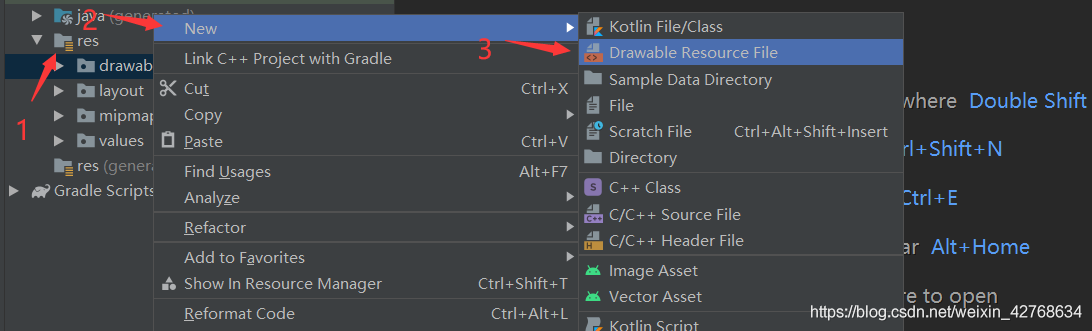
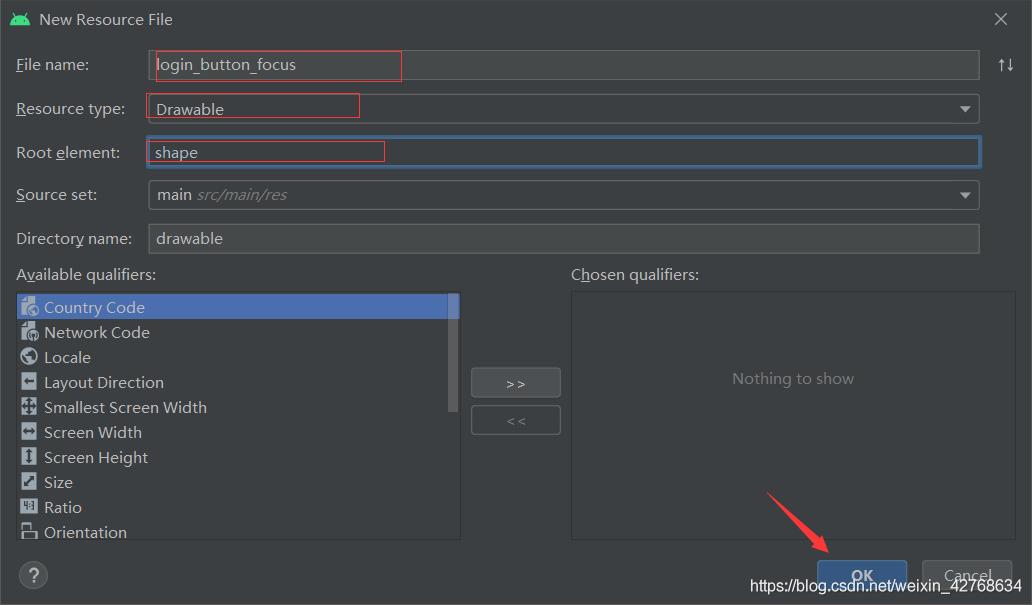
按鈕在所以文本框獲取輸入時(shí)顯示的shapre文件login_button_focus.xml
login_button_focus.xml
<?xml version='1.0' encoding='utf-8'?><shape xmlns:android='http://schemas.android.com/apk/res/android'> <solid android:color='@color/loginButtonBackgroundFouse' /><!-- 填充的顏色 --> <!-- 設(shè)置按鈕的四個(gè)角為弧形 --> <!-- android:radius 弧形的半徑 --> <cornersandroid:bottomLeftRadius='6dp'android:bottomRightRadius='6dp'android:topLeftRadius='6dp'android:topRightRadius='6dp' /> <!-- 邊框粗細(xì)及顏色 --></shape>
按鈕在所以文本框至少有一個(gè)沒(méi)有獲取輸入時(shí)顯示的shapre文件login_button_shape.xml
login_button_shape.xml
<?xml version='1.0' encoding='utf-8'?><shape xmlns:android='http://schemas.android.com/apk/res/android'> <solid android:color='@color/loginButtonBackgroundNotFouse' /><!-- 填充的顏色 --> <!-- 設(shè)置按鈕的四個(gè)角為弧形 --> <!-- android:radius 弧形的半徑 --> <cornersandroid:bottomLeftRadius='6dp'android:bottomRightRadius='6dp'android:topLeftRadius='6dp'android:topRightRadius='6dp' /> <!-- 邊框粗細(xì)及顏色 --></shape>
創(chuàng)建activity Reigister.java對(duì)應(yīng)的布局文件reigister.xml
reigister.xml
<?xml version='1.0' encoding='utf-8'?><LinearLayout xmlns:android='http://schemas.android.com/apk/res/android' android:layout_width='match_parent' android:layout_height='match_parent' android:background='@color/title' android:orientation='vertical'> <ImageViewandroid:layout_width='17dp'android:layout_height='17dp'android:layout_marginLeft='20dp'android:layout_marginTop='45dp'android:onClick='rigister_activity_back'android:src='http://m.b3g6.com/bcjs/@drawable/backpay' /> <TextViewandroid:layout_width='match_parent'android:layout_height='wrap_content'android:layout_marginLeft='30dp'android:layout_marginTop='25dp'android:text='手機(jī)號(hào)注冊(cè)'android:textColor='@color/loginText'android:textSize='25sp' /> <LinearLayoutandroid:layout_width='match_parent'android:layout_height='wrap_content'android:layout_marginTop='40dp'><TextView android:layout_width='wrap_content' android:layout_height='wrap_content' android:layout_marginLeft='30dp' android:text='昵稱' android:textColor='@color/loginText' android:textSize='16sp' /><EditText android: android:layout_width='200dp' android:layout_height='wrap_content' android:layout_marginLeft='55dp' android:background='@null' android:hint='例如:陳晨' android:singleLine='true' android:textColorHint='@color/textColorHint' android:textCursorDrawable='@drawable/edit_cursor_color' android:textSize='16sp' /> </LinearLayout> <ImageViewandroid: android:layout_width='320dp'android:layout_height='1dp'android:layout_gravity='center_horizontal'android:layout_marginTop='17dp'android:background='@color/input_dvier' /> <LinearLayoutandroid:layout_width='match_parent'android:layout_height='wrap_content'android:layout_marginTop='20dp'><TextView android:layout_width='wrap_content' android:layout_height='wrap_content' android:layout_marginLeft='30dp' android:text='手機(jī)號(hào)' android:textColor='@color/loginText' android:textSize='16sp' /><EditText android: android:layout_width='200dp' android:layout_height='wrap_content' android:layout_marginLeft='36dp' android:background='@null' android:hint='請(qǐng)?zhí)顚懯謾C(jī)號(hào)' android:singleLine='true' android:textColorHint='@color/textColorHint' android:textCursorDrawable='@drawable/edit_cursor_color' android:textSize='16sp' /> </LinearLayout> <ImageViewandroid: android:layout_width='320dp'android:layout_height='1dp'android:layout_gravity='center_horizontal'android:layout_marginTop='17dp'android:background='@color/input_dvier' /> <LinearLayoutandroid:layout_width='match_parent'android:layout_height='wrap_content'android:layout_marginTop='20dp'><TextView android:layout_width='wrap_content' android:layout_height='wrap_content' android:layout_marginLeft='30dp' android:text='密碼' android:textColor='@color/loginText' android:textSize='16sp' /><EditText android: android:layout_width='200dp' android:layout_height='wrap_content' android:layout_marginLeft='55dp' android:background='@null' android:hint='請(qǐng)?zhí)顚懨艽a' android:password='false' android:singleLine='true' android:textColorHint='@color/textColorHint' android:textCursorDrawable='@drawable/edit_cursor_color' android:textSize='16sp' /> </LinearLayout> <ImageViewandroid: android:layout_width='320dp'android:layout_height='1dp'android:layout_gravity='center_horizontal'android:layout_marginTop='17dp'android:background='@color/input_dvier' /> <LinearLayoutandroid:layout_width='match_parent'android:layout_height='wrap_content'android:layout_marginTop='40dp'android:gravity='center_horizontal'><Button android: android:layout_width='321dp' android:layout_height='48dp' android:background='@drawable/login_button_shape' android:text='注冊(cè)' android:textColor='@color/loginButtonText' android:textSize='16sp' /> </LinearLayout></LinearLayout>
創(chuàng)建shape文件edit_cursor_color.xml,自定義光標(biāo)顏色
<?xml version='1.0' encoding='utf-8'?><shape xmlns:android='http://schemas.android.com/apk/res/android' android:shape='rectangle' > <size android: /> <size android: /> <solid android:color='@color/loginButtonBackgroundFouse' /></shape>
在colors.xml文件中聲明所用到顏色
colors.xml
<color name='input_dvier'>#D8D8D8</color> <color name='input_dvier_focus'>#1BB879</color> <color name='loginButtonText'>#B5B2B2</color> <color name='loginButtonTextFouse'>#FFFFFF</color> <color name='loginButtonBackgroundFouse'>#07C160</color> <color name='loginButtonBackgroundNotFouse'>#D4D8D5</color> <color name='title'>#EDEDED</color> <color name='loginText'>#5A5959</color> <color name='textColorHint'>#DDDDDD</color>
在AndroidMainfest.xml中聲明注冊(cè)activity
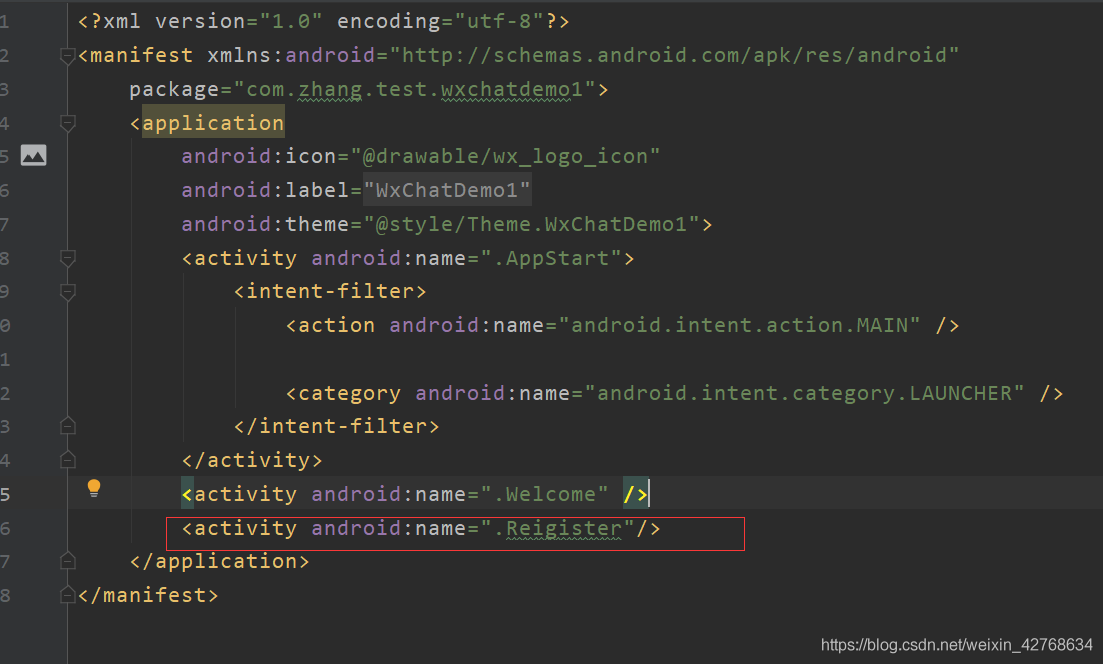
雖然服務(wù)器代碼還沒(méi)實(shí)現(xiàn),但是還是可以測(cè)試相應(yīng)功能,先把注冊(cè)成功后跳轉(zhuǎn)到登錄頁(yè)面的那段代碼注釋點(diǎn)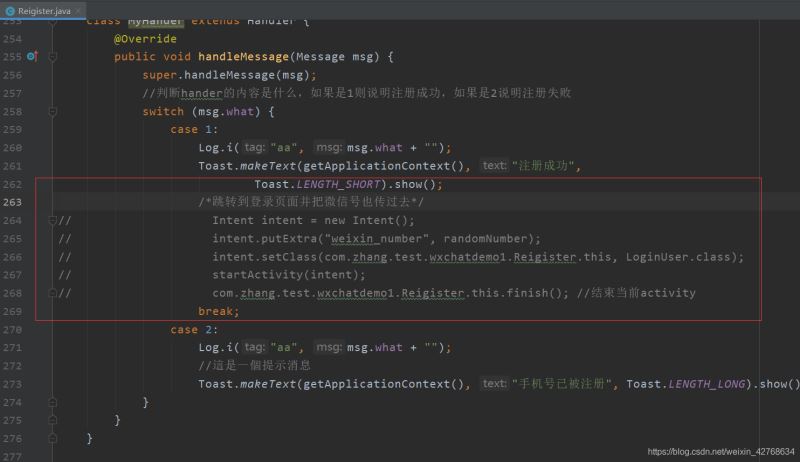
然后再上篇微信啟動(dòng)頁(yè)實(shí)現(xiàn)文章中的activity Welcome.java注冊(cè)按鈕點(diǎn)擊后跳轉(zhuǎn)的activity代碼注釋取消掉
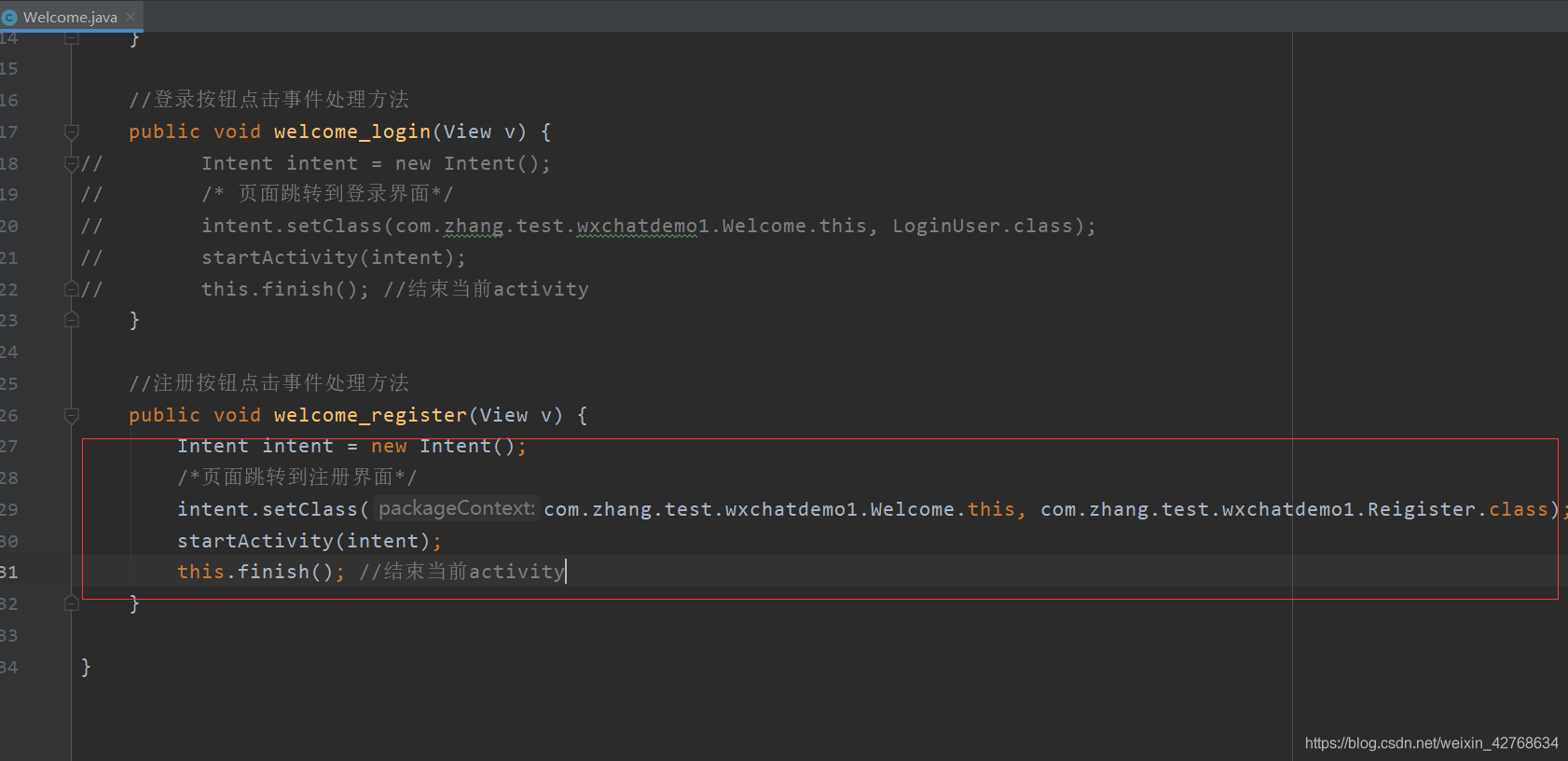
啟動(dòng)項(xiàng)目測(cè)試

雖然輸入正確的手機(jī)號(hào)格式,但是服務(wù)器功能還沒(méi)實(shí)現(xiàn),所以不論怎樣輸入手機(jī)號(hào)都會(huì)出現(xiàn)手機(jī)號(hào)已被注冊(cè),因?yàn)榘颜?qǐng)求服務(wù)器出現(xiàn)錯(cuò)誤時(shí)執(zhí)行的代碼段寫了手機(jī)號(hào)已被注冊(cè)的提示,這樣做的原因是服務(wù)器出現(xiàn)錯(cuò)誤就是手機(jī)號(hào)重復(fù)了。
總結(jié)這篇關(guān)于微信demo的文章就到這里了,希望大家可以多多關(guān)注好吧啦網(wǎng)的更多精彩內(nèi)容!
相關(guān)文章:
1. 建行生活app支付失敗什么原因2. 微信鍵盤怎么刪除輸入方式3. 微信公眾號(hào)怎么創(chuàng)建開通賬號(hào) 微信公眾號(hào)怎么賺錢運(yùn)營(yíng)推廣4. 手機(jī)qq怎樣不顯示黃鉆5. 釘釘群昵稱怎么設(shè)置?釘釘群昵稱設(shè)置方法6. qq音樂(lè)音樂(lè)包在哪里看7. 微信沒(méi)有實(shí)名認(rèn)證可以領(lǐng)紅包轉(zhuǎn)賬嗎8. 剪映APP怎么設(shè)置轉(zhuǎn)場(chǎng)?剪映APP設(shè)置轉(zhuǎn)場(chǎng)的方法9. 支付寶理財(cái)好品大賞怎么訂閱?支付寶理財(cái)好品大賞的訂閱方法10. 淘寶會(huì)員碼給別人了會(huì)不會(huì)被盜刷
 網(wǎng)公網(wǎng)安備