java實現Excel的導入導出
本文實例為大家分享了java實現Excel導入導出的具體代碼,供大家參考,具體內容如下
一.Excel讀寫技術

區別:
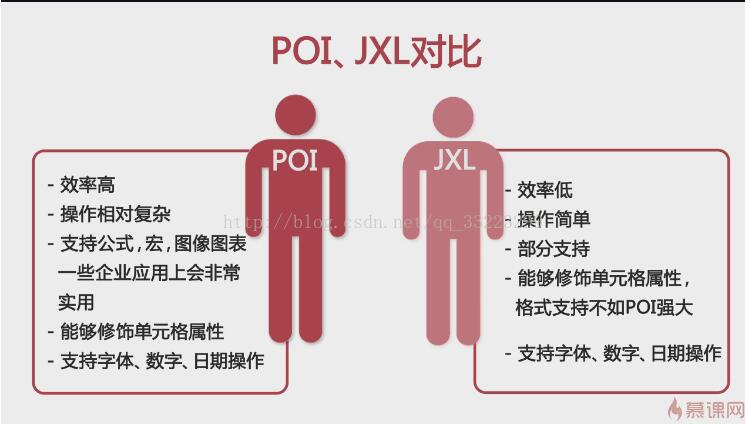
二.jxl讀寫基礎代碼
1.從數據庫將數據導出到excel表格
public class JxlExcel {public static void main(String[] args) { //創建Excel文件 String[] title= {'姓名','課程名','分數'}; File file=new File('f:/sheet1.xls'); try { file.createNewFile(); //創建工作簿 WritableWorkbook workbook=Workbook.createWorkbook(file); //創建Sheet WritableSheet sheet=workbook.createSheet('表格一', 20); //第一行設置列名 Label label=null; for (int i = 0; i < title.length; i++) { label=new Label(i, 0, title[i]);//第一個參數為列,第二個為行 sheet.addCell(label); } Data data=new Data(); ResultSet rs=data.getString(); while(rs.next()) { System.out.println(rs.getString(1)); label=new Label(0,rs.getRow(),rs.getString(1)); sheet.addCell(label); label=new Label(1,rs.getRow(),rs.getString(2)); sheet.addCell(label); label=new Label(2,rs.getRow(),rs.getString(3)); sheet.addCell(label); } workbook.write(); workbook.close(); } catch (Exception e) { // TODO Auto-generated catch block e.printStackTrace(); }} }
2.從Excel表格中讀取數據
public class JxlRead {public static void main(String[] args) { //創建workbook try { Workbook workbook=Workbook.getWorkbook(new File('f:/sheet1.xls')); //獲取第一個表格 Sheet sheet=workbook.getSheet(0); //獲取數據 for (int i = 0; i < sheet.getRows(); i++) { for (int j = 0; j < sheet.getColumns(); j++) { Cell cell=sheet.getCell(j, i); System.out.print(cell.getContents()+' '); } System.out.println(); } } catch (Exception e) { // TODO Auto-generated catch block e.printStackTrace(); } }}
三.Poi讀寫基礎代碼
//所需jar包:commons-io-2.2.jar;poi-3.11-20141221.jar//通過poi進行excel導入數據public class PoiExcel {public static void main(String[] args) throws SQLException { String title[]= {'名字','課程','分數'}; //1.創建Excel工作簿 HSSFWorkbook workbook=new HSSFWorkbook(); //2.創建一個工作表 HSSFSheet sheet=workbook.createSheet('sheet2'); //3.創建第一行 HSSFRow row=sheet.createRow(0); HSSFCell cell=null; //4.插入第一行數據 for (int i = 0; i < title.length; i++) { cell=row.createCell(i); cell.setCellValue(title[i]); } //5.追加數據 Data data=new Data(); ResultSet rs=data.getString(); while(rs.next()) { HSSFRow row2=sheet.createRow(rs.getRow()); HSSFCell cell2=row2.createCell(0); cell2.setCellValue(rs.getString(1)); cell2=row2.createCell(1); cell2.setCellValue(rs.getString(2)); cell2=row2.createCell(2); cell2.setCellValue(rs.getString(3)); } //創建一個文件,將Excel內容存盤 File file=new File('e:/sheet2.xls'); try { file.createNewFile(); FileOutputStream stream=FileUtils.openOutputStream(file); workbook.write(stream); stream.close(); } catch (IOException e) { // TODO Auto-generated catch block e.printStackTrace(); } }}
//將Excel表中內容讀取public class PoiRead {public static void main(String[] args) { //需要解析的Excel文件 File file=new File('e:/sheet2.xls'); try { //獲取工作簿 FileInputStream fs=FileUtils.openInputStream(file); HSSFWorkbook workbook=new HSSFWorkbook(fs); //獲取第一個工作表 HSSFSheet hs=workbook.getSheetAt(0); //獲取Sheet的第一個行號和最后一個行號 int last=hs.getLastRowNum(); int first=hs.getFirstRowNum(); //遍歷獲取單元格里的信息 for (int i = first; i <last; i++) { HSSFRow row=hs.getRow(i); int firstCellNum=row.getFirstCellNum();//獲取所在行的第一個行號 int lastCellNum=row.getLastCellNum();//獲取所在行的最后一個行號 for (int j = firstCellNum; j <lastCellNum; j++) { HSSFCell cell=row.getCell(j); String value=cell.getStringCellValue(); System.out.print(value+' '); } System.out.println(); } } catch (IOException e) { // TODO Auto-generated catch block e.printStackTrace(); }}}
如果Excel版本過高則需要改寫用XSSF
public class PoiExpExcel2 { /** * POI生成Excel文件 * @author David * @param args */ public static void main(String[] args) { String[] title = {'id','name','sex'}; //創建Excel工作簿 XSSFWorkbook workbook = new XSSFWorkbook(); //創建一個工作表sheet Sheet sheet = workbook.createSheet(); //創建第一行 Row row = sheet.createRow(0); Cell cell = null; //插入第一行數據 id,name,sex for (int i = 0; i < title.length; i++) { cell = row.createCell(i); cell.setCellValue(title[i]); } //追加數據 for (int i = 1; i <= 10; i++) { Row nextrow = sheet.createRow(i); Cell cell2 = nextrow.createCell(0); cell2.setCellValue('a' + i); cell2 = nextrow.createCell(1); cell2.setCellValue('user' + i); cell2 = nextrow.createCell(2); cell2.setCellValue('男'); } //創建一個文件 File file = new File('e:/poi_test.xlsx'); try { file.createNewFile(); //將Excel內容存盤 FileOutputStream stream = FileUtils.openOutputStream(file); workbook.write(stream); stream.close(); } catch (IOException e) { e.printStackTrace(); } } }
四.定制導入模板
1.首先準備好模板的.xml文件,然后導入所需的jar包
例子:student.xml文件
<?xml version='1.0' encoding='UTF-8'?><excel code='student' name='學生信息導入'> <colgroup> <col index='A' width=’17em’></col> <col index='B' width=’17em’></col> <col index='C' width=’17em’></col> <col index='D' width=’17em’></col> <col index='E' width=’17em’></col> <col index='F' width=’17em’></col> </colgroup> <title> <tr height='16px'> <td rowspan='1' colspan='6' value='學生信息導入' /> </tr> </title> <thead> <tr height='16px'> <th value='編號' /> <th value='姓名' /> <th value='年齡' /> <th value='性別' /> <th value='出生日期' /> <th value=' 愛好' /> </tr> </thead> <tbody> <tr firstrow='2' firstcol='0' repeat='5'> <td type='string' isnullable='false' maxlength='30' /><!--用戶編號 --> <td type='string' isnullable='false' maxlength='50' /><!--姓名 --> <td type='numeric' format='##0' isnullable='false' /><!--年齡 --> <td type='enum' format='男,女' isnullable='true' /><!--性別 --> <td type='date' isnullable='false' maxlength='30' /><!--出生日期 --> <td type='enum' format='足球,籃球,乒乓球' isnullable='true' /><!--愛好 --> </tr> </tbody></excel>
所需jar包:commons-lang3-3.1.jarjdom.jarpoi-3.11-20141221.jarcommons-io-2.2.jar
java代碼:
//準備工作:導入相關jar包commons-lang3-3.1.jar,jdom.jar,poi-3.11-20141221.jarpublic class CreateTemp {public static void main(String[] args) { //獲取解析Xml路徑 String path=System.getProperty('user.dir')+'/student.xml'; File file=new File(path); SAXBuilder builder=new SAXBuilder(); //解析xml文件 try { Document document=builder.build(file); //創建Excel HSSFWorkbook workbook=new HSSFWorkbook(); //創建表格 HSSFSheet sheet=workbook.createSheet('sheet0'); //獲取Xml文件的根節點 Element root=document.getRootElement(); //獲取模板名稱 String tempName=root.getAttributeValue('name'); //設置列寬 Element colgroup=root.getChild('colgroup'); setColumnWidth(sheet,colgroup); //設置標題 int rownum = 0; int column = 0; Element title=root.getChild('title'); List<Element> trs=title.getChildren('tr'); for (int i = 0; i <trs.size(); i++) { Element tr=trs.get(i); List<Element> tds=tr.getChildren('td'); HSSFRow row=sheet.createRow(rownum); HSSFCellStyle cellStyle=workbook.createCellStyle();//創建單元格格式 cellStyle.setAlignment(HSSFCellStyle.ALIGN_CENTER);//標題居中 for (int j = 0; j < tds.size(); j++) { Element td=tds.get(j); HSSFCell cell=row.createCell(j); Attribute rowspan=td.getAttribute('rowspan'); Attribute colspan=td.getAttribute('colspan'); Attribute value=td.getAttribute('value'); if (value!=null) { String content=value.getValue(); cell.setCellValue(content); int rspan=rowspan.getIntValue()-1; int cspan=colspan.getIntValue()-1; //設置字體 HSSFFont font=workbook.createFont(); font.setFontName('仿宋_GB2312'); font.setBoldweight(HSSFFont.BOLDWEIGHT_BOLD);//字體加粗// font.setFontHeight((short)12); font.setFontHeightInPoints((short)12); cellStyle.setFont(font); cell.setCellStyle(cellStyle); //合并單元格居中 sheet.addMergedRegion(new CellRangeAddress(rspan, rspan, 0, cspan)); } } rownum++; } //設置表頭 Element thead=root.getChild('thead'); trs=thead.getChildren('tr'); for (int i = 0; i < trs.size(); i++) { Element tr=trs.get(i); HSSFRow row=sheet.createRow(rownum); List<Element> ths=tr.getChildren('th'); for (int j = 0; j <ths.size(); j++) { Element th=ths.get(j); HSSFCell cell=row.createCell(j); Attribute value=th.getAttribute('value'); if (value!=null) { String content=value.getValue(); cell.setCellValue(content); } } rownum++; } //設置數據區域樣式 Element tbody = root.getChild('tbody'); Element tr=tbody.getChild('tr'); int repeat=tr.getAttribute('repeat').getIntValue(); List<Element> tds=tr.getChildren('td'); for (int i = 0; i < repeat; i++) { HSSFRow row=sheet.createRow(rownum); for (int j = 0; j < tds.size(); j++) { Element td=tds.get(j); HSSFCell cell=row.createCell(j); setType(workbook,cell,td); } } rownum++; //生成Excel導入模板 File tempFile=new File('e:/'+tempName+'.xls'); tempFile.delete(); tempFile.createNewFile(); FileOutputStream fos=FileUtils.openOutputStream(tempFile); workbook.write(fos); fos.close(); } catch (Exception e) { // TODO Auto-generated catch block e.printStackTrace(); }} private static void setType(HSSFWorkbook workbook, HSSFCell cell, Element td) { Attribute typeAttr = td.getAttribute('type'); String type = typeAttr.getValue(); HSSFDataFormat format = workbook.createDataFormat(); HSSFCellStyle cellStyle = workbook.createCellStyle(); if('NUMERIC'.equalsIgnoreCase(type)){ cell.setCellType(HSSFCell.CELL_TYPE_NUMERIC); Attribute formatAttr = td.getAttribute('format'); String formatValue = formatAttr.getValue(); formatValue = StringUtils.isNotBlank(formatValue)? formatValue : '#,##0.00'; cellStyle.setDataFormat(format.getFormat(formatValue)); }else if('STRING'.equalsIgnoreCase(type)){ cell.setCellValue(''); cell.setCellType(HSSFCell.CELL_TYPE_STRING); cellStyle.setDataFormat(format.getFormat('@')); }else if('DATE'.equalsIgnoreCase(type)){ cell.setCellType(HSSFCell.CELL_TYPE_NUMERIC); cellStyle.setDataFormat(format.getFormat('yyyy-m-d')); }else if('ENUM'.equalsIgnoreCase(type)){ CellRangeAddressList regions = new CellRangeAddressList(cell.getRowIndex(), cell.getRowIndex(), cell.getColumnIndex(), cell.getColumnIndex()); Attribute enumAttr = td.getAttribute('format'); String enumValue = enumAttr.getValue(); //加載下拉列表內容 DVConstraint constraint = DVConstraint.createExplicitListConstraint(enumValue.split(',')); //數據有效性對象 HSSFDataValidation dataValidation = new HSSFDataValidation(regions, constraint); workbook.getSheetAt(0).addValidationData(dataValidation); } cell.setCellStyle(cellStyle); } private static void setColumnWidth(HSSFSheet sheet, Element colgroup) { List<Element> cols=colgroup.getChildren('col');//獲取col的節點 for (int i = 0; i < cols.size(); i++) { Element col=cols.get(i); Attribute width=col.getAttribute('width');//獲取每列中的width屬性 String unit = width.getValue().replaceAll('[0-9,.]', '');//單位 String value = width.getValue().replaceAll(unit, '');//數值 int v=0; if(StringUtils.isBlank(unit) || 'px'.endsWith(unit)){ v = Math.round(Float.parseFloat(value) * 37F); }else if ('em'.endsWith(unit)){ v = Math.round(Float.parseFloat(value) * 267.5F); }//對單位進行判斷 sheet.setColumnWidth(i, v); } }}
以上就是本文的全部內容,希望對大家的學習有所幫助,也希望大家多多支持好吧啦網。
相關文章:

 網公網安備
網公網安備