文章詳情頁
Win10系統(tǒng)更新時出現(xiàn)0x80242fff錯誤代碼怎么辦?
瀏覽:22日期:2022-08-20 16:03:27
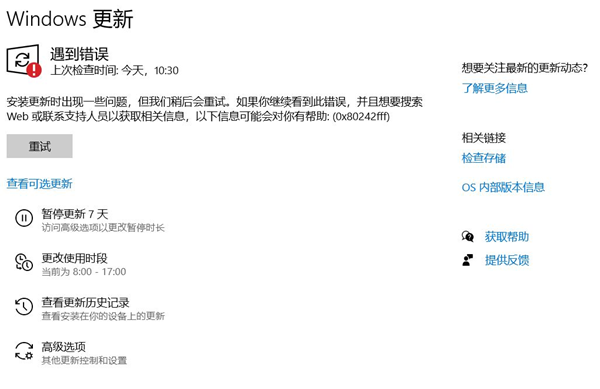
最近有用戶進(jìn)行執(zhí)行win10系統(tǒng)更新的時候,出現(xiàn)0x80242fff錯誤碼,有一個更新無法執(zhí)行,如下圖所示,那么Win10系統(tǒng)更新時出現(xiàn)0x80242fff錯誤代碼怎么辦?該如何解決呢?
Win10系統(tǒng)更新時出現(xiàn)0x80242fff錯誤代碼怎么辦?
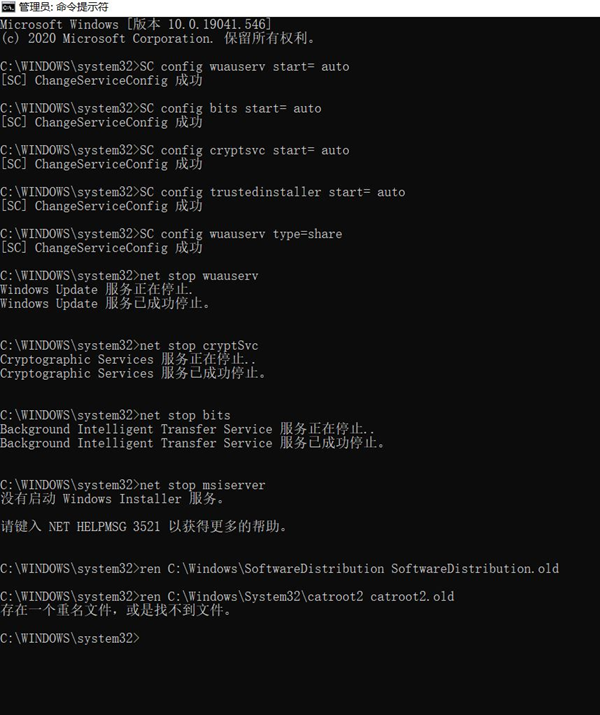
1、左下角搜索cmd,之后以管理員權(quán)限打開;
2、輸入以下命令;
01SC config wuauserv start= auto02SC config bits start= auto03SC config cryptsvc start= auto04SC config trustedinstaller start= auto05SC config wuauserv type=share復(fù)制代碼SC config wuauserv start= autoSC config bits start= autoSC config cryptsvc start= autoSC config trustedinstaller start= autoSC config wuauserv type=share3、然后輸入;
01net stop wuauserv02net stop cryptSvc03net stop bits04net stop msiserver05ren C:WindowsSoftwareDistribution SoftwareDistribution.old06ren C:WindowsSystem32catroot2 catroot2.old07net start wuauserv08net start cryptSvc09net start bits10net start msiserver復(fù)制代碼net stop wuauservnet stop cryptSvcnet stop bitsnet stop msiserverren C:WindowsSoftwareDistribution SoftwareDistribution.oldren C:WindowsSystem32catroot2 catroot2.oldnet start wuauservnet start cryptSvcnet start bitsnet start msiserver4、之后,重新啟動一下。
標(biāo)簽:
Windows系統(tǒng)
win10
相關(guān)文章:
1. win7電腦usb接口功能不足的解決方法2. Windows Server 2008幾個明顯漏洞封堵過程3. 怎么關(guān)閉win10自動更新詳細(xì)教程4. 怎么在win8系統(tǒng)查看電腦顯卡類型?查看獨(dú)立顯卡與集成顯卡的方法5. 點(diǎn)擊Windows7庫文件圖標(biāo)打開界面與XP一樣6. Win10睡眠喚醒就藍(lán)屏ntoskrnl.exe 代碼0x000000ef怎么辦?7. win11如何投屏到投影儀8. U盤移動硬盤在Windows 7下不能正常刪除的解決方案9. Win10系統(tǒng)如何切換桌面10. Win10專業(yè)版系統(tǒng)網(wǎng)絡(luò)圖標(biāo)出現(xiàn)紅叉不能上網(wǎng)怎么辦?
排行榜
 網(wǎng)公網(wǎng)安備