SQL Server Reporting Services 匿名登錄的問題及解決方案
每次訪問報(bào)表都需要windows驗(yàn)證,這樣的報(bào)表給客戶確實(shí)很說不過去.
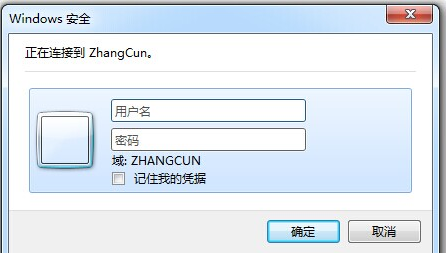
SSRS 可以匿名登錄的設(shè)定步驟:
環(huán)境:
開發(fā)工具:SQL Server Business Intelligence Development Studio
數(shù)據(jù)庫: SQL2008
首先確定你的Reporting Services 目錄位置
默認(rèn)為:C:\Program Files\Microsoft SQL Server\MSRS11.MSSQLSERVER\Reporting Services\ReportServer
打開目錄會(huì)修改該目錄下的3個(gè)配置文件,分別為:rsreportserver.config ,rssrvpolicy.config ,web.config
解決步驟:
1.打開rsreportserver.config
修改Configuration/Authentication/AuthenticationTypes
修改前:
<Authentication> <AuthenticationTypes><RSWindowsNTLM/> </AuthenticationTypes> </Authentication>
修改后:
<Authentication> <AuthenticationTypes><Custom/> </AuthenticationTypes> </Authentication>
2. 修改web.config
<!--節(jié)點(diǎn):configuration/system.web/authentication --><!-- 修改前 --><authentication mode="Windows" /><identity impersonate="true" /><!-- 修改后 --><authentication mode="None" /><identity impersonate="false" />
3. 從微軟下載匿名登錄的范例項(xiàng)目
( 下載網(wǎng)址 http://blog.quasarinc.com/wp-content/uploads/2012/03/Microsoft.Samples.ReportingServices.AnonymousSecurity.zip),
并且重新編譯出一個(gè)新的 Microsoft.Samples.ReportingServices.AnonymousSecurity.dll 動(dòng)態(tài)庫,
范例為2010解決方案,其實(shí)里面用到的只是class1.cs文件,還有項(xiàng)目名稱不能變,和我們下面配置有直接關(guān)系.
打開解決方案 將 Microsoft.ReportingServices.Interfaces.dll 的引用移除,并添加本地服務(wù)器的這個(gè)文件,位置在 ..\Reporting Services\ReportServer\bin 下, (注意別把這個(gè)dll當(dāng)成萬能的)
重新編譯會(huì)生成 :Microsoft.Samples.ReportingServices.AnonymousSecurity.dll 將該文件放置bin目錄下
4.再次修改rsreportserver.config
<!--修改節(jié)點(diǎn):Configuration/Extensions/Security/Extension --><!-- 修改前 --><Security> <Extension Name="Windows" Type="Microsoft.ReportingServices.Authorization.WindowsAuthorization, Microsoft.ReportingServices.Authorization" /></Security><Authentication> <Extension Name="Windows" Type="Microsoft.ReportingServices.Authentication.WindowsAuthentication, Microsoft.ReportingServices.Authorization" /></Authentication><!-- 修改后 --><Security> <Extension Name="None" Type="Microsoft.Samples.ReportingServices.AnonymousSecurity.Authorization, Microsoft.Samples.ReportingServices.AnonymousSecurity" /></Security><Authentication> <Extension Name="None" Type="Microsoft.Samples.ReportingServices.AnonymousSecurity.AuthenticationExtension, Microsoft.Samples.ReportingServices.AnonymousSecurity" /></Authentication>
5. 在 rssrvpolicy.config 內(nèi)新增一個(gè)節(jié)點(diǎn)
<!-- 要增加的節(jié)點(diǎn) configuration/mscorlib/security/PolicyLevel 之下 --><CodeGroupversion="1"PermissionSetName="FullTrust"Name="Private_assembly"Description="This code group grants custom code full trust. "> <IMembershipCondition version="1" Url="C:\Program Files\Microsoft SQL Server\MSRS11.MSSQLSERVER\Reporting Services\ReportServer\bin\Microsoft.Samples.ReportingServices.AnonymousSecurity.dll" /></CodeGroup>
注意:這個(gè)Url,路徑是reporting services 目錄下新編譯的文件,不同數(shù)據(jù)庫版本,或安裝目錄不同,會(huì)有差異
6. 重新啟動(dòng) Reporting Services
完美解決,歷時(shí)半個(gè)月,這個(gè)問題終于告以段落,以后可以專心設(shè)計(jì)報(bào)表了.
以上解決方案參考于msdn上的一篇文章,做了些整理.
由于是程序員,所有手工做的事還是交給程序做,以上5個(gè)步驟,已使用程序?qū)崿F(xiàn):
起個(gè)名字叫:ssrs_onekey_nologin 全稱:sql server report serveics 一鍵匿名登錄配置.
主要功能,修改xml ,自己生成dll,copy至 bin目錄下.
使用說明:需錄入report services 目錄
代碼共享:
class Program { static void Main(string[] args) { Console.WriteLine("請(qǐng)輸入Reporting Services目錄:為空則與c盤默認(rèn)sql2008"); string a = Console.ReadLine(); string basePath; if (string.IsNullOrEmpty(a)) { basePath = @"c:\Program Files\Microsoft SQL Server\MSRS10.MSSQLSERVER\Reporting Services\ReportServer"; }else { basePath = a; } Console.WriteLine("Reporting Services 目錄為:{0}", basePath); Console.WriteLine("確認(rèn)請(qǐng)按任意鍵..."); Console.ReadKey(); string bakPath = @"c:\SSRS_noLogin_bak\" + DateTime.Now.ToString("yyyyMMddHHmmss"); Directory.CreateDirectory(bakPath); File.Copy(basePath + "\\rsreportserver.config", bakPath + "\\rsreportserver.config"); File.Copy(basePath + "\\web.config", bakPath + "\\web.config"); File.Copy(basePath + "\\rssrvpolicy.config", bakPath + "\\rssrvpolicy.config"); Console.WriteLine("第1步開始:"); Step1(basePath); Console.WriteLine("第1步結(jié)束."); Console.WriteLine("第2步開始:"); Step2(basePath); Console.WriteLine("第2步結(jié)束."); Console.WriteLine("第3步開始:"); Step3(basePath); Console.WriteLine("第3步結(jié)束."); Console.WriteLine("第4步開始:"); Step4(basePath); Console.WriteLine("第4步結(jié)束."); Console.WriteLine("第5步開始:"); Step5(basePath); Console.WriteLine("第5步結(jié)束."); Console.WriteLine("完成"); Console.ReadKey(); } static void Step1(string basePath) { string file = basePath + "\\rsreportserver.config"; XmlDocument doc = new XmlDocument(); doc.Load(file); //Configuration XmlNode xn = doc.SelectSingleNode("Configuration/Authentication/AuthenticationTypes"); XmlNode oldXn = xn.SelectSingleNode("RSWindowsNTLM"); if (oldXn == null) { Console.WriteLine("未找到RSWindowsNTLM,或已更改"); } else {XmlNode newXn = doc.CreateElement("Custom");xn.ReplaceChild(newXn, oldXn); } doc.Save(file); }static void Step2(string basePath) { XmlDocument doc = new XmlDocument(); string file = basePath + "\\web.config"; doc.Load(file); XmlNode xn2 = doc.SelectSingleNode("configuration/system.web/authentication"); XmlElement xm2 = (XmlElement)xn2; xm2.SetAttribute("mode", "None"); XmlNode xn3 = doc.SelectSingleNode("configuration/system.web/identity"); XmlElement xm3 = (XmlElement)xn3; xm3.SetAttribute("impersonate", "false"); doc.Save(file);} static void Step3(string basePath) { CSharpCodeProvider objCSharpCodePrivoder = new CSharpCodeProvider(); CompilerParameters objCompilerParameters = new CompilerParameters(); objCompilerParameters.ReferencedAssemblies.Add("System.dll"); objCompilerParameters.ReferencedAssemblies.Add(basePath + @"\bin\Microsoft.ReportingServices.Interfaces.dll"); string strSourceCode = Resources.Class1; objCompilerParameters.GenerateInMemory = false; objCompilerParameters.OutputAssembly = "Microsoft.Samples.ReportingServices.AnonymousSecurity.dll"; CompilerResults cr = objCSharpCodePrivoder.CompileAssemblyFromSource(objCompilerParameters, strSourceCode); if (cr.Errors.HasErrors) { string strErrorMsg = cr.Errors.Count.ToString() + " Errors:"; for (int x = 0; x < cr.Errors.Count; x++) { strErrorMsg = strErrorMsg + "/r/nLine: " + cr.Errors[x].Line.ToString() + " - " + cr.Errors[x].ErrorText; } Console.WriteLine(strErrorMsg); return; } File.Copy("Microsoft.Samples.ReportingServices.AnonymousSecurity.dll", basePath + @"\bin\Microsoft.Samples.ReportingServices.AnonymousSecurity.dll", true); File.Delete("Microsoft.Samples.ReportingServices.AnonymousSecurity.dll"); } static void Step4(string basePath){ XmlDocument doc = new XmlDocument(); string file = basePath + "\\rsreportserver.config"; doc.Load(file); XmlNode xn2 = doc.SelectSingleNode("Configuration/Extensions/Security/Extension"); XmlElement xm2 = (XmlElement)xn2; xm2.SetAttribute("Name", "None"); xm2.SetAttribute("Type", "Microsoft.Samples.ReportingServices.AnonymousSecurity.Authorization, Microsoft.Samples.ReportingServices.AnonymousSecurity"); XmlNode xn3 = doc.SelectSingleNode("Configuration/Extensions/Authentication/Extension"); XmlElement xm3 = (XmlElement)xn3; xm3.SetAttribute("Name", "None"); xm3.SetAttribute("Type", "Microsoft.Samples.ReportingServices.AnonymousSecurity.AuthenticationExtension, Microsoft.Samples.ReportingServices.AnonymousSecurity"); doc.Save(file); } static void Step5(string basePath){ XmlDocument doc = new XmlDocument(); string file = basePath + "\\rssrvpolicy.config"; doc.Load(file); XmlNode xn1 = doc.SelectSingleNode("configuration/mscorlib/security/PolicyLevel/CodeGroup[@class=UnionCodeGroup]"); if (xn1 != null) {//已添加 } else { XmlNode xn = doc.SelectSingleNode("configuration/mscorlib/security/policy/PolicyLevel"); XmlElement xe = doc.CreateElement("CodeGroup");xe.SetAttribute("class", "UnionCodeGroup"); xe.SetAttribute("version", "1"); xe.SetAttribute("PermissionSetName", "FullTrust"); xe.SetAttribute("Name", "Private_assembly");xe.SetAttribute("Description", "This code group grants custom code full trust."); XmlElement xe2 = doc.CreateElement("IMembershipCondition"); xe2.SetAttribute("class", "UrlMembershipCondition"); xe2.SetAttribute("version", "1");xe2.SetAttribute("Url", basePath + @"\bin\Microsoft.Samples.ReportingServices.AnonymousSecurity.dll"); xe.AppendChild(xe2);xn.AppendChild(xe); } doc.Save(file);} } }ssrs onkey no login程序共享:
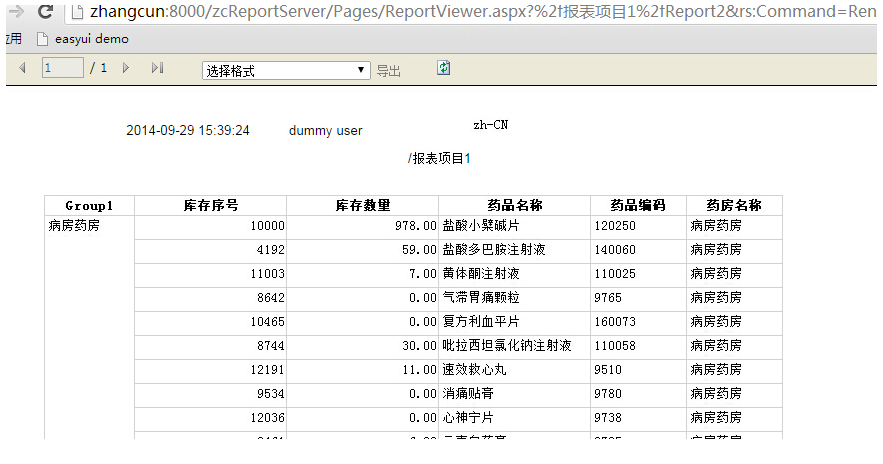
解決后測(cè)試頁的展示:
到此這篇關(guān)于關(guān)于 SQL Server Reporting Services 匿名登錄的解決方案的文章就介紹到這了,更多相關(guān)SQL Server Reporting Services內(nèi)容請(qǐng)搜索以前的文章或繼續(xù)瀏覽下面的相關(guān)文章希望大家以后多多支持!

 網(wǎng)公網(wǎng)安備