IE6/IE7/IE8/IE9中tbody的innerHTML不能賦值的完美解決方案
IE6/IE7/IE8/IE9中tbody的innerHTML不能賦值,重現(xiàn)代碼如下
復(fù)制代碼 代碼如下:
<!DOCTYPE html>
<html>
<head>
<meta charset="utf-8"/>
<title>IE6-IE9中tbody的innerHTML不能復(fù)制bug</title>
</head>
<body>
<table>
<tbody>
<tr><td>aaa</td></tr>
</tbody>
</table>
<p>
<button id="btn1">GET</button><button id="btn2">SET</button>
</p>
<script>
var tbody = document.getElementsByTagName("tbody")[0]
function setTbody() {
tbody.innerHTML = "<tr><td>bbb</td></tr>"
}
function getTbody() {
alert(tbody.innerHTML)
}
btn1.onclick = function() {
getTbody()
}
btn2.onclick = function() {
setTbody()
}
</script>
</body>
</html>
兩個按鈕,第一個獲取tbody的innerHTML,第二個設(shè)置tbody的innerHTML。
獲取時所有瀏覽器都彈出了tr的字符串,但設(shè)置時IE6-9不支持,而且報錯,如圖
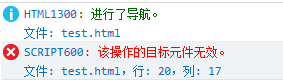
可以利用特性判斷來看瀏覽器是否支持tbody的innerHTML設(shè)值
復(fù)制代碼 代碼如下:
var isupportTbodyInnerHTML = function () {
var table = document.createElement("table")
var tbody = document.createElement("tbody")
table.appendChild(tbody)
var boo = true
try{
tbody.innerHTML = "<tr></tr>"
} catch(e) {
boo = false
}
return boo
}()
alert(isupportTbodyInnerHTML)
對于IE6-IE9里如果要設(shè)置tbody的innerHTML,可以使用如下替代方法
復(fù)制代碼 代碼如下:
function setTBodyInnerHTML(tbody, html) {
var div = document.createElement("div")
div.innerHTML = "<table>" + html + "</table>"
while(tbody.firstChild) {
tbody.removeChild(tbody.firstChild)
}
tbody.appendChild(div.firstChild.firstChild)
}
用一個div來包含一個table,然后刪除tbody里的所有元素,最后給tbody添加div的第一個元素的第一個元素,即div>table>tr。
當(dāng)然還有一個更精簡的版本,它直接采用replaceChild方法替換
復(fù)制代碼 代碼如下:
function setTBodyInnerHTML(tbody, html) {
var div = document.createElement("div")
div.innerHTML = "<table>" + html + "</table>"
tbody.parentNode.replaceChild(div.firstChild.firstChild, tbody)
}
從MSDN上記錄上看 col、colGroup、frameset、html、head、style、table、tfoot、tHead、title和tr的innerHTML都是只讀的(IE6-IE9)。
The innerHTML property is read-only on the col, colGroup, frameSet, html, head, style, table, tBody, tFoot, tHead, title, and tr objects.
You can change the value of the title element using the document.title property.
To change the contents of the table, tFoot, tHead, and tr elements, use the table object model described in Building Tables Dynamically. However, to change the content of a particular cell, you can use innerHTML.
相關(guān)文章:
1. Java commons-httpclient如果實現(xiàn)get及post請求2. Android實現(xiàn)梯形TextView效果3. Webform 內(nèi)置對象 Session對象、Application全局對象,ViewState詳細(xì)介紹4. Django cookie和session的應(yīng)用場景及如何使用5. PHP設(shè)置COOKIE保留時間為瀏覽器進(jìn)程6. VSCode中 Eslint 和 Prettier 沖突問題最新解決方法7. Django操作cookie的實現(xiàn)8. Android webView字體突然變小的原因及解決9. Django中的DateTimeField和DateField實現(xiàn)10. java HttpClient傳輸json格式的參數(shù)實例講解
 網(wǎng)公網(wǎng)安備