教你怎么用python刪除相似度高的圖片
因為輸入是視頻,切完幀之后都是連續圖片,所以我的目錄結構如下:
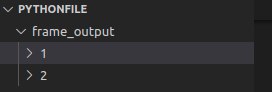
其中frame_output是視頻切幀后的保存路徑,1和2文件夾分別對應兩個是視頻切幀后的圖片。
2. 切幀代碼如下:#encoding:utf-8import osimport sysimport cv2video_path = ’/home/pythonfile/video/’ # 絕對路徑,video下有兩段視頻out_frame_path = os.path.join(os.path.dirname(os.path.abspath(__file__)), ’frame_output’) #frame_output是視頻切幀后的保存路徑if not os.path.exists(out_frame_path): os.makedirs(out_frame_path)print(’out_frame_path’, out_frame_path)files = []list1 = os.listdir(video_path)print(’list’, list1)for i in range(len(list1)): item = os.path.join(video_path, list1[i]) files.append(item)print(’files’,files)for k,file in enumerate(files): frame_dir = os.path.join(out_frame_path, ’%d’%(k+1)) if not os.path.exists(frame_dir):os.makedirs(frame_dir) cap = cv2.VideoCapture(file) j = 0 print(’start prossing NO.%d video’ % (k + 1)) while True:ret, frame = cap.read()j += 1if ret:#每三幀保存一張 if j % 3 == 0:cv2.imwrite(os.path.join(frame_dir, ’%d.jpg’%j), frame)else: cap.release() break print(’prossed NO.%d video’%(k+1))3. 刪除相似度高的圖片
# coding: utf-8import osimport cv2# from skimage.measure import compare_ssim# from skimage.metrics import _structural_similarityfrom skimage.metrics import structural_similarity as ssimdef delete(filename1): os.remove(filename1)def list_all_files(root): files = [] list = os.listdir(root) # os.listdir()方法:返回指定文件夾包含的文件或子文件夾名字的列表。該列表順序以字母排序 for i in range(len(list)):element = os.path.join(root, list[i])# 需要先使用python路徑拼接os.path.join()函數,將os.listdir()返回的名稱拼接成文件或目錄的絕對路徑再傳入os.path.isdir()和os.path.isfile().if os.path.isdir(element): # os.path.isdir()用于判斷某一對象(需提供絕對路徑)是否為目錄 # temp_dir = os.path.split(element)[-1] # os.path.split分割文件名與路徑,分割為data_dir和此路徑下的文件名,[-1]表示只取data_dir下的文件名 files.append(list_all_files(element))elif os.path.isfile(element): files.append(element) # print(’2’,files) return filesdef ssim_compare(img_files): count = 0 for currIndex, filename in enumerate(img_files):if not os.path.exists(img_files[currIndex]): print(’not exist’, img_files[currIndex]) breakimg = cv2.imread(img_files[currIndex])img1 = cv2.imread(img_files[currIndex + 1])#進行結構性相似度判斷# ssim_value = _structural_similarity.structural_similarity(img,img1,multichannel=True)ssim_value = ssim(img,img1,multichannel=True)if ssim_value > 0.9: #基數 count += 1 imgs_n.append(img_files[currIndex + 1]) print(’big_ssim:’,img_files[currIndex], img_files[currIndex + 1], ssim_value)# 避免數組越界if currIndex+1 >= len(img_files)-1: break return countif __name__ == ’__main__’: path = ’/home/dj/pythonfile/frame_output/’ img_path = path imgs_n = [] all_files = list_all_files(path) #返回包含完整路徑的所有圖片名的列表 print(’1’,len(all_files)) for files in all_files:# 根據文件名排序,x.rfind(’/’)是從右邊尋找第一個‘/’出現的位置,也就是最后出現的位置# 注意sort和sorted的區別,sort作用于原列表,sorted生成新的列表,且sorted可以作用于所有可迭代對象files.sort(key = lambda x: int(x[x.rfind(’/’)+1:-4]))#路徑中包含“/”# print(files)img_files = []for img in files: if img.endswith(’.jpg’):# 將所有圖片名都放入列表中img_files.append(img)count = ssim_compare(img_files)print(img[:img.rfind(’/’)],'路徑下刪除的圖片數量為:',count) for image in imgs_n:delete(image)4. 導入skimage.measure import compare_ssim出錯的解決方法:
將
from skimage.measure import compare_ssim
改為
from skimage.metrics import _structural_similarity5. structural_similarity.py的源碼
from warnings import warnimport numpy as npfrom scipy.ndimage import uniform_filter, gaussian_filterfrom ..util.dtype import dtype_rangefrom ..util.arraycrop import cropfrom .._shared.utils import warn, check_shape_equality__all__ = [’structural_similarity’]def structural_similarity(im1, im2, *, win_size=None, gradient=False, data_range=None, multichannel=False, gaussian_weights=False, full=False, **kwargs): ''' Compute the mean structural similarity index between two images. Parameters ---------- im1, im2 : ndarrayImages. Any dimensionality with same shape. win_size : int or None, optionalThe side-length of the sliding window used in comparison. Must be anodd value. If `gaussian_weights` is True, this is ignored and thewindow size will depend on `sigma`. gradient : bool, optionalIf True, also return the gradient with respect to im2. data_range : float, optionalThe data range of the input image (distance between minimum andmaximum possible values). By default, this is estimated from the imagedata-type. multichannel : bool, optionalIf True, treat the last dimension of the array as channels. Similaritycalculations are done independently for each channel then averaged. gaussian_weights : bool, optionalIf True, each patch has its mean and variance spatially weighted by anormalized Gaussian kernel of width sigma=1.5. full : bool, optionalIf True, also return the full structural similarity image. Other Parameters ---------------- use_sample_covariance : boolIf True, normalize covariances by N-1 rather than, N where N is thenumber of pixels within the sliding window. K1 : floatAlgorithm parameter, K1 (small constant, see [1]_). K2 : floatAlgorithm parameter, K2 (small constant, see [1]_). sigma : floatStandard deviation for the Gaussian when `gaussian_weights` is True. Returns ------- mssim : floatThe mean structural similarity index over the image. grad : ndarrayThe gradient of the structural similarity between im1 and im2 [2]_.This is only returned if `gradient` is set to True. S : ndarrayThe full SSIM image. This is only returned if `full` is set to True. Notes ----- To match the implementation of Wang et. al. [1]_, set `gaussian_weights` to True, `sigma` to 1.5, and `use_sample_covariance` to False. .. versionchanged:: 0.16This function was renamed from ``skimage.measure.compare_ssim`` to``skimage.metrics.structural_similarity``. References ---------- .. [1] Wang, Z., Bovik, A. C., Sheikh, H. R., & Simoncelli, E. P. (2004). Image quality assessment: From error visibility to structural similarity. IEEE Transactions on Image Processing, 13, 600-612. https://ece.uwaterloo.ca/~z70wang/publications/ssim.pdf, :DOI:`10.1109/TIP.2003.819861` .. [2] Avanaki, A. N. (2009). Exact global histogram specification optimized for structural similarity. Optical Review, 16, 613-621. :arxiv:`0901.0065` :DOI:`10.1007/s10043-009-0119-z` ''' check_shape_equality(im1, im2) if multichannel:# loop over channelsargs = dict(win_size=win_size, gradient=gradient, data_range=data_range, multichannel=False, gaussian_weights=gaussian_weights, full=full)args.update(kwargs)nch = im1.shape[-1]mssim = np.empty(nch)if gradient: G = np.empty(im1.shape)if full: S = np.empty(im1.shape)for ch in range(nch): ch_result = structural_similarity(im1[..., ch], im2[..., ch], **args) if gradient and full:mssim[..., ch], G[..., ch], S[..., ch] = ch_result elif gradient:mssim[..., ch], G[..., ch] = ch_result elif full:mssim[..., ch], S[..., ch] = ch_result else:mssim[..., ch] = ch_resultmssim = mssim.mean()if gradient and full: return mssim, G, Selif gradient: return mssim, Gelif full: return mssim, Selse: return mssim K1 = kwargs.pop(’K1’, 0.01) K2 = kwargs.pop(’K2’, 0.03) sigma = kwargs.pop(’sigma’, 1.5) if K1 < 0:raise ValueError('K1 must be positive') if K2 < 0:raise ValueError('K2 must be positive') if sigma < 0:raise ValueError('sigma must be positive') use_sample_covariance = kwargs.pop(’use_sample_covariance’, True) if gaussian_weights:# Set to give an 11-tap filter with the default sigma of 1.5 to match# Wang et. al. 2004.truncate = 3.5 if win_size is None:if gaussian_weights: # set win_size used by crop to match the filter size r = int(truncate * sigma + 0.5) # radius as in ndimage win_size = 2 * r + 1else: win_size = 7 # backwards compatibility if np.any((np.asarray(im1.shape) - win_size) < 0):raise ValueError( 'win_size exceeds image extent. If the input is a multichannel ' '(color) image, set multichannel=True.') if not (win_size % 2 == 1):raise ValueError(’Window size must be odd.’) if data_range is None:if im1.dtype != im2.dtype: warn('Inputs have mismatched dtype. Setting data_range based on ' 'im1.dtype.', stacklevel=2)dmin, dmax = dtype_range[im1.dtype.type]data_range = dmax - dmin ndim = im1.ndim if gaussian_weights:filter_func = gaussian_filterfilter_args = {’sigma’: sigma, ’truncate’: truncate} else:filter_func = uniform_filterfilter_args = {’size’: win_size} # ndimage filters need floating point data im1 = im1.astype(np.float64) im2 = im2.astype(np.float64) NP = win_size ** ndim # filter has already normalized by NP if use_sample_covariance:cov_norm = NP / (NP - 1) # sample covariance else:cov_norm = 1.0 # population covariance to match Wang et. al. 2004 # compute (weighted) means ux = filter_func(im1, **filter_args) uy = filter_func(im2, **filter_args) # compute (weighted) variances and covariances uxx = filter_func(im1 * im1, **filter_args) uyy = filter_func(im2 * im2, **filter_args) uxy = filter_func(im1 * im2, **filter_args) vx = cov_norm * (uxx - ux * ux) vy = cov_norm * (uyy - uy * uy) vxy = cov_norm * (uxy - ux * uy) R = data_range C1 = (K1 * R) ** 2 C2 = (K2 * R) ** 2 A1, A2, B1, B2 = ((2 * ux * uy + C1, 2 * vxy + C2, ux ** 2 + uy ** 2 + C1, vx + vy + C2)) D = B1 * B2 S = (A1 * A2) / D # to avoid edge effects will ignore filter radius strip around edges pad = (win_size - 1) // 2 # compute (weighted) mean of ssim mssim = crop(S, pad).mean() if gradient:# The following is Eqs. 7-8 of Avanaki 2009.grad = filter_func(A1 / D, **filter_args) * im1grad += filter_func(-S / B2, **filter_args) * im2grad += filter_func((ux * (A2 - A1) - uy * (B2 - B1) * S) / D, **filter_args)grad *= (2 / im1.size)if full: return mssim, grad, Selse: return mssim, grad else:if full: return mssim, Selse: return mssim
到此這篇關于教你怎么用python刪除相似度高的圖片的文章就介紹到這了,更多相關python刪除相似度高的圖片內容請搜索好吧啦網以前的文章或繼續瀏覽下面的相關文章希望大家以后多多支持好吧啦網!
相關文章:
 網公網安備
網公網安備