IDEA Servlet 模板設(shè)置的方法
IDEA Servlet 模板
1. 打開模板設(shè)置
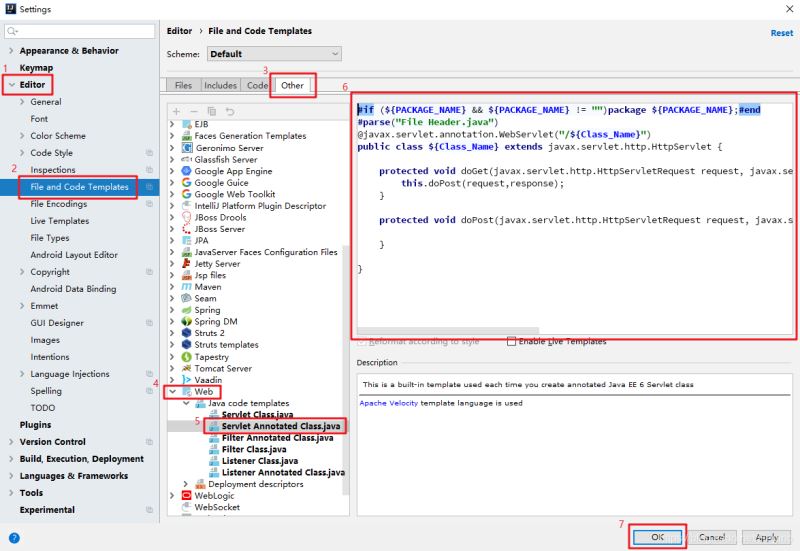
2. 替換模板內(nèi)容
#if (${PACKAGE_NAME} && ${PACKAGE_NAME} != '')package ${PACKAGE_NAME};#end#parse('File Header.java')@javax.servlet.annotation.WebServlet('/${Class_Name}')public class ${Class_Name} extends javax.servlet.http.HttpServlet { protected void doGet(javax.servlet.http.HttpServletRequest request, javax.servlet.http.HttpServletResponse response) throws javax.servlet.ServletException, java.io.IOException { this.doPost(request,response); } protected void doPost(javax.servlet.http.HttpServletRequest request, javax.servlet.http.HttpServletResponse response) throws javax.servlet.ServletException, java.io.IOException { }}
3. 新建 Servlet
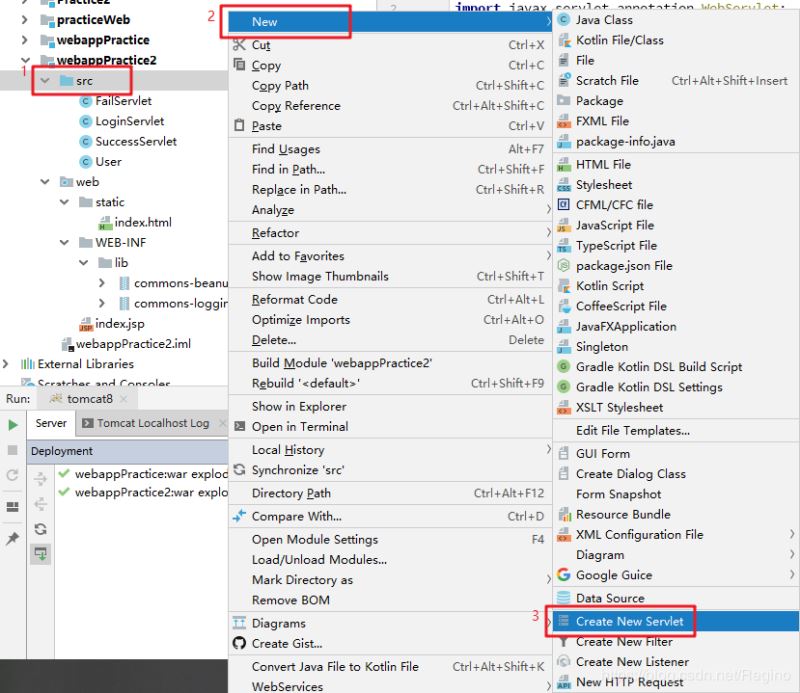
4. 效果輸入類名即可自動(dòng)創(chuàng)建 Servlet 文件:
import javax.servlet.ServletException;import javax.servlet.annotation.WebServlet;import javax.servlet.http.HttpServlet;import javax.servlet.http.HttpServletRequest;import javax.servlet.http.HttpServletResponse;import java.io.IOException;@WebServlet('/Servlet')public class Servlet extends HttpServlet { protected void doGet(HttpServletRequest request, HttpServletResponse response) throws ServletException, IOException { this.doPost(request, response); } protected void doPost(HttpServletRequest request, HttpServletResponse response) throws ServletException, IOException { }}
總結(jié)
到此這篇關(guān)于IDEA Servlet 模板設(shè)置的方法的文章就介紹到這了,更多相關(guān)IDEA Servlet 模板設(shè)置內(nèi)容請(qǐng)搜索好吧啦網(wǎng)以前的文章或繼續(xù)瀏覽下面的相關(guān)文章希望大家以后多多支持好吧啦網(wǎng)!
相關(guān)文章:
1. 一文帶你徹底理解Java序列化和反序列化2. 用Spring JMS使異步消息變得簡(jiǎn)單3. PHP驗(yàn)證碼工具-Securimage4. js實(shí)現(xiàn)碰撞檢測(cè)5. 關(guān)于IDEA 2020.3 多窗口視圖丟失的問題6. JS實(shí)現(xiàn)前端動(dòng)態(tài)分頁碼代碼實(shí)例7. javascript實(shí)現(xiàn)貪吃蛇小練習(xí)8. Python 制作查詢商品歷史價(jià)格的小工具9. ASP.NET MVC使用jQuery ui的progressbar實(shí)現(xiàn)進(jìn)度條10. Python 下載Bing壁紙的示例

 網(wǎng)公網(wǎng)安備