js實(shí)現(xiàn)簡(jiǎn)單的無(wú)縫輪播效果
本文實(shí)例為大家分享了js實(shí)現(xiàn)簡(jiǎn)單無(wú)縫輪播效果的具體代碼,供大家參考,具體內(nèi)容如下
*{ margin: 0; padding: 0;}#box{ width: 500px; height: 200px; padding: 5px; margin: 50px auto; border: 1px solid #999999;}.inner{ width: 500px; height: 200px; overflow: hidden; position: relative;}ul,ol{ list-style: none; position: absolute;}ul{ width: 3000px; height: 200px;}li{ float: left;}ol{ right: 20px; bottom: 20px;}ol>li{ width: 25px; height: 25px; line-height: 25px; text-align: center; background-color: #fff; border-radius: 50%; margin-right: 10px; cursor: pointer;}ol>li.current{ background-color: orange; color: white;}.control{ display: none;}.control>span{ position: absolute; top: 50%; margin-top: -20px; display: inline-block; width: 25px; height: 40px; line-height: 40px; background-color: rgba(0,0,0,0.3); color: white; font-size: 20px; cursor: pointer; text-align: center;}.right{ right: 0;}
<div id='box'> <div class='inner'> <ul> <li><img src='http://m.b3g6.com/bcjs/image/1.jpg' alt=''></li> <li><img src='http://m.b3g6.com/bcjs/image/2.jpg' alt=''></li> <li><img src='http://m.b3g6.com/bcjs/image/3.jpg' alt=''></li> <li><img src='http://m.b3g6.com/bcjs/image/4.jpg' alt=''></li> <li><img src='http://m.b3g6.com/bcjs/image/5.jpg' alt=''></li> </ul> <ol> <li class='current'>1</li> <li>2</li> <li>3</li> <li>4</li> <li>5</li> </ol> <div class='control'> <span class='left'><</span> <span class='right'>></span> </div> </div></div>
var box=document.getElementById('box');var ul=box.getElementsByTagName('ul')[0];var ol=box.getElementsByTagName('ol')[0];var olLiArr=ol.children;var control=box.getElementsByClassName('control')[0];ul.appendChild(ul.children[0].cloneNode(true));var index=0;var circleIndex=0;var timer=setInterval(autoPlay,2000);//鼠標(biāo)移入移出box.onmouseover=function () { clearInterval(timer); control.style.display='block';};box.onmouseout=function () { timer=setInterval(autoPlay,2000); control.style.display='none';};//小圓點(diǎn)for (var i=0;i<olLiArr.length;i++) { olLiArr[i].index=i; olLiArr[i].onclick=function () { if(index===5){ ul.style.left=0; index=0; } for (var i=0;i<olLiArr.length;i++){ olLiArr[i].removeAttribute('class'); } this.setAttribute('class','current'); animate_constSpeed_x(ul,-this.index*500); index=this.index; circleIndex=this.index; }}//左右點(diǎn)擊control.children[1].onclick=function () { autoPlay();};control.children[0].onclick=function () { index--; if (index<0){ ul.style.left=-2500+'px'; index=4; } animate_constSpeed_x(ul,-index*500); circleIndex--; if (circleIndex<0){ circleIndex=4; } for (var i=0;i<olLiArr.length;i++) { olLiArr[i].removeAttribute('class'); } olLiArr[circleIndex].setAttribute('class','current');};
//自動(dòng)輪播封裝function autoPlay() { index++; if (index>5){ ul.style.left=0; index=1; } animate_constSpeed_x(ul,-index*500); circleIndex++; if (circleIndex>4){ circleIndex=0; } for (var i=0;i<olLiArr.length;i++) { olLiArr[i].removeAttribute('class'); } olLiArr[circleIndex].setAttribute('class','current');}//勻速封裝function animate_constSpeed_x(ele,endX) { clearInterval(ele.timer); var step=(endX-ele.offsetLeft)>0?10:-10; ele.timer=setInterval(function () { ele.style.left=ele.offsetLeft+step+'px'; console.log(1); if(Math.abs(endX-ele.offsetLeft)<=Math.abs(step)){ clearInterval(ele.timer); ele.style.left=endX+'px'; } },10)}
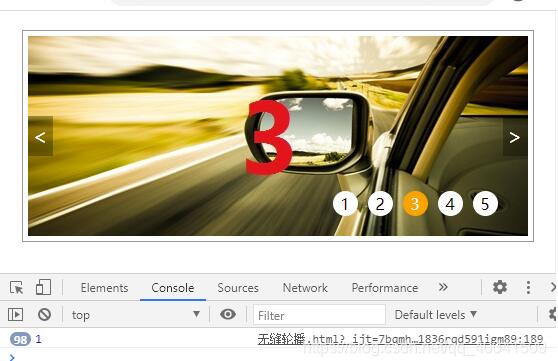
以上就是本文的全部?jī)?nèi)容,希望對(duì)大家的學(xué)習(xí)有所幫助,也希望大家多多支持好吧啦網(wǎng)。
相關(guān)文章:
1. Python 合并拼接字符串的方法2. python使用jenkins發(fā)送企業(yè)微信通知的實(shí)現(xiàn)3. Python3 json模塊之編碼解碼方法講解4. 通過(guò)實(shí)例解析Python文件操作實(shí)現(xiàn)步驟5. ASP基礎(chǔ)知識(shí)VBScript基本元素講解6. Python 制作查詢商品歷史價(jià)格的小工具7. ASP.NET MVC使用jQuery ui的progressbar實(shí)現(xiàn)進(jìn)度條8. PHP使用Swagger生成好看的API文檔9. Python 利用Entrez庫(kù)篩選下載PubMed文獻(xiàn)摘要的示例10. Python 如何調(diào)試程序崩潰錯(cuò)誤

 網(wǎng)公網(wǎng)安備