Android振動器使用方法詳解
本文實例為大家分享了Android振動器使用方法的具體代碼,供大家參考,具體內(nèi)容如下
效果圖:
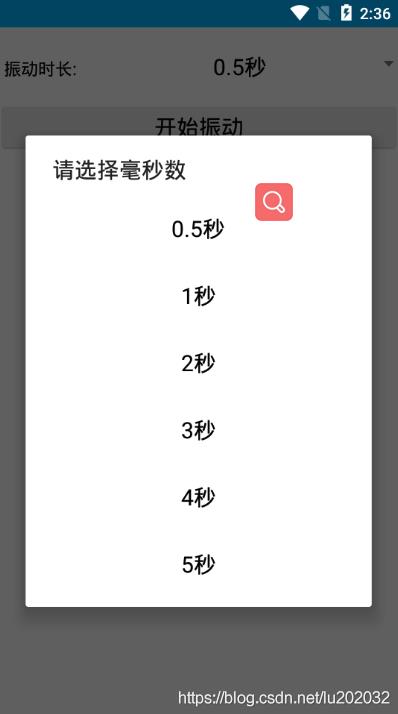
選擇相應的毫秒數(shù),就會振動相應的秒數(shù)。
實現(xiàn)步驟:一、創(chuàng)建activity_vibrator.xml布局
<?xml version='1.0' encoding='utf-8'?><LinearLayout xmlns:android='http://schemas.android.com/apk/res/android' xmlns:app='http://schemas.android.com/apk/res-auto' xmlns:tools='http://schemas.android.com/tools' android:layout_width='match_parent' android:layout_height='match_parent' tools:context='.VibratorActivity' android:orientation='vertical' > <LinearLayoutandroid:layout_width='match_parent'android:layout_height='wrap_content'android:orientation='horizontal'><TextView android:layout_width='0dp' android:layout_height='wrap_content' android:layout_weight='1' android:text='振動時長:' android:textSize='15sp' android:textColor='@color/black' android:paddingLeft='5dp' /><Spinner android: android:layout_width='0dp' android:layout_height='wrap_content' android:layout_weight='3' android:paddingTop='5dp' android:spinnerMode='dialog' /> </LinearLayout> <Buttonandroid: android:layout_width='match_parent'android:layout_height='wrap_content'android:text='開始振動'android:textColor='@color/black'android:textSize='20sp'/> <TextViewandroid: android:layout_width='match_parent'android:layout_height='wrap_content'android:textSize='20sp'android:gravity='center'android:text='當前振動了多長時間'/></LinearLayout>
之后繪制,下拉列表,每一列的高度和每一列中字體的顏色和太小等屬性在這里面設置
item_select.xml布局如下:
<TextView xmlns:android='http://schemas.android.com/apk/res/android' android: android:layout_width='match_parent' android:layout_height='60dp' android:gravity='center' android:textColor='@color/black' android:textSize='20sp' />
之后在VibratorActivity中實現(xiàn)振動功能:
public class VibratorActivity extends AppCompatActivity implements View.OnClickListener { private Spinner spinner; private TextView tv_specific; private Button btn_start; private ArrayAdapter<String> arrayAdapter; private String second; private Vibrator vibrator; private int mDuration; @Override protected void onCreate(Bundle savedInstanceState) {super.onCreate(savedInstanceState);setContentView(R.layout.activity_vibrator);spinner = findViewById(R.id.spinner);tv_specific = findViewById(R.id.tv_specific);btn_start = findViewById(R.id.btn_start);//設置下拉框CreateSpinner();btn_start.setOnClickListener(this); } private void CreateSpinner() {String[] array = new String[]{'0.5秒', '1秒', '2秒', '3秒', '4秒', '5秒'};int[] durationArray = new int[]{500, 1000, 2000, 3000, 4000, 5000};//設置我們自定義的資源樣式arrayAdapter = new ArrayAdapter<>(this, R.layout.item_select, array);spinner.setPrompt('請選擇毫秒數(shù)');//將適配器與下拉列表框關(guān)聯(lián)起來spinner.setAdapter(arrayAdapter);spinner.setOnItemSelectedListener(new AdapterView.OnItemSelectedListener() { @Override public void onItemSelected(AdapterView<?> parent, View view, int position, long id) {mDuration = durationArray[position]; } @Override public void onNothingSelected(AdapterView<?> parent) { }}); } @Override public void onClick(View v) {String vibratorService = Context.VIBRATOR_SERVICE;//從系統(tǒng)服務中獲取振動管理器vibrator = (Vibrator) getSystemService(vibratorService);//判斷設置是否包含振動器if (vibrator.hasVibrator()) { //振動的秒數(shù) vibrator.vibrate(mDuration); String desc = String.format('%s手機振動了%f秒', DateUtil.getNowTimeDetail(), mDuration / 1000.0F); tv_specific.setText(desc);} } //應用退出,則取消振動 @Override protected void onDestroy() {super.onDestroy();vibrator.cancel(); }}
最后不要忘了在AndroidManifest.xml清單文件中加入控制設備振動的權(quán)限:
<!-- 振動權(quán)限 --><uses-permission android:name='android.permission.VIBRATE' />
以上就是本文的全部內(nèi)容,希望對大家的學習有所幫助,也希望大家多多支持好吧啦網(wǎng)。
相關(guān)文章:
1. ASP.NET MVC使用jQuery ui的progressbar實現(xiàn)進度條2. Python 利用Entrez庫篩選下載PubMed文獻摘要的示例3. python使用jenkins發(fā)送企業(yè)微信通知的實現(xiàn)4. Python 合并拼接字符串的方法5. Python 制作查詢商品歷史價格的小工具6. ASP基礎知識VBScript基本元素講解7. Python sublime安裝及配置過程詳解8. Linux刪除系統(tǒng)自帶版本Python過程詳解9. Python 如何調(diào)試程序崩潰錯誤10. Python3 json模塊之編碼解碼方法講解

 網(wǎng)公網(wǎng)安備