深入學(xué)習(xí)Spring Cloud-Ribbon
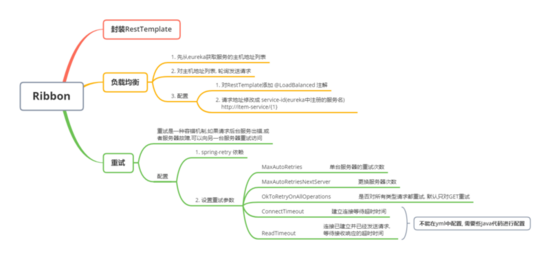
Ribbon 是 Netflix 發(fā)布的開源項目,主要功能是提供客戶端的 軟件負載均衡算法 ,將 Netflix 的中間層服務(wù)連接在一起。Ribbon 客戶端組件提供一系列完善的配置項如連接超時,重試等。簡單的說,就是在配置文件中列出Load Balancer(簡稱LB)后面所有的機器,Ribbon 會自動的幫助你基于某種規(guī)則(如簡單輪詢,隨機連接等)去連接這些機器。我們也很容易使用 Ribbon 實現(xiàn)自定義的負載均衡算法。
ribion=負載均衡+重試
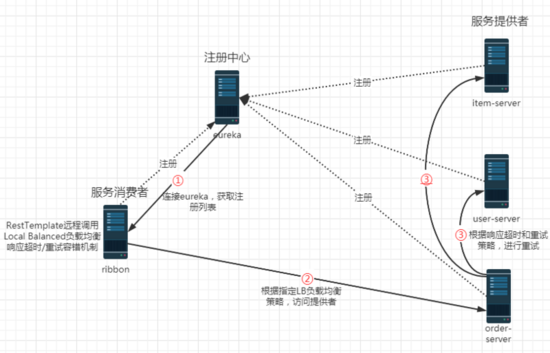
ribbon的工作步驟:
第一步先選擇 EurekaServer ,它優(yōu)先選擇在同一個區(qū)域內(nèi)負載較少的server。 第二步再根據(jù)用戶指定的策略,在從server取到的服務(wù)注冊列表中選擇一個地址。 其中Ribbon提供了多種策略:比如輪詢、隨機和根據(jù)響應(yīng)時間加權(quán)。
第一步:新建spring項目

第二步:添加Eureka Discovery Client,Spring Web依賴

第三步:添加sp01-commons工具API依賴;eureka-client 中已經(jīng)包含 ribbon 依賴
<?xml version='1.0' encoding='UTF-8'?><project xmlns='http://maven.apache.org/POM/4.0.0' xmlns:xsi='http://www.w3.org/2001/XMLSchema-instance' xsi:schemaLocation='http://maven.apache.org/POM/4.0.0 https://maven.apache.org/xsd/maven-4.0.0.xsd'> <modelVersion>4.0.0</modelVersion> <parent> <groupId>org.springframework.boot</groupId> <artifactId>spring-boot-starter-parent</artifactId> <version>2.2.1.RELEASE</version> <relativePath/> <!-- lookup parent from repository --> </parent> <groupId>cn.tedu</groupId> <artifactId>sp06-ribbon</artifactId> <version>0.0.1-SNAPSHOT</version> <name>sp06-ribbon</name> <description>Demo project for Spring Boot</description> <properties> <java.version>1.8</java.version> <spring-cloud.version>Hoxton.RELEASE</spring-cloud.version> </properties> <dependencies> <dependency> <groupId>org.springframework.boot</groupId> <artifactId>spring-boot-starter-web</artifactId> </dependency> <dependency> <groupId>org.springframework.cloud</groupId> <artifactId>spring-cloud-starter-netflix-eureka-client</artifactId> </dependency> <dependency> <groupId>org.springframework.boot</groupId> <artifactId>spring-boot-starter-test</artifactId> <scope>test</scope> <exclusions><exclusion> <groupId>org.junit.vintage</groupId> <artifactId>junit-vintage-engine</artifactId></exclusion> </exclusions> </dependency> <dependency> <groupId>cn.tedu</groupId> <artifactId>sp01-commons</artifactId> <version>0.0.1-SNAPSHOT</version> </dependency> </dependencies> <dependencyManagement> <dependencies> <dependency><groupId>org.springframework.cloud</groupId><artifactId>spring-cloud-dependencies</artifactId><version>${spring-cloud.version}</version><type>pom</type><scope>import</scope> </dependency> </dependencies> </dependencyManagement> <build> <plugins> <plugin><groupId>org.springframework.boot</groupId><artifactId>spring-boot-maven-plugin</artifactId> </plugin> </plugins> </build></project>
第四步:添加yml配置
spring: application: name: ribbon #服務(wù)器命名 server: port: 3001 # 設(shè)置服務(wù)器端口號 # 配置添加注冊中心集群 eureka: client: service-url: defaultZone: http://eureka1:2001/eureka, http://eureka2:2002/eureka遠程調(diào)用RestTemplate
RestTemplate 是SpringBoot提供的一個Rest遠程調(diào)用工具。
類似于 HttpClient,可以發(fā)送 http 請求,并處理響應(yīng)。RestTemplate簡化了Rest API調(diào)用,只需要使用它的一個方法,就可以完成請求、響應(yīng)、Json轉(zhuǎn)換
方法:
getForObject(url, 轉(zhuǎn)換的類型.class, 提交的參數(shù)) postForObject(url, 協(xié)議體數(shù)據(jù), 轉(zhuǎn)換的類型.class)RestTemplate 和 Dubbo 遠程調(diào)用的區(qū)別:
RestTemplate:
http調(diào)用
效率低
Dubbo:
RPC調(diào)用,Java的序列化
效率高
第一步:創(chuàng)建RestTemplate實例
RestTemplate 是用來調(diào)用其他微服務(wù)的工具類,封裝了遠程調(diào)用代碼,提供了一組用于遠程調(diào)用的模板方法,例如: getForObject() 、 postForObject() 等
package cn.tedu.sp06;import org.springframework.boot.SpringApplication;import org.springframework.boot.autoconfigure.SpringBootApplication;import org.springframework.cloud.client.discovery.EnableDiscoveryClient;import org.springframework.context.annotation.Bean;import org.springframework.web.client.RestTemplate;@EnableDiscoveryClient@SpringBootApplicationpublic class Sp06RibbonApplication { //創(chuàng)建 RestTemplate 實例,并存入 spring 容器 @Bean public RestTemplate getRestTemplate() { return new RestTemplate(); } public static void main(String[] args) { SpringApplication.run(Sp06RibbonApplication.class, args); }}
第二步:創(chuàng)建RibbonController
package cn.tedu.sp06.controller;import java.util.List;import org.springframework.beans.factory.annotation.Autowired;import org.springframework.web.bind.annotation.GetMapping;import org.springframework.web.bind.annotation.PathVariable;import org.springframework.web.bind.annotation.PostMapping;import org.springframework.web.bind.annotation.RequestBody;import org.springframework.web.bind.annotation.RestController;import org.springframework.web.client.RestTemplate;import cn.tedu.sp01.pojo.Item;import cn.tedu.sp01.pojo.Order;import cn.tedu.sp01.pojo.User;import cn.tedu.web.util.JsonResult;@RestControllerpublic class RibbonController { @Autowired private RestTemplate rt; @GetMapping('/item-service/{orderId}') public JsonResult<List<Item>> getItems(@PathVariable String orderId) { //向指定微服務(wù)地址發(fā)送 get 請求,并獲得該服務(wù)的返回結(jié)果 //{1} 占位符,用 orderId 填充 return rt.getForObject('http://localhost:8001/{1}', JsonResult.class, orderId); } @PostMapping('/item-service/decreaseNumber') public JsonResult decreaseNumber(@RequestBody List<Item> items) { //發(fā)送 post 請求 return rt.postForObject('http://localhost:8001/decreaseNumber', items, JsonResult.class); } / @GetMapping('/user-service/{userId}') public JsonResult<User> getUser(@PathVariable Integer userId) { return rt.getForObject('http://localhost:8101/{1}', JsonResult.class, userId); } @GetMapping('/user-service/{userId}/score') public JsonResult addScore( @PathVariable Integer userId, Integer score) { return rt.getForObject('http://localhost:8101/{1}/score?score={2}', JsonResult.class, userId, score); } / @GetMapping('/order-service/{orderId}') public JsonResult<Order> getOrder(@PathVariable String orderId) { return rt.getForObject('http://localhost:8201/{1}', JsonResult.class, orderId); } @GetMapping('/order-service') public JsonResult addOrder() { return rt.getForObject('http://localhost:8201/', JsonResult.class); }}
第三步:啟動服務(wù),進行測試
http://localhost:3001/item-service/35
等。。
ribbon負載均衡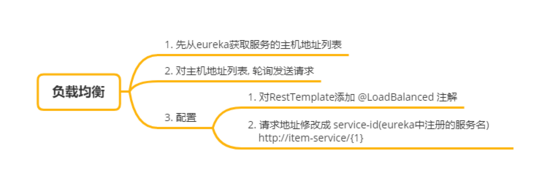
第一步:RestTemplate設(shè)置@LoadBalanced
@LoadBalanced 負載均衡注解,會對 RestTemplate 實例進行封裝,創(chuàng)建動態(tài)代理對象,并切入(AOP)負載均衡代碼,把請求分發(fā)到集群中的服務(wù)器
package cn.tedu.sp06;import org.springframework.boot.SpringApplication;import org.springframework.boot.autoconfigure.SpringBootApplication;import org.springframework.cloud.client.discovery.EnableDiscoveryClient;import org.springframework.cloud.client.loadbalancer.LoadBalanced;import org.springframework.context.annotation.Bean;import org.springframework.web.client.RestTemplate;@EnableDiscoveryClient@SpringBootApplicationpublic class Sp06RibbonApplication { @LoadBalanced //負載均衡注解 @Bean public RestTemplate getRestTemplate() { return new RestTemplate(); } public static void main(String[] args) { SpringApplication.run(Sp06RibbonApplication.class, args); }}
第二步:訪問路徑設(shè)置為id
package cn.tedu.sp06.controller;import java.util.List;import org.springframework.beans.factory.annotation.Autowired;import org.springframework.web.bind.annotation.GetMapping;import org.springframework.web.bind.annotation.PathVariable;import org.springframework.web.bind.annotation.PostMapping;import org.springframework.web.bind.annotation.RequestBody;import org.springframework.web.bind.annotation.RestController;import org.springframework.web.client.RestTemplate;import cn.tedu.sp01.pojo.Item;import cn.tedu.sp01.pojo.Order;import cn.tedu.sp01.pojo.User;import cn.tedu.web.util.JsonResult;@RestControllerpublic class RibbonController { @Autowired private RestTemplate rt; @GetMapping('/item-service/{orderId}') public JsonResult<List<Item>> getItems(@PathVariable String orderId) { //這里服務(wù)器路徑用 service-id 代替,ribbon 會向服務(wù)的多臺集群服務(wù)器分發(fā)請求 return rt.getForObject('http://item-service/{1}', JsonResult.class, orderId); } @PostMapping('/item-service/decreaseNumber') public JsonResult decreaseNumber(@RequestBody List<Item> items) { return rt.postForObject('http://item-service/decreaseNumber', items, JsonResult.class); } / @GetMapping('/user-service/{userId}') public JsonResult<User> getUser(@PathVariable Integer userId) { return rt.getForObject('http://user-service/{1}', JsonResult.class, userId); } @GetMapping('/user-service/{userId}/score') public JsonResult addScore( @PathVariable Integer userId, Integer score) { return rt.getForObject('http://user-service/{1}/score?score={2}', JsonResult.class, userId, score); } / @GetMapping('/order-service/{orderId}') public JsonResult<Order> getOrder(@PathVariable String orderId) { return rt.getForObject('http://order-service/{1}', JsonResult.class, orderId); } @GetMapping('/order-service') public JsonResult addOrder() { return rt.getForObject('http://order-service/', JsonResult.class); }}
第三步:訪問測試,ribbon 會把請求分發(fā)到 8001 和 8002 兩個服務(wù)端口上
http://localhost:3001/item-service/34 ribbon重試
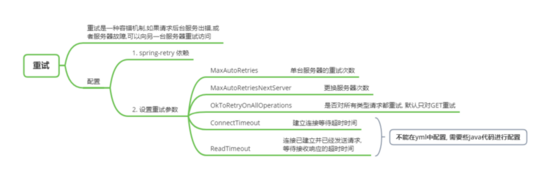
第一步:添加spring-retry依賴
<dependency> <groupId>org.springframework.retry</groupId> <artifactId>spring-retry</artifactId></dependency>
第二步:application.yml 配置 ribbon 重試
# 06項目用來測試遠程調(diào)用和ribbon工具# 等功能測試完成后,直接刪除spring: application: name: ribbonserver: port: 3001# 連接eureka,從eureka發(fā)現(xiàn)其他服務(wù)的地址eureka: client: service-url: defaultZone: http://eureka1:2001/eureka,http://eureka2:2002/eureka#配置ribbon 重試次數(shù)ribbon: # 次數(shù)參數(shù)沒有提示,并且會有黃色警告 # 重試次數(shù)越少越好,一般建議用0,1 MaxAutoRetries: 1 MaxAutoRetriesNextServer: 2
第三步:設(shè)置 RestTemplate 的請求工廠的超時屬性
package cn.tedu.sp06;import org.springframework.boot.SpringApplication;import org.springframework.boot.autoconfigure.SpringBootApplication;import org.springframework.cloud.client.loadbalancer.LoadBalanced;import org.springframework.context.annotation.Bean;import org.springframework.http.client.SimpleClientHttpRequestFactory;import org.springframework.web.client.RestTemplate;@SpringBootApplicationpublic class Sp06RibbonApplication { public static void main(String[] args) { SpringApplication.run(Sp06RibbonApplication.class, args); } /** * 創(chuàng)建RestTemplate實例 * 放入spring容器 * @LoadBalanced-對RestTemplate進行增強,封裝RestTemplate,添加負載均衡功能 */ @LoadBalanced @Bean public RestTemplate restTemplate(){ //設(shè)置調(diào)用超時時間,超時后認為調(diào)用失敗 SimpleClientHttpRequestFactory f = new SimpleClientHttpRequestFactory(); f.setConnectTimeout(1000);//建立連接等待時間 f.setReadTimeout(1000);//連接建立后,發(fā)送請求后,等待接收響應(yīng)的時間 return new RestTemplate(f); }}
第四步:ItemController 添加延遲代碼
package cn.tedu.sp02.item.controller;import java.util.List;import java.util.Random;import org.springframework.beans.factory.annotation.Autowired;import org.springframework.beans.factory.annotation.Value;import org.springframework.web.bind.annotation.GetMapping;import org.springframework.web.bind.annotation.PathVariable;import org.springframework.web.bind.annotation.PostMapping;import org.springframework.web.bind.annotation.RequestBody;import org.springframework.web.bind.annotation.RestController;import cn.tedu.sp01.pojo.Item;import cn.tedu.sp01.service.ItemService;import cn.tedu.web.util.JsonResult;import lombok.extern.slf4j.Slf4j;@Slf4j@RestControllerpublic class ItemController { @Autowired private ItemService itemService; //配置文件 application.yml中的server.port=8001注入到這個變量 //是為了后面做負載均衡測試,可以直接看到調(diào)用的是那個服務(wù)器 @Value('${server.port}') private int port; //獲取訂單的商品列表 @GetMapping('/{orderId}') public JsonResult<List<Item>> getItems(@PathVariable String orderId) throws InterruptedException { log.info('server.port='+port+', orderId='+orderId); //模擬延遲代碼 if (Math.random()<0.9){ long t = new Random().nextInt(5000); log.info('延遲:'+t); Thread.sleep(t); } List<Item> items = itemService.getItems(orderId);//根據(jù)訂單id獲取商品列表 return JsonResult.ok(items).msg('port='+port); } //減少商品庫存 /** * @RequestBody 完整接收請求協(xié)議體中的數(shù)據(jù) * @param items * @return */ @PostMapping('/decreaseNumber') public JsonResult decreaseNumber(@RequestBody List<Item> items) { for (Item item : items){ log.info('減少商品庫存:'+item ); } itemService.decreaseNumbers(items); return JsonResult.ok(); }}
第五步:測試 ribbon 重試機制
通過 ribbon 訪問 item-service,當超時,ribbon 會重試請求集群中其他服務(wù)器
http://localhost:3001/item-service/35
到此這篇關(guān)于深入學(xué)習(xí)Spring Cloud-Ribbon的文章就介紹到這了,更多相關(guān)Spring Cloud-Ribbon內(nèi)容請搜索好吧啦網(wǎng)以前的文章或繼續(xù)瀏覽下面的相關(guān)文章希望大家以后多多支持好吧啦網(wǎng)!
相關(guān)文章:
1. Java commons-httpclient如果實現(xiàn)get及post請求2. 一文帶你徹底理解Java序列化和反序列化3. JS中6個對象數(shù)組去重的方法4. Python基于requests庫爬取網(wǎng)站信息5. vscode運行php報錯php?not?found解決辦法6. python中文本字符處理的簡單方法記錄7. PHP laravel實現(xiàn)導(dǎo)出PDF功能8. Python使用Selenium自動進行百度搜索的實現(xiàn)9. PHP利用curl發(fā)送HTTP請求的實例代碼10. 資深程序員:給Python軟件開發(fā)測試的25個忠告!
 網(wǎng)公網(wǎng)安備