javascript繪制簡(jiǎn)單鐘表效果
本文給大家分享一個(gè)canvas的時(shí)鐘繪制,供大家參考,具體內(nèi)容如下
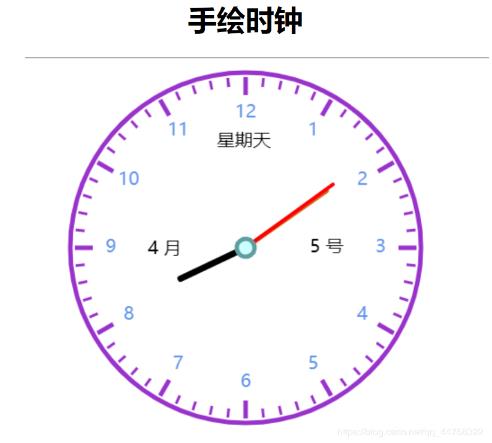
復(fù)制可直接使用
<!DOCTYPE html><html> <head> <meta charset='UTF-8'> <title></title> <style> h1 { text-align: center; } div { width: 400px; height: 400px; margin: 10px auto; padding: 0; } </style> </head> <body> <h1>手繪時(shí)鐘</h1> <hr /> <div> <canvas height='400px'> </canvas> </div> <script type='text/javascript'> var clock = document.getElementById('c1').getContext('2d'); // var clock = $('#huabu').get(0).getContext('2d'); //$中使用畫(huà)布 function play() { clock.clearRect(0, 0, 400, 400); clock.save(); clock.translate(200, 200); //把畫(huà)布中心轉(zhuǎn)移到canvas中間 biaopan(); run(); clock.restore(); } setInterval(function() { play(); }, 1000); function biaopan() { //繪制表盤(pán) clock.strokeStyle = ' #9932CC'; clock.lineWidth = 5; clock.beginPath(); clock.arc(0, 0, 195, 0, 2 * Math.PI); clock.stroke(); //刻度(小時(shí)) clock.strokeStyle = '#9932CC'; clock.lineWidth = 5; for(var i = 0; i < 12; i++) { clock.beginPath(); clock.moveTo(0, -190); clock.lineTo(0, -170); clock.stroke(); clock.rotate(2 * Math.PI / 12); } //刻度(分鐘) clock.strokeStyle = '#9932CC'; clock.lineWidth = 3; for(var i = 0; i < 60; i++) { clock.beginPath(); clock.moveTo(0, -190); clock.lineTo(0, -180); clock.stroke(); clock.rotate(2 * Math.PI / 60); } //繪制文字 clock.textAlign = 'center'; clock.textBaseline = 'middle'; clock.fillStyle = '#6495ED'; clock.font = '20px 微軟雅黑' for(var i = 1; i < 13; i++) { clock.fillText(i,Math.sin(2*Math.PI /12*i)*150,Math.cos(2*Math.PI/12*i)*-150); } } function run() { var date = new Date(); var h = date.getHours(); var m = date.getMinutes(); var s = date.getSeconds();// if(h > 12) {// h = h - 12;// } //日期 var week = date.getDay(); var month = date.getMonth() + 1; var day = date.getDate(); switch (week){ case 1: week = '星期一'; break; case 2: week = '星期二'; break; case 3: week = '星期三'; break; case 4: week = '星期四'; break; case 5: week = '星期五'; break; case 6: week = '星期六'; break; default: week = '星期天'; break; } clock.save(); clock.textAlign = 'center'; clock.textBaseline = 'middle'; clock.fillStyle = 'black'; clock.font = '16px' clock.fillText(week,-2,-118); clock.fillText(month+' 月',-90,2); clock.fillText(day+' 號(hào)',90,0); clock.stroke(); clock.restore(); //時(shí)針 //分針60格 分針5格 clock.save(); clock.rotate(2 * Math.PI / 12 * h + (2 * Math.PI / 60 * m + 2 * Math.PI / 60 * s / 60) / 12); clock.strokeStyle = 'black'; clock.lineWidth = 7; clock.beginPath(); clock.moveTo(0, 0); clock.lineTo(0, -80); clock.lineCap = 'round'; clock.stroke(); clock.restore(); //分針 //秒針60格 分針一格 clock.save(); clock.beginPath(); clock.strokeStyle = '#D2691E'; clock.lineWidth = 5; clock.rotate(2 * Math.PI / 60 * m + 2 * Math.PI / 60 * s / 60); clock.moveTo(0, 0); clock.lineTo(0, -110); clock.lineCap = 'round'; clock.stroke(); clock.restore(); //秒針 clock.strokeStyle = 'red'; clock.rotate(2 * Math.PI / 60 * s); clock.lineWidth = 4; clock.beginPath(); clock.moveTo(0, 0); clock.lineTo(0, -120); clock.lineCap = 'round'; clock.stroke(); //中心 clock.fillStyle = ' #CCFFFF'; clock.lineWidth = 5; clock.beginPath(); clock.arc(0, 0, 10, 0, 2 * Math.PI); clock.fill(); clock.strokeStyle = 'cadetblue'; clock.stroke(); } </script> </body></html>
更多JavaScript時(shí)鐘特效點(diǎn)擊查看:JavaScript時(shí)鐘特效專題
以上就是本文的全部?jī)?nèi)容,希望對(duì)大家的學(xué)習(xí)有所幫助,也希望大家多多支持好吧啦網(wǎng)。
相關(guān)文章:
1. 從Python的字符串中剝離所有非數(shù)字字符(“。”除外)2. 解決spring @ControllerAdvice處理異常無(wú)法正確匹配自定義異常3. IDEA一鍵完成格式化、去除無(wú)用引用、編譯的操作4. IntelliJ IDEA設(shè)置自動(dòng)提示功能快捷鍵的方法5. 詳解python 內(nèi)存優(yōu)化6. 詳解如何使用Net將HTML簡(jiǎn)歷導(dǎo)出為PDF格式7. 基于python調(diào)用jenkins-cli實(shí)現(xiàn)快速發(fā)布8. ASP.NET MVC使用jQuery ui的progressbar實(shí)現(xiàn)進(jìn)度條9. Python使用xlrd實(shí)現(xiàn)讀取合并單元格10. PHP程序員簡(jiǎn)單的開(kāi)展服務(wù)治理架構(gòu)操作詳解(二)

 網(wǎng)公網(wǎng)安備