JavaScript實現簡單的計算器功能
本文實例為大家分享了JavaScript實現簡單計算器功能的具體代碼,供大家參考,具體內容如下
具體要求如下:
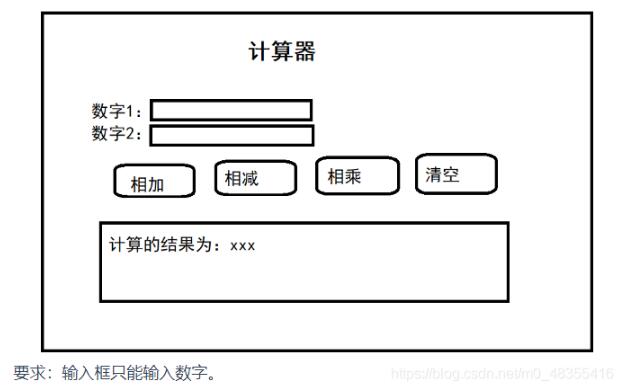
實現代碼:
<html> <head> <meta charset='utf-8'> <title>計算器</title> <script> function myck(type){var num1 = document.getElementById('num1');var num2 = document.getElementById('num2');if(type==1){ // 計算操作 var result = parseInt(num1.value) + parseInt(num2.value); alert(result); document.getElementById('resultDiv').innerText ='最終計算結果:'+ result;}else if(type==2){ var result = parseInt(num1.value) - parseInt(num2.value); alert(result); document.getElementById('resultDiv').innerText ='最終計算結果:'+ result; } else if(type==3){ var result = parseInt(num1.value) * parseInt(num2.value); alert(result); document.getElementById('resultDiv').innerText ='最終計算結果:'+ result; } else if(type==4){if(confirm('是否正確清空?')){// 清空num1.value = '';num2.value = '';document.getElementById('resultDiv').innerText=''; } } } </script> </head> <body> <div style='margin-top: 100px;margin-left: 500px;'> <span style='font-size: 60px;'>計算器</span> </div> <div> <div style='margin-left: 490px;'>數 字1:<input type='number' placeholder='請輸入數字1'> </div> </div> <div> <div style='margin-left:490px;'> 數 字2:<input type='number' placeholder='請輸入數字2'> </div> </div> <div> <div class='innerDiv'><input type='button' onclick='myck(1)' value='相 加'> <input type='button' onclick='myck(2)' value='相 減'> <input type='button' onclick='myck(3)' value='相 乘'><input type='button' onclick='myck(4)' value='清 空'> </div> </div> <div id='resultDiv'> </div> </body> <style> .innerDiv{ margin-left: 420px; margin-top: 20px; } </style></html>
以上就是本文的全部內容,希望對大家的學習有所幫助,也希望大家多多支持好吧啦網。
相關文章:
1. 使用Python webdriver圖書館搶座自動預約的正確方法2. PHP如何開啟Opcache功能提升程序處理效率3. ASP.NET MVC使用jQuery ui的progressbar實現進度條4. 在線php代碼縮進、代碼美化工具:PHP Formatter5. 淺談由position屬性引申的css進階討論6. PHP程序員簡單的開展服務治理架構操作詳解(二)7. 從Python的字符串中剝離所有非數字字符(“。”除外)8. Python3 json模塊之編碼解碼方法講解9. android H5本地緩存加載優化的實戰10. Android Studio 3.5格式化布局代碼時錯位、錯亂bug的解決

 網公網安備
網公網安備