SpringBoot實(shí)現(xiàn)本地存儲(chǔ)文件上傳及提供HTTP訪問服務(wù)的方法
筆者計(jì)劃為大家介紹分布式文件系統(tǒng),用于存儲(chǔ)應(yīng)用的圖片、word、excel、pdf等文件。在開始介紹分布式文件系統(tǒng)之前,為大家介紹一下使用本機(jī)存儲(chǔ)來存放文件資源。二者的核心實(shí)現(xiàn)過程是一樣的:
上傳文件,保存文件(本節(jié)是本地磁盤) 返回文件HTTP訪問服務(wù)路徑給前端,進(jìn)行上傳之后的效果展示一、復(fù)習(xí)
服務(wù)端接收上傳的目的是提供文件的訪問服務(wù),那么對(duì)于SpringBoot而言,有哪些可以提供文件訪問的靜態(tài)資源目錄呢?
classpath:/META-INF/resources/ , classpath:/static/ , classpath:/public/ , classpath:/resources/這是之前我們?yōu)榇蠹医榻B的內(nèi)容,從這里看出這里的靜態(tài)資源都在classpath下。那么就出現(xiàn)問題:
應(yīng)用的文件資源不能和項(xiàng)目代碼分開存儲(chǔ)(你見過往github上傳代碼,還附帶項(xiàng)目文件數(shù)據(jù)的么?) 項(xiàng)目打包困難,當(dāng)上傳的文件越來越多,項(xiàng)目的打包jar越來越大。 代碼與文件數(shù)據(jù)不能分開存儲(chǔ),就意味著文件數(shù)據(jù)的備份將變得復(fù)雜二、文件上傳目錄自定義配置
怎么解決上述問題?別忘記了spring boot 為我們提供了使用spring.resources.static-locations配置自定義靜態(tài)文件的位置。
web: upload-path: D:/data/spring: resources: static-locations: classpath:/META-INF/resources/,classpath:/resources/,classpath:/static/,classpath:/public/,file:${web.upload-path} 配置web.upload-path為與項(xiàng)目代碼分離的靜態(tài)資源路徑,即:文件上傳保存根路徑 配置spring.resources.static-locations,除了帶上Spring Boot默認(rèn)的靜態(tài)資源路徑之外,加上file:${web.upload-path}指向外部的文件資源上傳路徑。該路徑下的靜態(tài)資源可以直接對(duì)外提供HTTP訪問服務(wù)。
三、文件上傳的Controller實(shí)現(xiàn)
詳情看代碼注釋
@RestControllerpublic class FileUploadController { //綁定文件上傳路徑到uploadPath @Value('${web.upload-path}') private String uploadPath; SimpleDateFormat sdf = new SimpleDateFormat('yyyy/MM/dd/'); @PostMapping('/upload') public String upload(MultipartFile uploadFile, HttpServletRequest request) { // 在 uploadPath 文件夾中通過日期對(duì)上傳的文件歸類保存 // 比如:/2019/06/06/cf13891e-4b95-4000-81eb-b6d70ae44930.png String format = sdf.format(new Date()); File folder = new File(uploadPath + format); if (!folder.isDirectory()) { folder.mkdirs(); } // 對(duì)上傳的文件重命名,避免文件重名 String oldName = uploadFile.getOriginalFilename(); String newName = UUID.randomUUID().toString() + oldName.substring(oldName.lastIndexOf('.'), oldName.length()); try { // 文件保存 uploadFile.transferTo(new File(folder, newName)); // 返回上傳文件的訪問路徑 String filePath = request.getScheme() + '://' + request.getServerName() + ':' + request.getServerPort() + format + newName; return filePath; } catch (IOException e) { throw new CustomException(CustomExceptionType.SYSTEM_ERROR); } }}
四、寫一個(gè)模擬的文件上傳頁面,進(jìn)行測(cè)試
把該upload.html文件放到classpath:public目錄下,對(duì)外提供訪問。
<!DOCTYPE html><html lang='en'><head> <meta charset='UTF-8'> <title>Title</title></head><body><form action='/upload' method='post' enctype='multipart/form-data'> <input type='file' name='uploadFile' value='請(qǐng)選擇上傳文件'> <input type='submit' value='保存'></form></body></html>
訪問測(cè)試、點(diǎn)擊“選擇文件”,之后保存

文件被保存到服務(wù)端的web.upload-path指定的資源目錄下
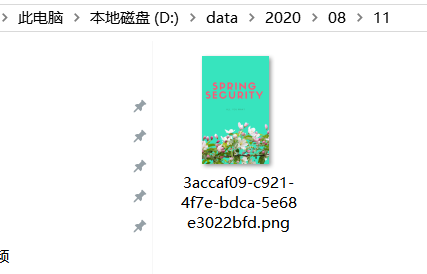
瀏覽器端響應(yīng)結(jié)果如下,返回一個(gè)文件HTTP訪問路徑:

使用該HTTP訪問路徑,在瀏覽器端訪問效果如下。證明我們的文件已經(jīng)成功上傳到服務(wù)端,以后需要訪問該圖片就通過這個(gè)HTTP URL就可以了。

到此這篇關(guān)于SpringBoot實(shí)現(xiàn)本地存儲(chǔ)文件上傳及提供HTTP訪問服務(wù)的文章就介紹到這了,更多相關(guān)SpringBoot實(shí)現(xiàn)文件上傳和訪問內(nèi)容請(qǐng)搜索好吧啦網(wǎng)以前的文章或繼續(xù)瀏覽下面的相關(guān)文章希望大家以后多多支持好吧啦網(wǎng)!
相關(guān)文章:
1. 用Spring JMS使異步消息變得簡單2. PHP驗(yàn)證碼工具-Securimage3. 關(guān)于IDEA 2020.3 多窗口視圖丟失的問題4. js實(shí)現(xiàn)碰撞檢測(cè)5. 一文帶你徹底理解Java序列化和反序列化6. JS實(shí)現(xiàn)前端動(dòng)態(tài)分頁碼代碼實(shí)例7. PHP使用Swagger生成好看的API文檔8. ASP.NET MVC使用jQuery ui的progressbar實(shí)現(xiàn)進(jìn)度條9. Python 下載Bing壁紙的示例10. Python 制作查詢商品歷史價(jià)格的小工具
 網(wǎng)公網(wǎng)安備