SpringBoot Security前后端分離登錄驗證的實現
最近一段時間在研究OAuth2的使用,想整個單點登錄,從網上找了很多demo都沒有實施成功,也許是因為壓根就不懂OAuth2的原理導致。有那么幾天,越來越沒有頭緒,又不能放棄,轉過頭來一想,OAuth2是在Security的基礎上擴展的,對于Security自己都是一無所知,干脆就先研究一下Security吧,先把Security搭建起來,找找感覺。
說干就干,在現成的SpringBoot 2.1.4.RELEASE環境下,進行Security的使用。簡單的Security的使用就不說了,目前的項目是前后端分離的,登錄成功或者失敗返回的數據格式必須JSON形式的,未登錄時也需要返回JSON格式的提示信息 ,退出時一樣需要返回JSON格式的數據。授權先不管,先返回JSON格式的數據,這一個搞定,也研究了好幾天,翻看了很多別人的經驗,別人的經驗有的看得懂,有的看不懂,關鍵時刻還需要自己研究呀。
下面,上代碼:
第一步,在pom.xml中引入Security配置文件
<dependency> <groupId>org.springframework.boot</groupId> <artifactId>spring-boot-starter-security</artifactId> </dependency>
第二步,增加Configuration配置文件
import java.io.PrintWriter;import java.util.HashMap;import java.util.Map;import javax.servlet.http.HttpServletResponse;import org.springframework.beans.factory.annotation.Autowired;import org.springframework.context.annotation.Bean;import org.springframework.context.annotation.Configuration;import org.springframework.http.HttpMethod;import org.springframework.security.authentication.AuthenticationProvider;import org.springframework.security.authentication.BadCredentialsException;import org.springframework.security.authentication.DisabledException;import org.springframework.security.authentication.dao.DaoAuthenticationProvider;import org.springframework.security.config.annotation.web.builders.HttpSecurity;import org.springframework.security.config.annotation.web.builders.WebSecurity;import org.springframework.security.config.annotation.web.configuration.WebSecurityConfigurerAdapter;import org.springframework.security.core.userdetails.UserDetailsService;import org.springframework.security.core.userdetails.UsernameNotFoundException;import com.fasterxml.jackson.databind.ObjectMapper;/** * 參考網址: * https://blog.csdn.net/XlxfyzsFdblj/article/details/82083443 * https://blog.csdn.net/lizc_lizc/article/details/84059004 * https://blog.csdn.net/XlxfyzsFdblj/article/details/82084183 * https://blog.csdn.net/weixin_36451151/article/details/83868891 * 查找了很多文件,有用的還有有的,感謝他們的辛勤付出 * Security配置文件,項目啟動時就加載了 * @author 程就人生 * */@Configurationpublic class SecurityConfig extends WebSecurityConfigurerAdapter { @Autowired private MyPasswordEncoder myPasswordEncoder; @Autowired private UserDetailsService myCustomUserService; @Autowired private ObjectMapper objectMapper; @Override protected void configure(HttpSecurity http) throws Exception { http .authenticationProvider(authenticationProvider()) .httpBasic() //未登錄時,進行json格式的提示,很喜歡這種寫法,不用單獨寫一個又一個的類 .authenticationEntryPoint((request,response,authException) -> { response.setContentType('application/json;charset=utf-8'); response.setStatus(HttpServletResponse.SC_FORBIDDEN); PrintWriter out = response.getWriter(); Map<String,Object> map = new HashMap<String,Object>(); map.put('code',403); map.put('message','未登錄'); out.write(objectMapper.writeValueAsString(map)); out.flush(); out.close(); }) .and() .authorizeRequests() .anyRequest().authenticated() //必須授權才能范圍 .and() .formLogin() //使用自帶的登錄 .permitAll() //登錄失敗,返回json .failureHandler((request,response,ex) -> { response.setContentType('application/json;charset=utf-8'); response.setStatus(HttpServletResponse.SC_UNAUTHORIZED); PrintWriter out = response.getWriter(); Map<String,Object> map = new HashMap<String,Object>(); map.put('code',401); if (ex instanceof UsernameNotFoundException || ex instanceof BadCredentialsException) { map.put('message','用戶名或密碼錯誤'); } else if (ex instanceof DisabledException) { map.put('message','賬戶被禁用'); } else { map.put('message','登錄失敗!'); } out.write(objectMapper.writeValueAsString(map)); out.flush(); out.close(); }) //登錄成功,返回json .successHandler((request,response,authentication) -> { Map<String,Object> map = new HashMap<String,Object>(); map.put('code',200); map.put('message','登錄成功'); map.put('data',authentication); response.setContentType('application/json;charset=utf-8'); PrintWriter out = response.getWriter(); out.write(objectMapper.writeValueAsString(map)); out.flush(); out.close(); }) .and() .exceptionHandling() //沒有權限,返回json .accessDeniedHandler((request,response,ex) -> { response.setContentType('application/json;charset=utf-8'); response.setStatus(HttpServletResponse.SC_FORBIDDEN); PrintWriter out = response.getWriter(); Map<String,Object> map = new HashMap<String,Object>(); map.put('code',403); map.put('message', '權限不足'); out.write(objectMapper.writeValueAsString(map)); out.flush(); out.close(); }) .and() .logout() //退出成功,返回json .logoutSuccessHandler((request,response,authentication) -> { Map<String,Object> map = new HashMap<String,Object>(); map.put('code',200); map.put('message','退出成功'); map.put('data',authentication); response.setContentType('application/json;charset=utf-8'); PrintWriter out = response.getWriter(); out.write(objectMapper.writeValueAsString(map)); out.flush(); out.close(); }) .permitAll(); //開啟跨域訪問 http.cors().disable(); //開啟模擬請求,比如API POST測試工具的測試,不開啟時,API POST為報403錯誤 http.csrf().disable(); } @Override public void configure(WebSecurity web) { //對于在header里面增加token等類似情況,放行所有OPTIONS請求。 web.ignoring().antMatchers(HttpMethod.OPTIONS, '/**'); } @Bean public AuthenticationProvider authenticationProvider() { DaoAuthenticationProvider authenticationProvider = new DaoAuthenticationProvider(); //對默認的UserDetailsService進行覆蓋 authenticationProvider.setUserDetailsService(myCustomUserService); authenticationProvider.setPasswordEncoder(myPasswordEncoder); return authenticationProvider; } }
第三步,實現UserDetailsService接口
import org.springframework.security.core.userdetails.UserDetails;import org.springframework.security.core.userdetails.UserDetailsService;import org.springframework.security.core.userdetails.UsernameNotFoundException;import org.springframework.stereotype.Component;/** * 登錄專用類 * 自定義類,實現了UserDetailsService接口,用戶登錄時調用的第一類 * @author 程就人生 * */@Componentpublic class MyCustomUserService implements UserDetailsService { /** * 登陸驗證時,通過username獲取用戶的所有權限信息 * 并返回UserDetails放到spring的全局緩存SecurityContextHolder中,以供授權器使用 */ @Override public UserDetails loadUserByUsername(String username) throws UsernameNotFoundException { //在這里可以自己調用數據庫,對username進行查詢,看看在數據庫中是否存在 MyUserDetails myUserDetail = new MyUserDetails(); myUserDetail.setUsername(username); myUserDetail.setPassword('123456'); return myUserDetail; }}
說明:這個類,主要是用來接收登錄傳遞過來的用戶名,然后可以在這里擴展,查詢該用戶名在數據庫中是否存在,不存在時,可以拋出異常。本測試為了演示,把數據寫死了。
第四步,實現PasswordEncoder接口
import org.springframework.security.crypto.password.PasswordEncoder;import org.springframework.stereotype.Component;/** * 自定義的密碼加密方法,實現了PasswordEncoder接口 * @author 程就人生 * */@Componentpublic class MyPasswordEncoder implements PasswordEncoder { @Override public String encode(CharSequence charSequence) { //加密方法可以根據自己的需要修改 return charSequence.toString(); } @Override public boolean matches(CharSequence charSequence, String s) { return encode(charSequence).equals(s); }}
說明:這個類主要是對密碼加密的處理,以及用戶傳遞過來的密碼和數據庫密碼(UserDetailsService中的密碼)進行比對。
第五步,實現UserDetails接口
import java.util.Collection;import org.springframework.security.core.GrantedAuthority;import org.springframework.security.core.userdetails.UserDetails;import org.springframework.stereotype.Component;/** * 實現了UserDetails接口,只留必需的屬性,也可添加自己需要的屬性 * @author 程就人生 * */@Componentpublic class MyUserDetails implements UserDetails { /** * */ private static final long serialVersionUID = 1L; //登錄用戶名 private String username; //登錄密碼 private String password; private Collection<? extends GrantedAuthority> authorities; public void setUsername(String username) { this.username = username; } public void setPassword(String password) { this.password = password; } public void setAuthorities(Collection<? extends GrantedAuthority> authorities) { this.authorities = authorities; } @Override public Collection<? extends GrantedAuthority> getAuthorities() { return this.authorities; } @Override public String getPassword() { return this.password; } @Override public String getUsername() { return this.username; } @Override public boolean isAccountNonExpired() { return true; } @Override public boolean isAccountNonLocked() { return true; } @Override public boolean isCredentialsNonExpired() { return true; } @Override public boolean isEnabled() { return true; }}
說明:這個類是用來存儲登錄成功后的用戶數據,登錄成功后,可以使用下列代碼獲取:
MyUserDetails myUserDetails= (MyUserDetails) SecurityContextHolder.getContext().getAuthentication() .getPrincipal();
代碼寫完了,接下來需要測試一下,經過測試才能證明代碼的有效性,先用瀏覽器吧。
第一步測試,未登錄前訪問index,頁面直接重定向到默認的login頁面了,測試接口OK。
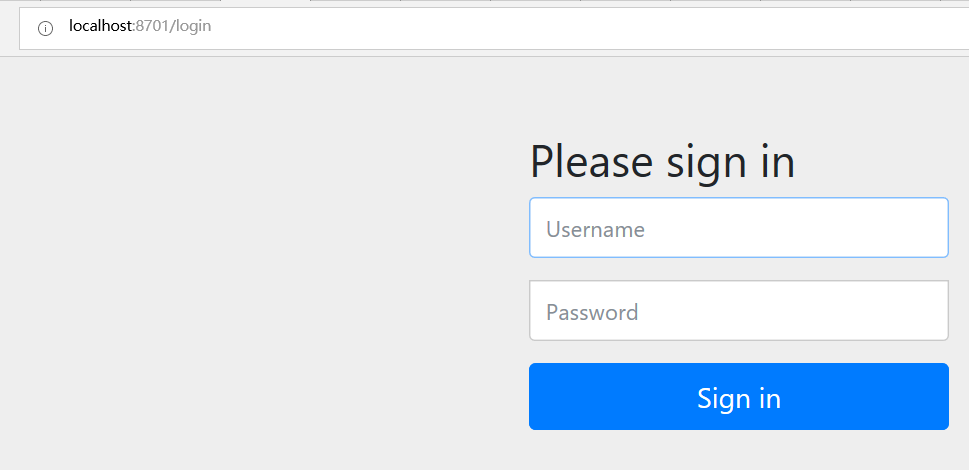
圖-1
第二步測試,登錄login后,返回了json數據,測試結果OK。

圖-2
第三步測試,訪問index,返回輸出的登錄數據,測試結果OK。

圖-3
第四步,訪問logout,返回json數據,測試接口OK。

圖-4
第五步,用API POST測試,用這個工具模擬ajax請求,看請求結果如何,首先訪問index,這個必須登錄后才能訪問。測試結果ok,返回了我們需要的JSON格式數據。
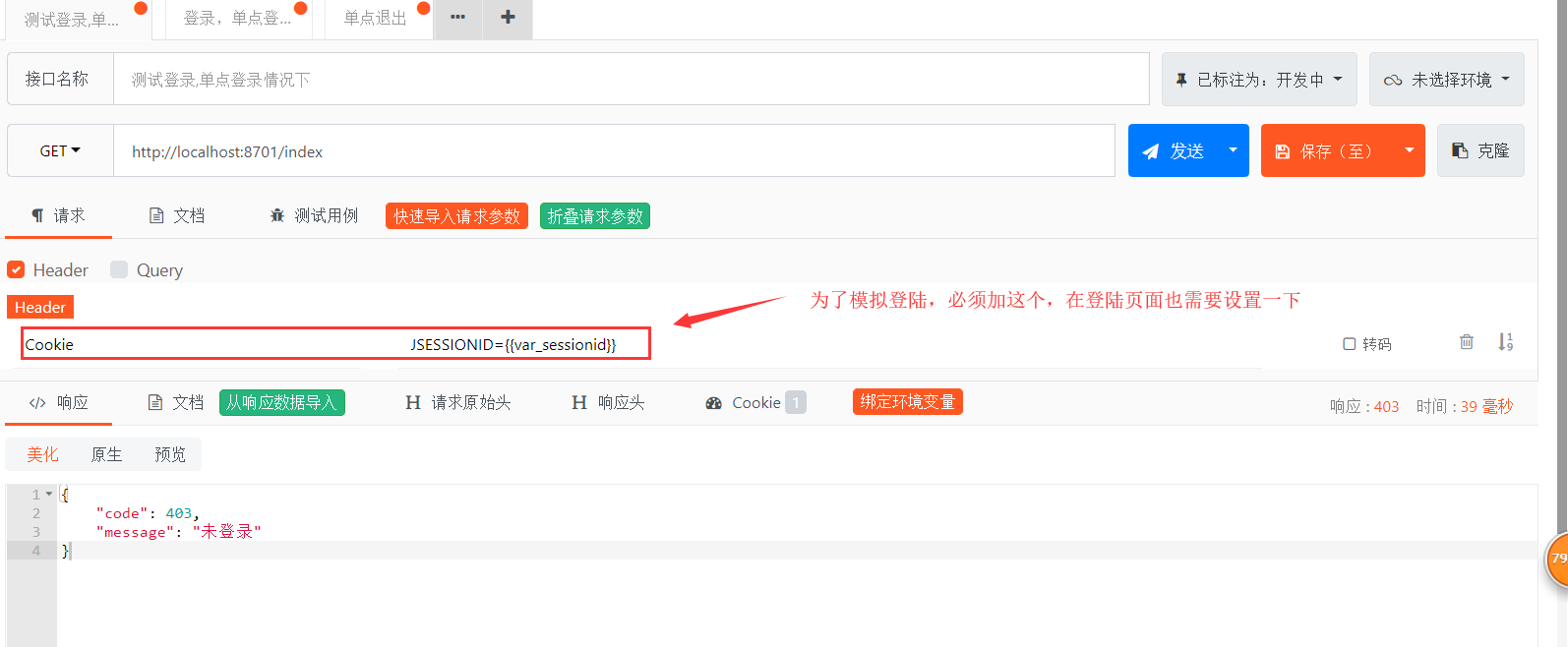
圖-5
第六步,在登錄模擬對話框,設置環境變量,以保持登錄狀態。
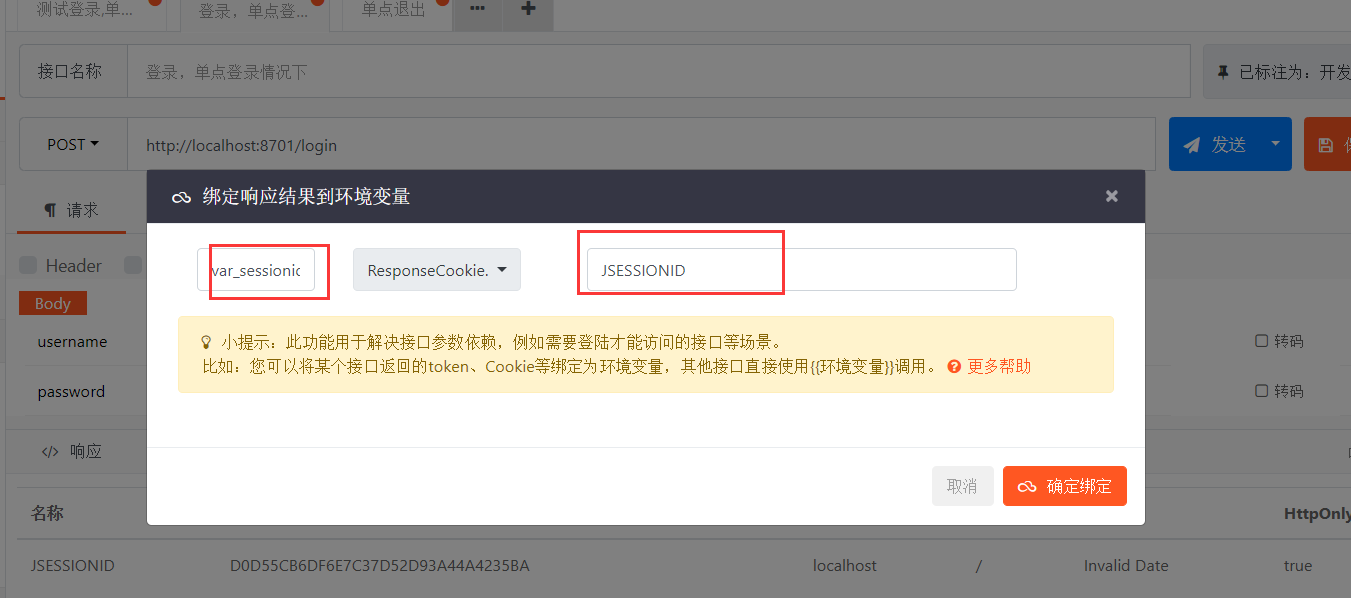
圖-6
**第七步,登錄測試,返回JSON格式的數據,測試結果OK。
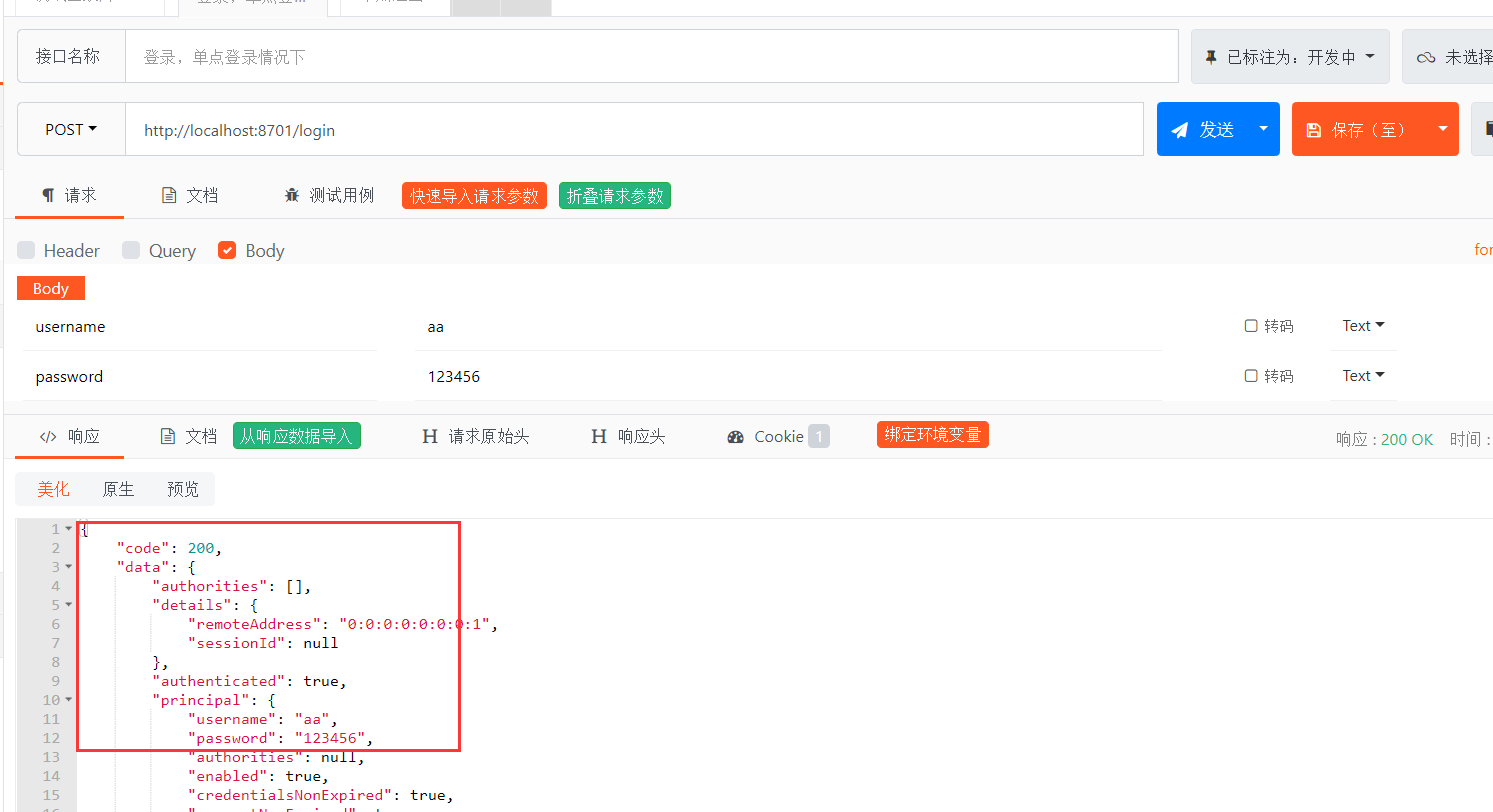
圖-7
第八步,在返回到index測試窗口,發送請求,返回當前用戶JSON格式的信息,測試結果OK。
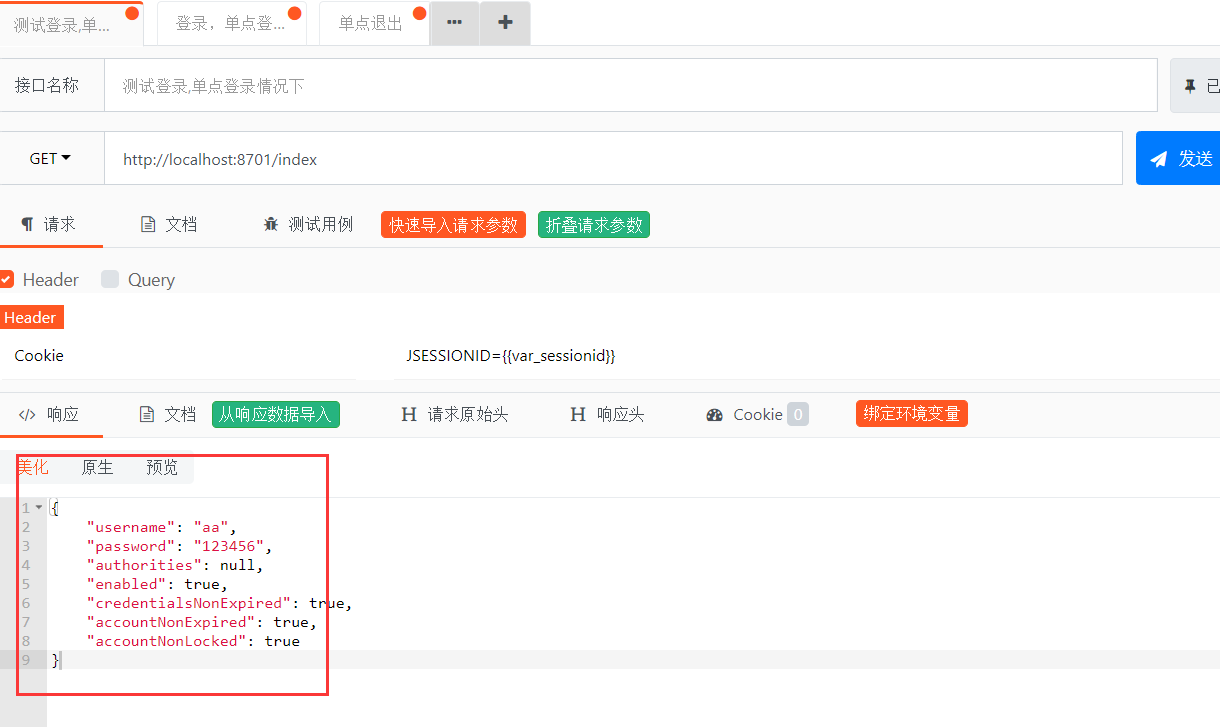
圖-8
第九步,測試退出,返回JSON格式數據,測試結果OK
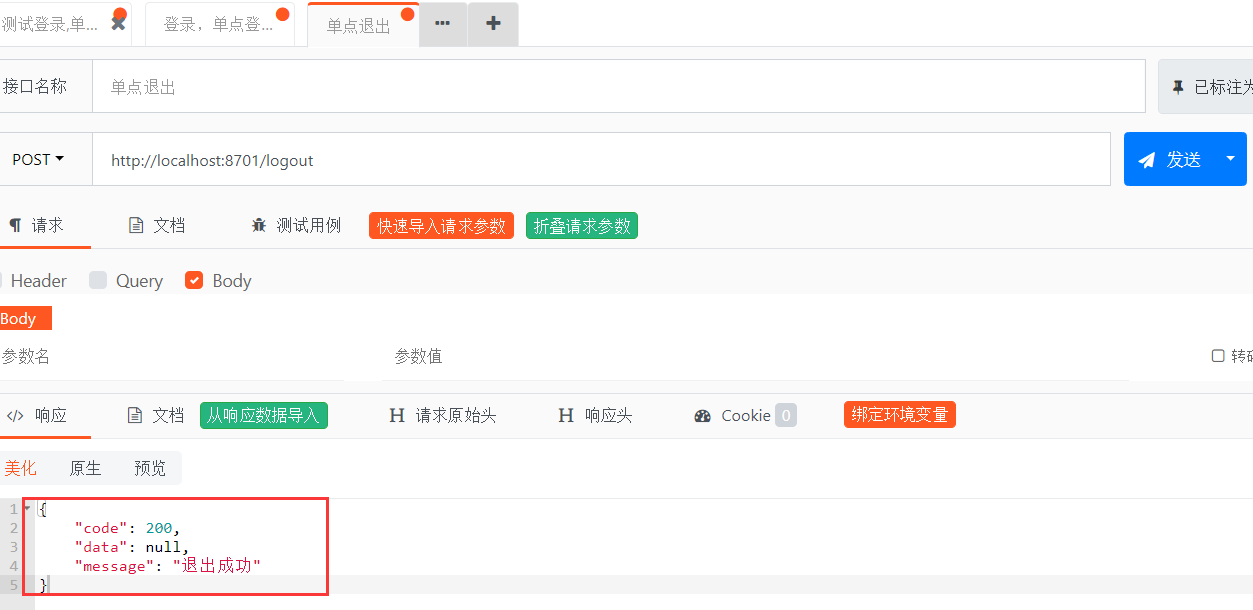
圖-9
第十步,退出后,再訪問index,出現問題,登錄信息還在,LOOK!
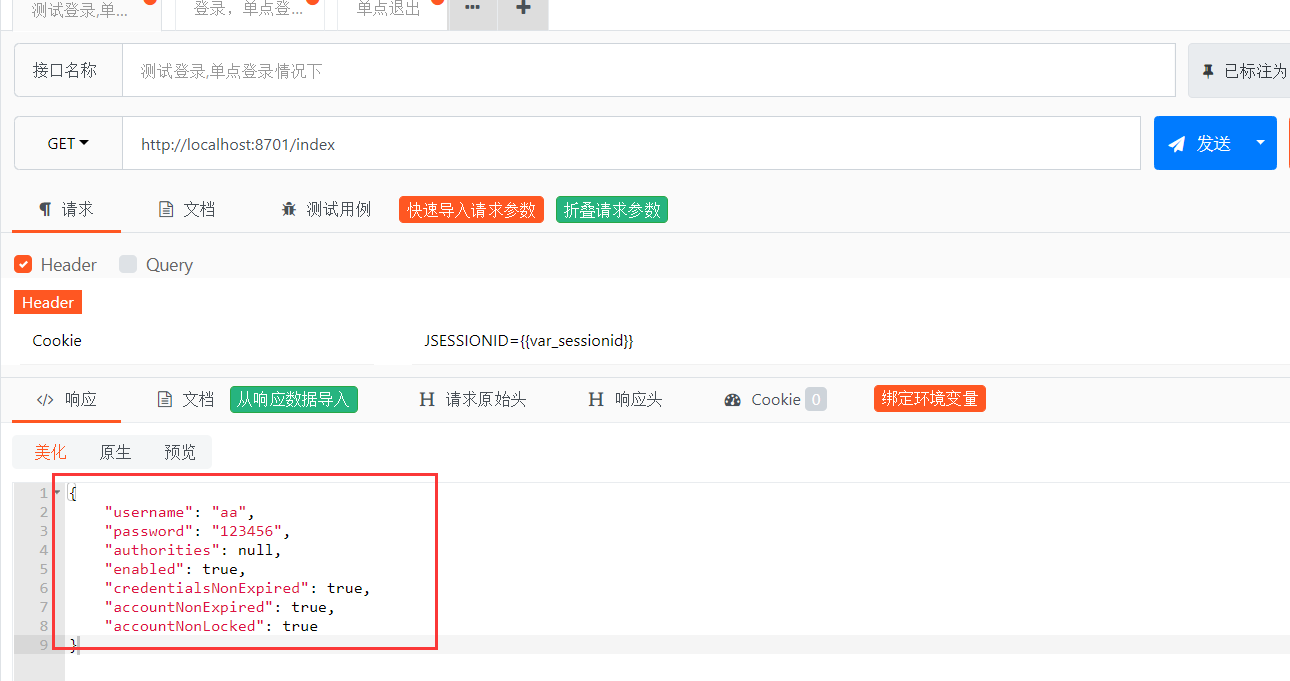
圖-10
把頭部的header前面的勾去掉,也就是去掉cookie,這時正常了,原因很簡單,在退出時,沒有清除cookie,這個只能到正式的環境上去測了。API POST再怎么模擬還是和正式環境有區別的。
如果在API POST測試報403錯誤,那就需要把configuration配置文件里的
//開啟跨域訪問http.cors().disable();//開啟模擬請求,比如API POST測試工具的測試,不開啟時,API POST為報403錯誤http.csrf().disable();
到此這篇關于SpringBoot Security前后端分離登錄驗證的實現的文章就介紹到這了,更多相關SpringBoot Security登錄驗證內容請搜索好吧啦網以前的文章或繼續瀏覽下面的相關文章希望大家以后多多支持好吧啦網!
相關文章:
 網公網安備
網公網安備