SpringBoot RestTemplate GET POST請求的實例講解
一)RestTemplate簡介
RestTemplate是HTTP客戶端庫提供了一個更高水平的API。主要用于Rest服務調用。
RestTemplate方法:
方法組 描述getForObject
通過GET檢索表示形式。
getForEntity
ResponseEntity通過使用GET 檢索(即狀態,標頭和正文)。
headForHeaders
通過使用HEAD檢索資源的所有標頭。
postForLocation
通過使用POST創建新資源,并Location從響應中返回標頭。
postForObject
通過使用POST創建新資源,并從響應中返回表示形式。
postForEntity
通過使用POST創建新資源,并從響應中返回表示形式。
put
通過使用PUT創建或更新資源。
patchForObject
通過使用PATCH更新資源,并從響應中返回表示形式。請注意,JDK HttpURLConnection不支持PATCH,但是Apache HttpComponents和其他支持。
delete
使用DELETE刪除指定URI處的資源。
optionsForAllow
通過使用ALLOW檢索資源的允許的HTTP方法。
exchange
前述方法的通用性強(且意見少的版本),在需要時提供了額外的靈活性。它接受RequestEntity(包括HTTP方法,URL,標頭和正文作為輸入)并返回ResponseEntity。
這些方法允許使用ParameterizedTypeReference而不是Class使用泛型來指定響應類型。
execute
執行請求的最通用方法,完全控制通過回調接口進行的請求準備和響應提取。
二)RestTemplate案例
第一步:創建一個maven項目,在pom.xml引入一個springboot的版本
pom.xml內容:
<project xmlns='http://maven.apache.org/POM/4.0.0' xmlns:xsi='http://www.w3.org/2001/XMLSchema-instance' xsi:schemaLocation='http://maven.apache.org/POM/4.0.0 http://maven.apache.org/xsd/maven-4.0.0.xsd'> <modelVersion>4.0.0</modelVersion> <groupId>com.oysept</groupId> <artifactId>spring_resttemplate</artifactId> <version>0.0.1-SNAPSHOT</version> <packaging>jar</packaging> <parent> <groupId>org.springframework.boot</groupId> <artifactId>spring-boot-starter-parent</artifactId> <version>2.1.4.RELEASE</version> <relativePath/> </parent> <dependencies> <dependency> <groupId>org.springframework.boot</groupId> <artifactId>spring-boot-starter-web</artifactId> </dependency> </dependencies> <build> <plugins> <plugin><groupId>org.springframework.boot</groupId><artifactId>spring-boot-maven-plugin</artifactId><configuration> <mainClass>com.oysept.RestTemplateApplication</mainClass></configuration> </plugin> <plugin><groupId>org.apache.tomcat.maven</groupId><artifactId>tomcat7-maven-plugin</artifactId> </plugin> </plugins> </build></project>
application.yml配置:該配置就一個默認端口
server:
port: 8080
創建一個springboot啟動類RestTemplateApplication
package com.oysept; import org.springframework.boot.autoconfigure.SpringBootApplication;import org.springframework.boot.builder.SpringApplicationBuilder; @SpringBootApplicationpublic class RestTemplateApplication { public static void main(String[] args) { new SpringApplicationBuilder(RestTemplateApplication.class).run(args); }}
到此步驟時,可以先運行RestTemplateApplication中的main方法,檢驗springboot啟動是否正常。
第二步:創建一個RestTemplate配置類并注入,因為在使用時,不提前注入ResttTemplate,在通過@Autowired使用會報RestTemplate找不到
package com.oysept.config; import org.springframework.context.annotation.Bean;import org.springframework.context.annotation.Configuration;import org.springframework.web.client.RestTemplate; /** * 注冊一個RestTemplate Bean, 否則直接通過@Autowired使用會報RestTemplate找不到 * @author ouyangjun */@Configurationpublic class RestTemplateConfig { /** * 方式一: 默認是使用JDK原生java.net.HttpURLConnection請求 * @return */ @Bean(name = 'restTemplate') public RestTemplate restTemplate() { return new RestTemplate(); } /** * 方式二: 使用apache http內置請求, 需要在pom.xml中引入相應的apache jar * 可以使用HttpClient,設置一些http連接池等信息 * @return * @Bean(name = 'restTemplate') public RestTemplate restTemplate() { return new RestTemplate(new HttpComponentsClientHttpRequestFactory()); } */ /** * 方式三: 使用OkHttp內置請求, 需要在pom.xml中引入相應的OkHttp3 jar * 可以使用OkHttpClient,設置一些http連接池信息 * @return * @Bean(name = 'restTemplate') public RestTemplate restTemplate() { return new RestTemplate(new OkHttp3ClientHttpRequestFactory()); } */}
第三步:創建一個VO類,用于測試入參和出參
package com.oysept.vo; public class MsgVO { private String msgKey; private String msgValue; public String getMsgKey() {return msgKey;} public void setMsgKey(String msgKey) {this.msgKey = msgKey;} public String getMsgValue() {return msgValue;} public void setMsgValue(String msgValue) {this.msgValue = msgValue;} public String toString() { return 'MsgVO [msgKey: '+this.msgKey+', msgValue: '+this.msgValue+']'; }}
第四步:創建一個服務端接口,用于測試
package com.oysept.controller; import java.util.ArrayList;import java.util.List; import org.springframework.http.MediaType;import org.springframework.web.bind.annotation.PathVariable;import org.springframework.web.bind.annotation.RequestBody;import org.springframework.web.bind.annotation.RequestMapping;import org.springframework.web.bind.annotation.RequestMethod;import org.springframework.web.bind.annotation.RequestParam;import org.springframework.web.bind.annotation.RestController; import com.oysept.vo.MsgVO; /** * 服務端, 提供接口被調用 * @author ouyangjun */@RestControllerpublic class ServerController { // 無參GET請求: http://localhost:8080/server/get @RequestMapping(value = '/server/get', method = RequestMethod.GET) public String get() { return '/server/get'; } // 帶參GET請求: http://localhost:8080/server/get/param?param=111222333444 @RequestMapping(value = '/server/get/param', method = RequestMethod.GET) public String getParam(@RequestParam(value = 'param') String param) { return '/server/get/param,' + param; } // 路徑中帶參GET請求: http://localhost:8080/server/get/url/AAAA/BBBB @RequestMapping(value = '/server/get/url/{one}/{two}', method = RequestMethod.GET) public String getUrl(@PathVariable('one') String one, @PathVariable('two') String two) { return '/get/url/{one}/{two},' + one + ',' + two; } // 無參GET請求, 返回List: http://localhost:8080/server/get/list @RequestMapping(value = '/server/get/list', method = RequestMethod.GET) public List<Object> getList() { List<Object> list = new ArrayList<Object>(); list.add(11); list.add('AA'); return list; } // 無參GET請求, 返回對象: http://localhost:8080/server/get/MsgVO @RequestMapping(value = '/server/get/MsgVO', method = RequestMethod.GET) public MsgVO getMsgVO() { MsgVO vo = new MsgVO(); vo.setMsgKey('keyAAA'); vo.setMsgValue('valueBBB'); return vo; } // POST請求, 表單參數, application/x-www-form-urlencoded @RequestMapping(value = '/server/post/form', method = RequestMethod.POST, consumes = MediaType.APPLICATION_FORM_URLENCODED_VALUE) public MsgVO postForm(MsgVO msgVO) { System.out.println('msgKey: ' + msgVO.getMsgKey() + ', msgValue: ' + msgVO.getMsgValue()); return msgVO; } // POST請求, JSON參數, application/json @RequestMapping(value = '/server/post/json', method = RequestMethod.POST, consumes = MediaType.APPLICATION_JSON_UTF8_VALUE, produces = MediaType.APPLICATION_JSON_UTF8_VALUE) public MsgVO postJson(@RequestBody MsgVO msgVO) { System.out.println('msgKey: ' + msgVO.getMsgKey() + ', msgValue: ' + msgVO.getMsgValue()); return msgVO; }}
第五步:創建一個測試服務端接口的API
import的類和注入的RestTemplate:
package com.oysept.controller; import java.net.URI;import java.util.HashMap;import java.util.List;import java.util.Map; import org.springframework.beans.factory.annotation.Autowired;import org.springframework.beans.factory.annotation.Qualifier;import org.springframework.http.HttpEntity;import org.springframework.http.HttpHeaders;import org.springframework.http.MediaType;import org.springframework.http.RequestEntity;import org.springframework.http.ResponseEntity;import org.springframework.util.LinkedMultiValueMap;import org.springframework.util.MultiValueMap;import org.springframework.web.bind.annotation.RequestMapping;import org.springframework.web.bind.annotation.RequestMethod;import org.springframework.web.bind.annotation.RestController;import org.springframework.web.client.RestTemplate;import org.springframework.web.util.UriComponentsBuilder; import com.oysept.vo.MsgVO; /** * 客戶端, 調用服務端提供的接口 * @author ouyangjun */@RestControllerpublic class ClientController { // 使用默認請求方式 @Autowired @Qualifier(value = 'restTemplate') private RestTemplate restTemplate; // 在此處添加客戶端測試代碼}
1、GET請求
// 直接在瀏覽中輸入訪問地址: http://localhost:8080/client/get@RequestMapping(value = '/client/get', method = RequestMethod.GET)public String get() { // 無參GET請求 String get = restTemplate.getForObject('http://localhost:8080/server/get', String.class); System.out.println('==>/server/get return: ' + get); // 帶參GET請求 String getParam = restTemplate.getForObject('http://localhost:8080/server/get/param?param=111222333444', String.class); System.out.println('==>/server/get/param return: ' + getParam); // 帶參GET url請求 String getUrlParam = restTemplate.getForObject('http://localhost:8080/server/get/url/{one}/{two}', String.class, 'AAAA', 'BBBB'); System.out.println('==>/server/get/url/{one}/{two} return: ' + getUrlParam); // 帶參GET url請求 Map<String, String> vars = new HashMap<String, String>(); vars.put('one', 'HHHH'); vars.put('two', 'EEEE'); String getUrlVars = restTemplate.getForObject('http://localhost:8080/server/get/url/{one}/{two}', String.class, vars); System.out.println('==>/server/get/url/{one}/{two} return: ' + getUrlVars); // 無參GET請求, 返回List @SuppressWarnings('unchecked') List<String> getList = restTemplate.getForObject('http://localhost:8080/server/get/list', List.class); System.out.println('==>/server/get/list return: ' + getList); // GET請求, 返回對象 ResponseEntity<MsgVO> entity = restTemplate.getForEntity('http://localhost:8080/server/get/MsgVO', MsgVO.class); System.out.println('==>/server/get/list return: ' + entity.getBody()); return 'GET SUCCESS';}
2、GET url中傳參請求
// 直接在瀏覽中輸入訪問地址: http://localhost:8080/client/get/request// GET請求, url參數, 在表頭中添加參數@RequestMapping(value = '/client/get/request', method = RequestMethod.GET)public String getRequest() { // url中參數 Map<String, String> vars = new HashMap<String, String>(); vars.put('one', 'HHHH'); vars.put('two', 'EEEE'); // 請求地址 String uriTemplate = 'http://localhost:8080/server/get/url/{one}/{two}'; // 給URL地址encode轉碼 URI uri = UriComponentsBuilder.fromUriString(uriTemplate).buildAndExpand(vars).toUri(); // GET請求參數 RequestEntity<Void> requestEntity = RequestEntity.get(uri).header('MyHeader', 'aaabbbcccddd').build(); // 響應 ResponseEntity<String> response = restTemplate.exchange(requestEntity, String.class); // 結果 System.out.println('==>/get/request header: ' + response.getHeaders().getFirst('MyHeader')); System.out.println('==>/get/request body: ' + response.getBody()); return 'POST SUCCESS';}
3、POST application/x-www-form-urlencoded表單傳參請求
// 直接在瀏覽中輸入訪問地址: http://localhost:8080/client/postForm// POST請求, form表單入參@RequestMapping(value = '/client/postForm', method = RequestMethod.GET)public String postForm() { // uri String uriTemplate = 'http://localhost:8080/server/post/form'; // 設置請求頭為form形式: application/x-www-form-urlencoded HttpHeaders headers = new HttpHeaders(); headers.setContentType(MediaType.APPLICATION_FORM_URLENCODED); // 設置參數, 和MsgVO中變量名對應 MultiValueMap<String, String> map = new LinkedMultiValueMap<String, String>(); map.add('msgKey', '1234'); map.add('msgValue', 'TestTest'); // 封裝請求參數 HttpEntity<MultiValueMap<String, String>> requestb = new HttpEntity<MultiValueMap<String, String>>(map, headers); ResponseEntity<String> response = restTemplate.postForEntity(uriTemplate, requestb, String.class); System.out.println('==>/server/post/form return: ' + response.getBody()); return 'POST SUCCESS';}
4、POST application/json JSON傳參請求
// 直接在瀏覽中輸入訪問地址: http://localhost:8080/client/postJson// POST請求, JSON入參@RequestMapping(value = '/client/postJson', method = RequestMethod.GET)public String postJson() { // json入參 MsgVO vo = new MsgVO(); vo.setMsgKey('TTT'); vo.setMsgValue('KKK'); String uriTemplate = 'http://localhost:8080/server/post/json'; URI uri = UriComponentsBuilder.fromUriString(uriTemplate).buildAndExpand().toUri(); RequestEntity<MsgVO> requestEntity = RequestEntity.post(uri) .header('Content-Type', 'application/json; charset=UTF-8') .body(vo); ResponseEntity<MsgVO> response = restTemplate.exchange(requestEntity, MsgVO.class); System.out.println('==>/server/post/json return: ' + response.getBody()); return 'POST SUCCESS';}
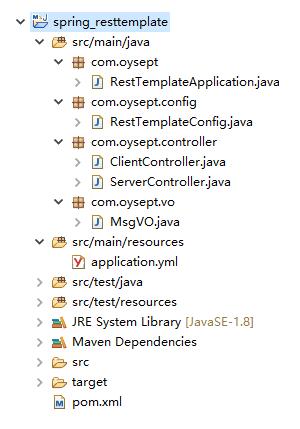
項目結構圖:
以上這篇SpringBoot RestTemplate GET POST請求的實例講解就是小編分享給大家的全部內容了,希望能給大家一個參考,也希望大家多多支持好吧啦網。
相關文章:

 網公網安備
網公網安備