SpringBoot隨機(jī)端口啟動(dòng)的實(shí)現(xiàn)
創(chuàng)建ServerPortUtil .java端口工具類,使用socket連接指定端口,例如有以下條件
a. 指定端口范圍為8000-65535b. 識(shí)別端口是否使用,已被使用則繼續(xù)隨機(jī)產(chǎn)生c. 如果全部端口不可使用則直接拋出錯(cuò)誤,中斷運(yùn)行
import java.net.InetAddress;import java.net.Socket;import java.util.Random;public class ServerPortUtil { private static final int MAX_PORT = 65535; private static final int MIN_PORT = 8000; public static String getAvailablePort() {Random random = new Random();// 最大嘗試次數(shù)為端口范圍int maxRetryCount = MAX_PORT - MIN_PORT;while (maxRetryCount > 0) {// 指定范圍內(nèi)隨機(jī)端口,隨便寫(xiě)的算法,根據(jù)自己需要調(diào)整 int port = random.nextInt(MAX_PORT - MIN_PORT) + MIN_PORT; boolean isUsed = isLocalePortUsing(port); if (!isUsed) {return String.valueOf(port); } --maxRetryCount;}System.out.println('系統(tǒng)暫無(wú)端口可用,運(yùn)行結(jié)束');System.exit(1);return null; } /** * 檢查給定端口是否可用 * * @author tianxincode@163.com * @since 2020/10/14 */ public static boolean isLocalePortUsing(int port) {try { // 建立一個(gè)Socket連接, 如果該端口還在使用則返回true, 否則返回false, 127.0.0.1代表本機(jī) new Socket(InetAddress.getByName('127.0.0.1'), port); return true;} catch (Exception e) { // 異常說(shuō)明端口連接不上,端口能使用}return false; }}
創(chuàng)建StartCommand.java命令類,調(diào)用隨機(jī)端口功能獲取端口信息,然后將端口信息寫(xiě)入運(yùn)行環(huán)境中a. 如果傳入的參數(shù)包含了端口則使用指定的,否則使用自動(dòng)生成
import com.codecoord.randomport.util.ServerPortUtil;import org.springframework.util.StringUtils;public class StartCommand { /** * 端口屬性名稱,如果名稱為server.port則在配置文件中不用指定,否則需要指定為此處配置的名稱,如${auto.port} */ private static final String SERVER_PORT = 'auto.port'; public StartCommand(String[] args) {boolean isServerPort = false;String serverPort = '';if (args != null) { for (String arg : args) {if (StringUtils.hasText(arg) && arg.startsWith('--server.port' )) { isServerPort = true; serverPort = arg; break;} }}String port;if (isServerPort) { port = serverPort.split('=')[1];} else { port = ServerPortUtil.getAvailablePort();}System.out.println('Current project port is ' + port);System.setProperty(SERVER_PORT, port); }}
在啟動(dòng)類啟動(dòng)前向環(huán)境寫(xiě)入端口信息
import com.codecoord.randomport.config.StartCommand;import org.springframework.boot.SpringApplication;import org.springframework.boot.autoconfigure.SpringBootApplication;@SpringBootApplicatiopublic class SpringbootRandomPortApplication { public static void main(String[] args) {// 寫(xiě)入端口信息 new StartCommand(args);SpringApplication.run(SpringbootRandomPortApplication.class, args); }}
在配置文件中指定端口為隨機(jī)生成的端口信息
server: # 隨機(jī)端口配置 port: ${auto.port}
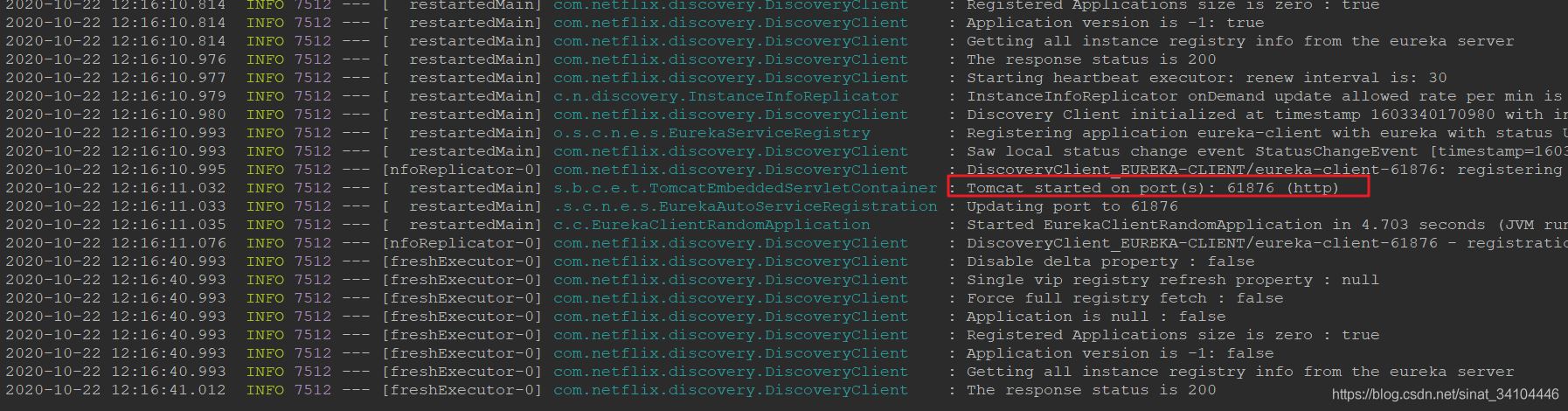
項(xiàng)目測(cè)試 正常啟動(dòng)項(xiàng)目,可以在控制臺(tái)看到啟動(dòng)的端口信息

SpringBoot的多實(shí)例運(yùn)行在IDEA中配置如下
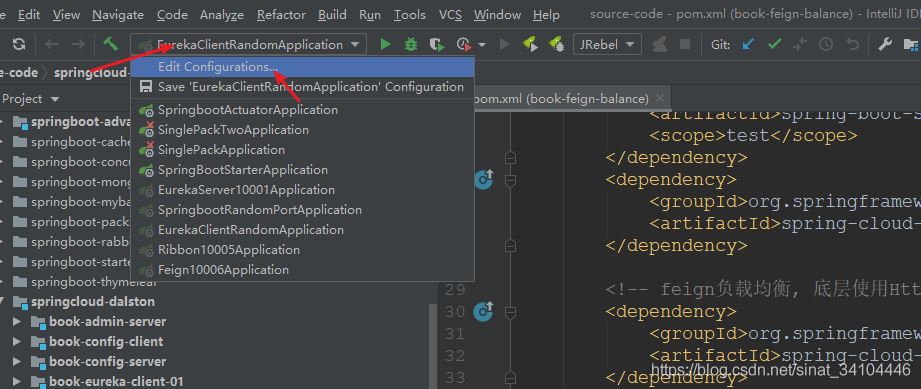
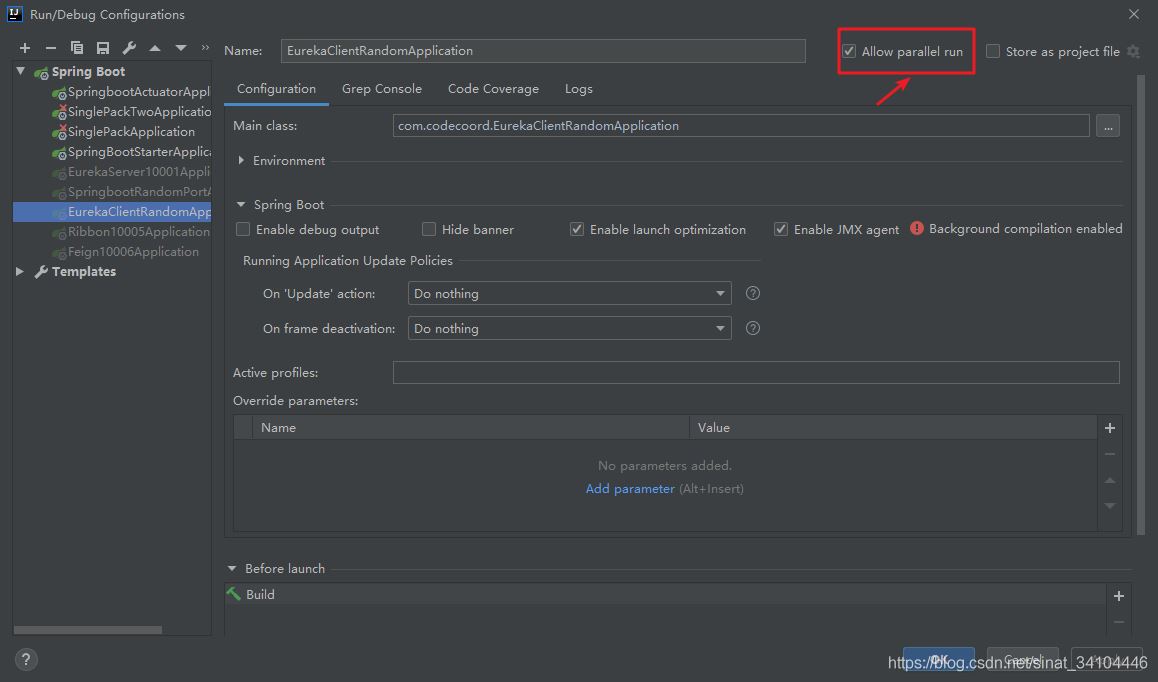
然后在啟動(dòng)上run/debug啟動(dòng)即可
到此這篇關(guān)于SpringBoot隨機(jī)端口啟動(dòng)的實(shí)現(xiàn)的文章就介紹到這了,更多相關(guān)SpringBoot隨機(jī)端口啟動(dòng)內(nèi)容請(qǐng)搜索好吧啦網(wǎng)以前的文章或繼續(xù)瀏覽下面的相關(guān)文章希望大家以后多多支持好吧啦網(wǎng)!
相關(guān)文章:
1. js實(shí)現(xiàn)碰撞檢測(cè)2. 一文帶你徹底理解Java序列化和反序列化3. JS實(shí)現(xiàn)前端動(dòng)態(tài)分頁(yè)碼代碼實(shí)例4. 關(guān)于IDEA 2020.3 多窗口視圖丟失的問(wèn)題5. PHP驗(yàn)證碼工具-Securimage6. 用Spring JMS使異步消息變得簡(jiǎn)單7. 通過(guò)實(shí)例解析Python文件操作實(shí)現(xiàn)步驟8. Python3 json模塊之編碼解碼方法講解9. Python 制作查詢商品歷史價(jià)格的小工具10. Python 解析庫(kù)json及jsonpath pickle的實(shí)現(xiàn)

 網(wǎng)公網(wǎng)安備