Vue+tsx使用slot沒(méi)有被替換的問(wèn)題
最近自己準(zhǔn)備寫(xiě)一個(gè) UI 組件,想對(duì) vue 的 2.x、3.x 可以更深層次的掌握
在架構(gòu)時(shí),準(zhǔn)備全部使用 tsx 書(shū)寫(xiě)組件
但遇到了 tsx 中使用 slot 的問(wèn)題
發(fā)現(xiàn)問(wèn)題先寫(xiě)了一個(gè)基礎(chǔ)的 card 組件:
card.tsx:
import Component from ’vue-class-component’import VanUIComponent from ’@packs/common/VanUIComponent’import { VNode } from ’vue’import { Prop } from ’vue-property-decorator’import { CardShadowEnum } from ’@packs/config/card’@Componentexport default class Card extends VanUIComponent { @Prop({ type: String, default: undefined }) public headerPadding !: string | undefined @Prop({ type: String, default: ’’ }) public title !: string @Prop({ type: String, default: CardShadowEnum.Hover }) public shadow !: CardShadowEnum public static componentName = ’v-card’ public get wrapperClassName(): string { const list: string[] = [’v-card__wrapper’] list.push(`shadow-${ this.shadow }`) return list.join(’ ’) } public render(): VNode { return ( <div class={ this.wrapperClassName }><div style={ { padding: this.headerPadding } }> { this.$slots.title ? <slot name='title' /> : <div>{ this.title }</div> }</div><div class='v-card__body'> <slot name='default' /></div><div class='v-card__footer'></div> </div> ) }}
在 examples 中使用這個(gè) v-card 的時(shí)候:
<template> <v-card> <template #title>1111</template> </v-card></template><script lang='ts'>import Vue from ’vue’import Component from ’vue-class-component’@Componentexport default class Components extends Vue {}</script><style lang='scss' scoped>.components__wrapper { padding: 20px;}</style>
我發(fā)現(xiàn)渲染后,瀏覽器不替換 slot 標(biāo)簽:
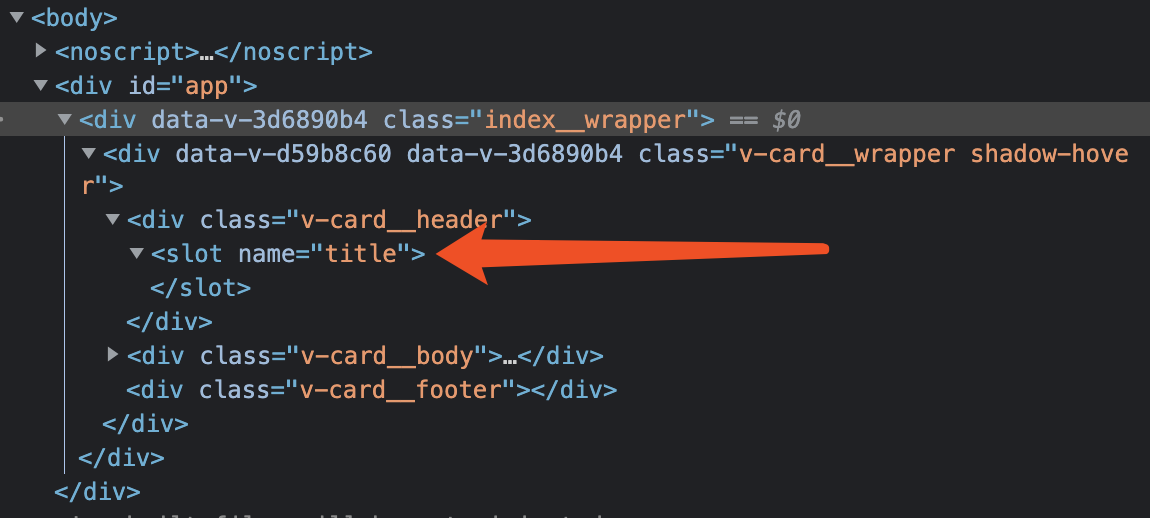
我在百度、Google尋找了一天也沒(méi)有解釋,在官方文檔中仔仔細(xì)細(xì)閱讀后,也沒(méi)有類似的提示,以及 jsx 編譯器的文檔中也沒(méi)有寫(xiě)明,只是聲明了如何使用命名 slot。
解決第二天,我一直在糾結(jié)這個(gè),也查了 element-ui 、ant-design-vue 的 UI 組件庫(kù)中如何書(shū)寫(xiě),也沒(méi)有找到對(duì)應(yīng)的使用 jsx 使用 slot 的。
不甘放棄的我更換了搜索文字,于是終于找到解決方案,并將代碼改為:
... public render(): VNode { return ( <div class={ this.wrapperClassName }><div style={ { padding: this.headerPadding } }> { this.$slots.title ?? <div>{ this.title }</div> }</div><div class='v-card__body'> <slot name='default' /></div><div class='v-card__footer'></div> </div> ) }...
再查看瀏覽器渲染:
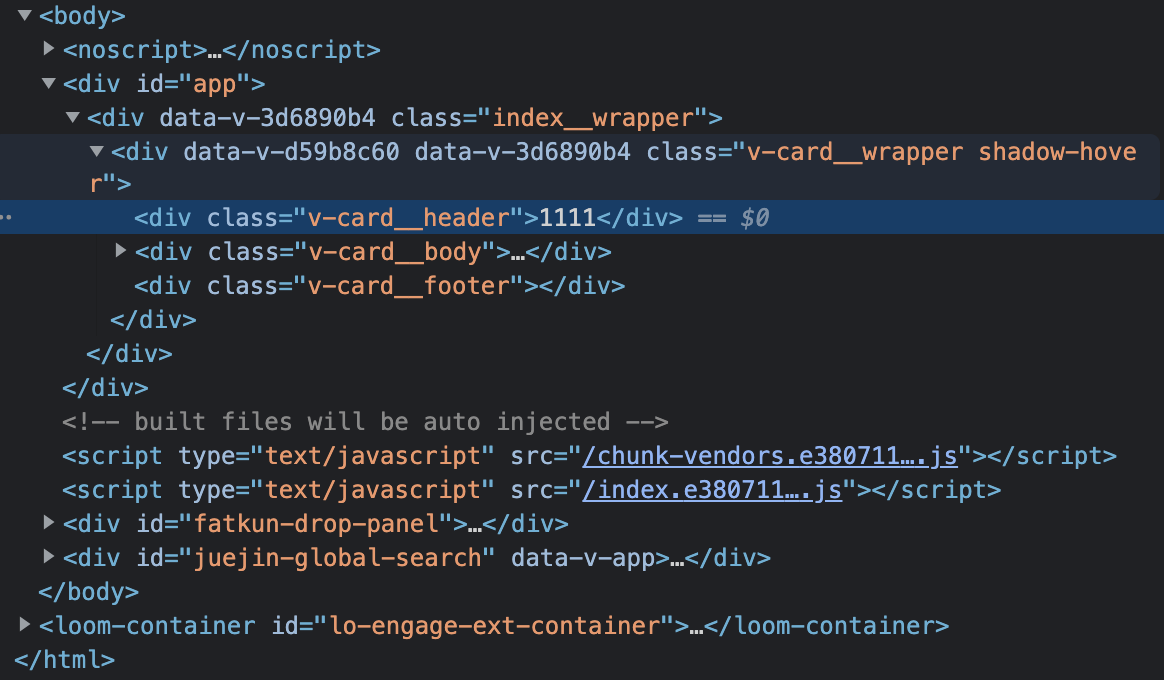
問(wèn)題解決
后記在使用 jsx / tsx 時(shí),如果 js 語(yǔ)法本身可以解決的,或本身注冊(cè)在 this 上的方法,優(yōu)先使用 js 去做,例如 v-if / v-else 可以使用 雙目運(yùn)算符 替代。實(shí)在沒(méi)有可用的簡(jiǎn)便方法,再使用 vue 的指令做,例如 v-show 。
到此這篇關(guān)于Vue+tsx使用slot沒(méi)有被替換的問(wèn)題的文章就介紹到這了,更多相關(guān)Vue+tsx slot沒(méi)有被替換內(nèi)容請(qǐng)搜索好吧啦網(wǎng)以前的文章或繼續(xù)瀏覽下面的相關(guān)文章希望大家以后多多支持好吧啦網(wǎng)!
相關(guān)文章:
1. PHP使用Swagger生成好看的API文檔2. 通過(guò)實(shí)例解析Python文件操作實(shí)現(xiàn)步驟3. Python3 json模塊之編碼解碼方法講解4. Python 利用Entrez庫(kù)篩選下載PubMed文獻(xiàn)摘要的示例5. ASP.NET MVC使用jQuery ui的progressbar實(shí)現(xiàn)進(jìn)度條6. ASP基礎(chǔ)知識(shí)VBScript基本元素講解7. Python 制作查詢商品歷史價(jià)格的小工具8. python使用jenkins發(fā)送企業(yè)微信通知的實(shí)現(xiàn)9. Python 合并拼接字符串的方法10. Python 如何調(diào)試程序崩潰錯(cuò)誤

 網(wǎng)公網(wǎng)安備