Vue Object.defineProperty及ProxyVue實現雙向數據綁定
雙向數據綁定無非就是,視圖 => 數據,數據 => 視圖的更新過程
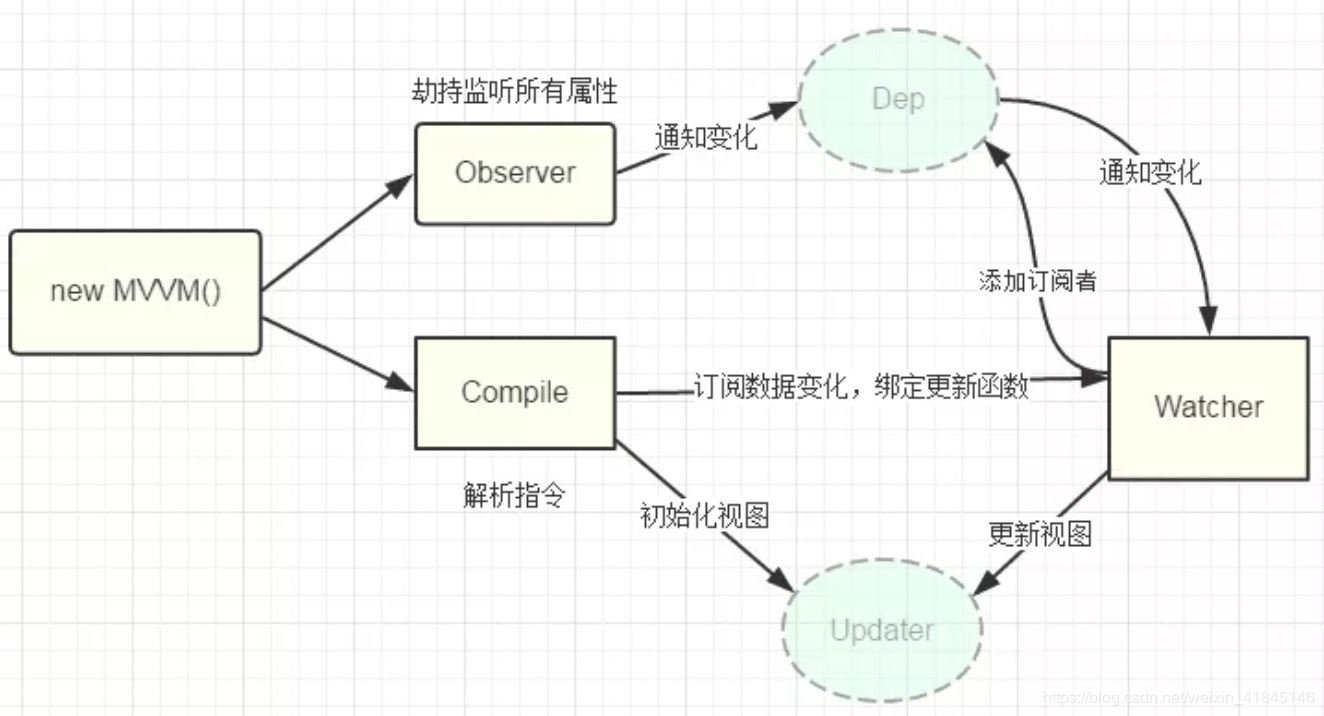
以下的方案中的實現思路:
定義一個Vue的構造函數并初始化這個函數(myVue.prototype._init) 實現數據層的更新:數據劫持,定義一個 obverse 函數重寫data的set和get(myVue.prototype._obsever) 實現視圖層的更新:訂閱者模式,定義個 Watcher 函數實現對DOM的更新(Watcher) 將數據和視圖層進行綁定,解析指令v-bind、v-model、v-click(myVue.prototype._compile) 創建Vue實例(new myVue)1.object.defineproperty方式實現雙向數據綁定
<!DOCTYPE html><html> <head> <title>myVue</title> <style> #app{ text-align: center; }</style></head> <body> <div id='app'> <form> <input type='text' v-model='number' /> <button type='button' v-click='increment'>增加</button> </form> <h3 v-bind='number'></h3> </div></body><script> // 定義一個myVue構造函數 function myVue(option) { this._init(option) } myVue.prototype._init = function (options) { // 傳了一個配置對象 this.$options = options // options 為上面使用時傳入的結構體,包括el,data,methods this.$el = document.querySelector(options.el) // el是 #app, this.$el是id為app的Element元素 this.$data = options.data // this.$data = {number: 0} this.$methods = options.methods // this.$methods = {increment: function(){}} // _binding保存著model與view的映射關系,也就是我們前面定義的Watcher的實例。當model改變時,我們會觸發其中的指令類更新,保證view也能實時更新 this._binding = {} this._obsever(this.$data) this._compile(this.$el) } // 數據劫持:更新數據 myVue.prototype._obsever = function (obj) { let _this = this Object.keys(obj).forEach((key) => { // 遍歷obj對象 if (obj.hasOwnProperty(key)) { // 判斷 obj 對象是否包含 key屬性 _this._binding[key] = [] // 按照前面的數據,_binding = {number: []} 存儲 每一個 new Watcher } let value = obj[key] if (typeof value === ’object’) { //如果值還是對象,則遍歷處理 _this._obsever(value) } Object.defineProperty(_this.$data, key, { enumerable: true, configurable: true, get: () => { // 獲取 value 值 return value }, set: (newVal) => { // 更新 value 值 if (value !== newVal) { value = newVal _this._binding[key].forEach((item) => { // 當number改變時,觸發_binding[number] 中的綁定的Watcher類的更新 item.update() // 調 Watcher 實例的 update 方法更新 DOM }) } } }) }) } // 訂閱者模式: 綁定更新函數,實現對 DOM 元素的更新 function Watcher(el, data, key, attr) { this.el = el // 指令對應的DOM元素 this.data = data // this.$data 數據: {number: 0, count: 0} this.key = key // 指令綁定的值,本例如'number' this.attr = attr // 綁定的屬性值,本例為'innerHTML','value' this.update() } // 比如 H3.innerHTML = this.data.number; 當number改變時,會觸發這個update函數,保證對應的DOM內容進行了更新 Watcher.prototype.update = function () { this.el[this.attr] = this.data[this.key] } // 將view與model進行綁定,解析指令(v-bind,v-model,v-clickde)等 myVue.prototype._compile = function (el) { // root 為id為app的Element元素,也就是我們的根元素 let _this = this let nodes = Array.prototype.slice.call(el.children) // 將為數組轉化為真正的數組 nodes.map(node => { if (node.children.length && node.children.length > 0) { // 對所有元素進行遍歷,并進行處理 _this._compile(node) } if (node.hasAttribute(’v-click’)) { // 如果有v-click屬性,我們監聽它的onclick事件,觸發increment事件,即number++ let attrVal = node.getAttribute(’v-click’) node.onclick = _this.$methods[attrVal].bind(_this.$data) // bind是使data的作用域與method函數的作用域保持一致 } // 如果有v-model屬性,并且元素是INPUT或者TEXTAREA,我們監聽它的input事件 if (node.hasAttribute(’v-model’) && (node.tagName === ’INPUT’ || node.tagName === ’TEXTAREA’)) { let attrVal = node.getAttribute(’v-model’) _this._binding[attrVal].push(new Watcher( node, // 對應的 DOM 節點 _this.$data, attrVal, // v-model 綁定的值 ’value’ )) node.addEventListener(’input’, () => { _this.$data[attrVal] = node.value // 使number 的值與 node的value保持一致,已經實現了雙向綁定 }) } if (node.hasAttribute(’v-bind’)) { let attrVal = node.getAttribute(’v-bind’) _this._binding[attrVal].push(new Watcher( node, _this.$data, attrVal, // v-bind 綁定的值 ’innerHTML’ )) } }) } window.onload = () => { // 當文檔內容完全加載完成會觸發該事件,避免獲取不到對象的情況 new myVue({ el: ’#app’, data: { number: 0, count: 0 }, methods: { increment() { this.number++ }, incre() { this.count++ } } }) }</script> </html>
2.Proxy 實現雙向數據綁定
<!DOCTYPE html><html> <head> <title>myVue</title> <style> #app{ text-align: center; }</style></head> <body> <div id='app'> <form> <input type='text' v-model='number' /> <button type='button' v-click='increment'>增加</button> </form> <h3 v-bind='number'></h3> </div></body><script> // 定義一個myVue構造函數 function myVue(option) { this._init(option) } myVue.prototype._init = function (options) { // 傳了一個配置對象 this.$options = options // options 為上面使用時傳入的結構體,包括el,data,methods this.$el = document.querySelector(options.el) // el是 #app, this.$el是id為app的Element元素 this.$data = options.data // this.$data = {number: 0} this.$methods = options.methods // this.$methods = {increment: function(){}} this._binding = {} this._obsever(this.$data) this._complie(this.$el) } // 數據劫持:更新數據myVue.prototype._obsever = function (data) { let _this = this let handler = { get(target, key) { return target[key]; // 獲取該對象上key的值 }, set(target, key, newValue) { let res = Reflect.set(target, key, newValue); // 將新值分配給屬性的函數 _this._binding[key].map(item => { item.update(); }); return res; } }; // 把代理器返回的對象代理到this.$data,即this.$data是代理后的對象,外部每次對this.$data進行操作時,實際上執行的是這段代碼里handler對象上的方法 this.$data = new Proxy(data, handler); } // 將view與model進行綁定,解析指令(v-bind,v-model,v-clickde)等 myVue.prototype._complie = function (el) { // el 為id為app的Element元素,也就是我們的根元素 let _this = this let nodes = Array.prototype.slice.call(el.children) // 將為數組轉化為真正的數組 nodes.map(node => { if (node.children.length && node.children.length > 0) this._complie(node) if (node.hasAttribute(’v-click’)) { // 如果有v-click屬性,我們監聽它的onclick事件,觸發increment事件,即number++ let attrVal = node.getAttribute(’v-click’) node.onclick = _this.$methods[attrVal].bind(_this.$data) // bind是使data的作用域與method函數的作用域保持一致 } // 如果有v-model屬性,并且元素是INPUT或者TEXTAREA,我們監聽它的input事件 if (node.hasAttribute(’v-model’) && (node.tagName === ’INPUT’ || node.tagName === ’TEXTAREA’)) { let attrVal = node.getAttribute(’v-model’)console.log(_this._binding) if (!_this._binding[attrVal]) _this._binding[attrVal] = [] _this._binding[attrVal].push(new Watcher( node, // 對應的 DOM 節點 _this.$data, attrVal, // v-model 綁定的值 ’value’, )) node.addEventListener(’input’, () => { _this.$data[attrVal] = node.value // 使number 的值與 node的value保持一致,已經實現了雙向綁定 }) } if (node.hasAttribute(’v-bind’)) { let attrVal = node.getAttribute(’v-bind’) if (!_this._binding[attrVal]) _this._binding[attrVal] = [] _this._binding[attrVal].push(new Watcher( node, _this.$data, attrVal, // v-bind 綁定的值 ’innerHTML’, )) } }) } // 綁定更新函數,實現對 DOM 元素的更新 function Watcher(el, data, key, attr) { this.el = el // 指令對應的DOM元素 this.data = data // 代理的對象 this.$data 數據: {number: 0, count: 0} this.key = key // 指令綁定的值,本例如'num' this.attr = attr // 綁定的屬性值,本例為'innerHTML','value' this.update() } // 比如 H3.innerHTML = this.data.number; 當number改變時,會觸發這個update函數,保證對應的DOM內容進行了更新 Watcher.prototype.update = function () { this.el[this.attr] = this.data[this.key] } window.onload = () => { // 當文檔內容完全加載完成會觸發該事件,避免獲取不到對象的情況 new myVue({ el: ’#app’, data: { number: 0, count: 0 }, methods: { increment() { this.number++ }, incre() { this.count++ } } }) }</script> </html>
3.將上面代碼改成class的寫法
<!DOCTYPE html><html> <head> <title>myVue</title> <style> #app{ text-align: center; }</style></head> <body> <div id='app'> <form> <input type='text' v-model='number' /> <button type='button' v-click='increment'>增加</button> </form> <h3 v-bind='number'></h3> </div></body><script> class MyVue { constructor(options) { // 接收了一個配置對象 this.$options = options // options 為上面使用時傳入的結構體,包括el,data,methods this.$el = document.querySelector(options.el) // el是 #app, this.$el是id為app的Element元素 this.$data = options.data // this.$data = {number: 0} this.$methods = options.methods // this.$methods = {increment: function(){}} this._binding = {} this._obsever(this.$data) this._complie(this.$el) } _obsever (data) { // 數據劫持:更新數據 let _this = this let handler = { get(target, key) { return target[key]; // 獲取該對象上key的值 }, set(target, key, newValue) { let res = Reflect.set(target, key, newValue); // 將新值分配給屬性的函數 _this._binding[key].map(item => { item.update(); }); return res; } }; // 把代理器返回的對象代理到this.$data,即this.$data是代理后的對象,外部每次對this.$data進行操作時,實際上執行的是這段代碼里handler對象上的方法 this.$data = new Proxy(data, handler); } _complie(el) { // el 為id為app的Element元素,也就是我們的根元素 let _this = this let nodes = Array.prototype.slice.call(el.children) // 將為數組轉化為真正的數組 nodes.map(node => { if (node.children.length && node.children.length > 0) this._complie(node) if (node.hasAttribute(’v-click’)) { // 如果有v-click屬性,我們監聽它的onclick事件,觸發increment事件,即number++ let attrVal = node.getAttribute(’v-click’) node.onclick = _this.$methods[attrVal].bind(_this.$data) // bind是使data的作用域與method函數的作用域保持一致 } // 如果有v-model屬性,并且元素是INPUT或者TEXTAREA,我們監聽它的input事件 if (node.hasAttribute(’v-model’) && (node.tagName === ’INPUT’ || node.tagName === ’TEXTAREA’)) { let attrVal = node.getAttribute(’v-model’) if (!_this._binding[attrVal]) _this._binding[attrVal] = [] _this._binding[attrVal].push(new Watcher( node, // 對應的 DOM 節點 _this.$data, attrVal, // v-model 綁定的值 ’value’, )) node.addEventListener(’input’, () => { _this.$data[attrVal] = node.value // 使number 的值與 node的value保持一致,已經實現了雙向綁定 }) } if (node.hasAttribute(’v-bind’)) { let attrVal = node.getAttribute(’v-bind’) if (!_this._binding[attrVal]) _this._binding[attrVal] = [] _this._binding[attrVal].push(new Watcher( node, _this.$data, attrVal, // v-bind 綁定的值 ’innerHTML’, )) } }) } } class Watcher { constructor (el, data, key, attr) { this.el = el // 指令對應的DOM元素 this.data = data // 代理的對象 this.$data 數據: {number: 0, count: 0} this.key = key // 指令綁定的值,本例如'num' this.attr = attr // 綁定的屬性值,本例為'innerHTML','value' this.update() } update () { this.el[this.attr] = this.data[this.key] } } window.onload = () => { // 當文檔內容完全加載完成會觸發該事件,避免獲取不到對象的情況 new MyVue({ el: ’#app’, data: { number: 0, count: 0 }, methods: { increment() { this.number++ }, incre() { this.count++ } } }) }</script> </html>
以上就是本文的全部內容,希望對大家的學習有所幫助,也希望大家多多支持好吧啦網。
相關文章:
 網公網安備
網公網安備