vue的hash值原理也是table切換實(shí)例代碼
我希望大家敲一遍
<!DOCTYPE html><html><head><meta charset='utf-8'><title></title><style>.pages>div{display: none;}</style></head><body><p><a href='http://m.b3g6.com/bcjs/10507.html#/' rel='external nofollow' >aaa</a><a href='http://m.b3g6.com/bcjs/10507.html#/about' rel='external nofollow' >bbb</a><a href='http://m.b3g6.com/bcjs/10507.html#/user' rel='external nofollow' >cccc</a></p><div class='pages'><div id='home'>首頁</div><div id='about'>關(guān)于我的頁面</div><div class='user'>用戶中心</div></div></body><script type='text/javascript'>//hash 和頁面一一對應(yīng)起來//router 配置var router = [{path:'/',component:document.getElementById('home')},{path:'/about',component:document.getElementById('about')},{path:'/user',component:document.querySelector('.user')},]// 默認(rèn)hashwindow.location.hash = '#/';// 默認(rèn)頁面var currentView = router[0].component;currentView.style.display='block';window.onhashchange=()=>{//通過判斷hash切換div頁面console.log(location.hash);//獲取hash值,不要井號var hash = location.hash.slice(1);router.forEach(item=>{if(item.path==hash){//先隱藏之前顯示的頁面currentView.style.display = 'none';// 顯示對應(yīng)的組件item.component.style.display = 'block';//重新設(shè)置當(dāng)前顯示的頁面是哪個divcurrentView = item.component;}})}</script></html>
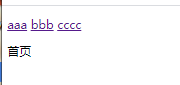

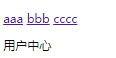
到此這篇關(guān)于vue的hash值原理也是table切換的文章就介紹到這了,更多相關(guān)vue hash原理內(nèi)容請搜索好吧啦網(wǎng)以前的文章或繼續(xù)瀏覽下面的相關(guān)文章希望大家以后多多支持好吧啦網(wǎng)!
相關(guān)文章:
1. 解決spring @ControllerAdvice處理異常無法正確匹配自定義異常2. IntelliJ IDEA設(shè)置自動提示功能快捷鍵的方法3. IDEA一鍵完成格式化、去除無用引用、編譯的操作4. 詳解如何使用Net將HTML簡歷導(dǎo)出為PDF格式5. python新手學(xué)習(xí)使用庫6. PHP如何開啟Opcache功能提升程序處理效率7. PHP程序員簡單的開展服務(wù)治理架構(gòu)操作詳解(二)8. android H5本地緩存加載優(yōu)化的實(shí)戰(zhàn)9. ASP.NET MVC使用jQuery ui的progressbar實(shí)現(xiàn)進(jìn)度條10. JavaScript創(chuàng)建表格的方法

 網(wǎng)公網(wǎng)安備