解決Android studio 3.6.1 出現(xiàn)Cause: unable to find valid certification path to requested target 報(bào)錯(cuò)的問題
1、首先修改根目錄下的build.gradle成如下格式
// Top-level build file where you can add configuration options common to all sub-projects/modules.buildscript { repositories { maven { url ’http://maven.aliyun.com/nexus/content/repositories/google’ } maven { url ’http://maven.aliyun.com/nexus/content/repositories/jcenter’} } dependencies { classpath ’com.android.tools.build:gradle:3.6.1’ // NOTE: Do not place your application dependencies here; they belong // in the individual module build.gradle files }}allprojects { repositories {// google()// jcenter() maven { url ’http://maven.aliyun.com/nexus/content/repositories/google’ } maven { url ’http://maven.aliyun.com/nexus/content/repositories/jcenter’} }}
2、然后點(diǎn)擊sync project with gradle files,如下圖所示

3、 如果再次報(bào)錯(cuò)請(qǐng)清理緩存并重啟AS,方法如下圖
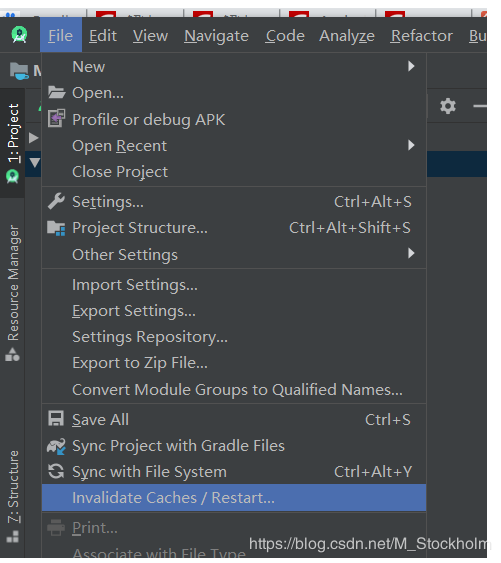
4、(最重要的步驟)如果再次報(bào)錯(cuò),請(qǐng)不厭其煩的且厚不要臉的多次點(diǎn)擊這個(gè)小象(即重復(fù)第二步操作),正常情況下奇跡會(huì)發(fā)生的。(反正我是見證該奇跡了)
到此這篇關(guān)于解決Android studio 3.6.1 出現(xiàn)Cause: unable to find valid certification path to requested target 報(bào)錯(cuò)的問題的文章就介紹到這了,更多相關(guān)Android studio 3.6.1 報(bào)錯(cuò)內(nèi)容請(qǐng)搜索好吧啦網(wǎng)以前的文章或繼續(xù)瀏覽下面的相關(guān)文章希望大家以后多多支持好吧啦網(wǎng)!
相關(guān)文章:
1. PHP驗(yàn)證碼工具-Securimage2. 一文帶你徹底理解Java序列化和反序列化3. 關(guān)于IDEA 2020.3 多窗口視圖丟失的問題4. JS實(shí)現(xiàn)前端動(dòng)態(tài)分頁碼代碼實(shí)例5. javascript實(shí)現(xiàn)貪吃蛇小練習(xí)6. 用Spring JMS使異步消息變得簡(jiǎn)單7. js實(shí)現(xiàn)碰撞檢測(cè)8. Python 制作查詢商品歷史價(jià)格的小工具9. ASP.NET MVC使用jQuery ui的progressbar實(shí)現(xiàn)進(jìn)度條10. Python 下載Bing壁紙的示例
 網(wǎng)公網(wǎng)安備