android studio實現簡單考試應用程序實例代碼詳解
一、問題
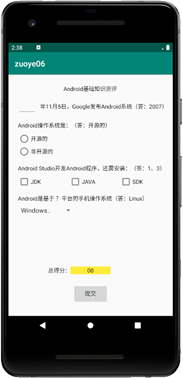
1、如圖所示,設計一個包含四種題型的簡單考試應用程序(具體考試題目可以選用以下設計,也可以自己另外確定),項目名稱:zuoye06_666 ;(666,改成自己的實際編號)。
2、布局管理器任選(約束布局相對容易實現)。
3、“提交”按鈕的Text通過字符串資源賦值,不要直接輸入“提交”兩個字。
4、每題按25分計算,編寫相應的程序,答題完成后單擊“提交”按鈕,在“總得分:”右邊文本框中顯示實際得分;同時,顯示一個Toast消息框:
答對不足3題,顯示:“還需努力啊!”;
答對3題,顯示:“祝賀你通過考試!”;
全部答對,顯示:“你真棒!祝賀你!”
二、分析
1.這次作業比較簡單,就是上課講的東西的集合,練習spinner、checkbox、radiobutton、edittext以及button的監聽,還有setText和Toast用法。
2.注意點,要考慮到正常考試的時候學生第一次選對后來改錯,或者一開始選錯后來改對的情況,考生的分數應該由最后一次監聽到結果來確定,所以添加了boolean類型的以及checkbox的計數。
三、代碼
1.布局代碼
<?xml version='1.0' encoding='utf-8'?><androidx.constraintlayout.widget.ConstraintLayout xmlns:android='http://schemas.android.com/apk/res/android' xmlns:app='http://schemas.android.com/apk/res-auto' xmlns:tools='http://schemas.android.com/tools' android:layout_width='match_parent' android:layout_height='match_parent' tools:context='.MainActivity'> <TextView android: android:layout_width='wrap_content' android:layout_height='wrap_content' android:text='Android基礎知識測評' app:layout_constraintBottom_toBottomOf='parent' app:layout_constraintHorizontal_bias='0.498' app:layout_constraintLeft_toLeftOf='parent' app:layout_constraintRight_toRightOf='parent' app:layout_constraintTop_toTopOf='parent' app:layout_constraintVertical_bias='0.058' /> <EditText android: android:layout_width='wrap_content' android:layout_height='wrap_content' android:layout_marginStart='16dp' android:ems='3' android:inputType='textPersonName' app:layout_constraintBottom_toBottomOf='@+id/textView' app:layout_constraintStart_toStartOf='parent' app:layout_constraintTop_toTopOf='@+id/textView' app:layout_constraintVertical_bias='0.615' /> <TextView android: android:layout_width='wrap_content' android:layout_height='wrap_content' android:layout_marginTop='20dp' android:text='@string/di1ti' app:layout_constraintStart_toEndOf='@+id/et_on' app:layout_constraintTop_toBottomOf='@+id/textView2' /> <TextView android: android:layout_width='wrap_content' android:layout_height='wrap_content' android:layout_marginTop='20dp' android:text='@string/di2ti' app:layout_constraintStart_toStartOf='@+id/et_on' app:layout_constraintTop_toBottomOf='@+id/textView' /> <RadioGroup android: android:layout_width='113dp' android:layout_height='64dp' app:layout_constraintStart_toStartOf='@+id/textView3' app:layout_constraintTop_toBottomOf='@+id/textView3'> <RadioButton android: android:layout_width='match_parent' android:layout_height='wrap_content' android:text='開源的' /> <RadioButton android: android:layout_width='match_parent' android:layout_height='wrap_content' android:text='非開源的' /> </RadioGroup> <TextView android: android:layout_width='wrap_content' android:layout_height='wrap_content' android:layout_marginTop='20dp' android:text='@string/di3ti' app:layout_constraintStart_toStartOf='@+id/textView3' app:layout_constraintTop_toBottomOf='@+id/radioGroup' /> <CheckBox android: android:layout_width='wrap_content' android:layout_height='wrap_content' android:layout_marginStart='60dp' android:text='JAVA' app:layout_constraintStart_toEndOf='@+id/cb1' app:layout_constraintTop_toBottomOf='@+id/textView4' /> <CheckBox android: android:layout_width='wrap_content' android:layout_height='wrap_content' android:text='JDK' app:layout_constraintStart_toStartOf='@+id/textView4' app:layout_constraintTop_toBottomOf='@+id/textView4' /> <CheckBox android: android:layout_width='wrap_content' android:layout_height='wrap_content' android:layout_marginStart='60dp' android:text='SDK' app:layout_constraintStart_toEndOf='@+id/cb2' app:layout_constraintTop_toBottomOf='@+id/textView4' /> <TextView android: android:layout_width='wrap_content' android:layout_height='wrap_content' android:layout_marginTop='20dp' android:text='@string/di4ti' app:layout_constraintStart_toStartOf='@+id/textView4' app:layout_constraintTop_toBottomOf='@+id/cb1' /> <Spinner android: android:layout_width='130dp' android:layout_height='30dp' android:entries='@array/Systems' app:layout_constraintStart_toStartOf='@+id/textView5' app:layout_constraintTop_toBottomOf='@+id/textView5' /> <TextView android: android:layout_width='wrap_content' android:layout_height='wrap_content' android:layout_marginStart='104dp' android:layout_marginBottom='36dp' android:text='總得分:' app:layout_constraintBottom_toTopOf='@+id/button' app:layout_constraintStart_toStartOf='parent' /> <TextView android: android:layout_width='wrap_content' android:layout_height='wrap_content' android:background='#F1ED06' android:text=' 00 ' app:layout_constraintBottom_toBottomOf='@+id/textView6' app:layout_constraintEnd_toEndOf='parent' app:layout_constraintHorizontal_bias='0.025' app:layout_constraintStart_toEndOf='@+id/textView6' app:layout_constraintTop_toTopOf='@+id/textView6' app:layout_constraintVertical_bias='0.0' /> <Button android: android:layout_width='wrap_content' android:layout_height='wrap_content' android:layout_marginBottom='20dp' android:text='@string/subscribe' app:layout_constraintBottom_toBottomOf='parent' app:layout_constraintEnd_toEndOf='parent' app:layout_constraintStart_toStartOf='parent' /> </androidx.constraintlayout.widget.ConstraintLayout>
2.strings.xml
<resources> <string name='app_name'>zuoye06_231</string> <string name='di1ti'>年11月5日,Google發布安卓系統(答:2007)</string> <string name='di2ti'>Android操作系統是(答:開源的)</string> <string name='di3ti'>Android Studio 開發Android程序,還需安裝:(1、3)</string> <string name='di4ti'>Android是基于?平臺手機的操作系統(Linux)</string> <string name='subscribe'>提交</string></resources>
3.Systems.xml
<?xml version='1.0' encoding='utf-8'?><resources> <string-array name='Systems'> <item>Windows</item> <item>Linux</item> <item>Mac</item> </string-array></resources>
4.java代碼
package com.example.lenovo.zuoye06_231; import androidx.appcompat.app.AppCompatActivity; import android.os.Bundle;import android.view.KeyEvent;import android.view.View;import android.widget.AdapterView;import android.widget.Button;import android.widget.CheckBox;import android.widget.RadioButton;import android.widget.RadioGroup;import android.widget.Spinner;import android.widget.TextView;import android.widget.Toast;import android.widget.CompoundButton; public class MainActivity extends AppCompatActivity { static int i = 0,cb_num = 0; boolean rd_num = false,sp_num = false,et_num = false; TextView sorce; TextView et_on; RadioGroup rd; Button button; CheckBox checkBox1; CheckBox checkBox2; CheckBox checkBox3; @Override protected void onCreate(Bundle savedInstanceState) { super.onCreate(savedInstanceState); setContentView(R.layout.activity_main); //定義 et_on = findViewById(R.id.et_on); sorce = findViewById(R.id.sorce); rd = findViewById(R.id.radioGroup); button = findViewById(R.id.button); checkBox1 = findViewById(R.id.cb1); checkBox2 = findViewById(R.id.cb2); checkBox3 = findViewById(R.id.cb3); //為每個復選按鈕設置狀態改變監聽器 checkBox1.setOnCheckedChangeListener(new CompoundButton.OnCheckedChangeListener(){ @Override public void onCheckedChanged(CompoundButton buttonView, boolean isChecked) { // TODO Auto-generated method stub if(isChecked) cb_num++; else cb_num--; } }); checkBox2.setOnCheckedChangeListener(new CompoundButton.OnCheckedChangeListener(){ @Override public void onCheckedChanged(CompoundButton buttonView, boolean isChecked) { // TODO Auto-generated method stub if(isChecked) cb_num--; else cb_num++; } }); checkBox3.setOnCheckedChangeListener(new CompoundButton.OnCheckedChangeListener(){ @Override public void onCheckedChanged(CompoundButton buttonView, boolean isChecked) { // TODO Auto-generated method stub if(isChecked) cb_num++; else cb_num--; } }); //設置單選按鈕組添加事件監聽 rd.setOnCheckedChangeListener(new RadioGroup.OnCheckedChangeListener() { @Override public void onCheckedChanged(RadioGroup group, int checkedId) { //獲取被選擇的單選按鈕 RadioButton r = (RadioButton) findViewById(checkedId); if(r.getText().equals('開源的')) rd_num = true; else rd_num = false; } }); //edittext監聽 et_on.setOnEditorActionListener(new TextView.OnEditorActionListener() { @Override public boolean onEditorAction(TextView textView, int i, KeyEvent keyEvent) { if(et_on.getText().toString().equals('2007')) et_num = true; else et_num = false; return false; } }); //獲取下拉列表對象 final Spinner spinner = (Spinner) findViewById(R.id.spinner); //為Spinner添加選擇監聽器 spinner.setOnItemSelectedListener(new AdapterView.OnItemSelectedListener() { @Override //數據選擇事件處理 public void onItemSelected(AdapterView<?> parent, View view, int pos, long id) { String[] Systems = getResources().getStringArray(R.array.Systems); //顯示選擇結果 if(Systems[pos].equals('Linux')) sp_num = true; else sp_num = false; } //以下方法重寫必須有 @Override public void onNothingSelected(AdapterView<?> parent) { // Another interface callback } }); button.setOnClickListener(new View.OnClickListener() { @Override public void onClick(View v) { if(cb_num == 2) i++; if(sp_num) i++; if(et_num) i++; if(rd_num) i++; sorce.setText(' '+(i*25)+' '); if(i == 4) Toast.makeText(MainActivity.this,'你真棒!祝賀你!', Toast.LENGTH_SHORT).show(); else if(i == 3) Toast.makeText(MainActivity.this,'祝賀你通過考試!', Toast.LENGTH_SHORT).show(); else Toast.makeText(MainActivity.this,'還需努力啊!', Toast.LENGTH_SHORT).show(); } }); }}
四、結論
1.當用戶填寫的時候最終答案是按最后修改的來確定的。
2.考慮到正常情況下當用戶提交后數據已經上傳到網絡上,所以沒有添加不能二次修改的代碼,因此測試的時候會出現第一次提交后不退出,修改后結果會出問題。
五、參考文章
3.29更新如果想要解決不能2次修改問題可以加一個狀態標志符。
如果想要解決二次提交后累加的問題,可以在Toast后加一個i=0。
到此這篇關于android studio實現簡單考試應用程序的文章就介紹到這了,更多相關android studio實現 考試應用程序內容請搜索好吧啦網以前的文章或繼續瀏覽下面的相關文章希望大家以后多多支持好吧啦網!
相關文章:
 網公網安備
網公網安備