Android studio實現簡單的計算器
本文實例為大家分享了Android studio實現簡單計算器的具體代碼,供大家參考,具體內容如下
需求分析及概要設計
目的
開發一個簡單的計算器App,使之能夠完成加減乘除混合運算
工具及環境
使用java語言,在Android studio平臺上進行開發
功能設計
“+”:實現兩數相加 “-”:實現兩數相減 “*”:實現兩數相乘 “/”:實現兩數相除 “=”:計算并得出正確結果 “C”:清屏 “Backspace”:倒退設計思路
1、首先設計一個可視化的界面,供用戶輸入數據并查看結果。2、用戶可通過點擊相應按鈕輸入正確的表達式(注意:這里只實現對正確表達式的計算處理),最后按'='得出正確結果。在計算過程中可以通過點擊倒退鍵修改輸入內容,在進行下一次的運算之前必須先進行清零操作。3、設計好的計算器應可以進行加減乘除混合四則運算,且可以進行小數和整數運算
詳細設計
當用戶點擊按鈕時,用SringBuilder變量記錄其輸入的運算式,并顯示到文本區中。
當用戶點擊'='時,把文本區的運算式拿出來,首先將它內部的一個一個字節拼接成獨立的運算數和運算符,然后存儲在一個ArrayList數組中,接著再新建兩個ArrayList數組,用來分別存放運算數和運算符,然后遍歷存儲運算式的ArrayList數組,把其中的運算數和運算符分別放進不同的ArrayList中,每一次放置運算符時,都要先和已存在的運算符進行比較,若要放進的運算符優先級低于或等于運算符數組中的運算符,則彈出一個運算符,并從運算數數組中彈出兩個運算數,然后進行運算,并把結果送入運算數數組中,直到遇到比自己優先級低的運算符或運算符數組為空時,則送入該運算符。當遍歷到運算式末尾時,依次彈出運算符中的運算符,并對應彈出運算數進行運算直到運算符數組為空,此時運算數數組中只有一個數據就是最終的結果
代碼
MainAcivity.java
package com.example.qw.calculator;import android.os.Bundle;import android.support.v7.app.AppCompatActivity;import android.view.View;import android.widget.Button;import android.widget.EditText;import java.lang.reflect.Method;import java.math.BigDecimal;import java.util.ArrayList;import java.util.List;public class MainActivity extends AppCompatActivity{ private StringBuilder show_equation=new StringBuilder();//顯示運算式 private ArrayList calculate_equation;//計算式 private int signal=0;//為0 時表示剛輸入狀態;為1 時表示當前在輸出結果上繼續輸入 @Override protected void onCreate(Bundle savedInstanceState) { super.onCreate(savedInstanceState); setContentView(R.layout.activity_main); //初始化 show_equation=new StringBuilder(); calculate_equation=new ArrayList<>(); Button zero=(Button)findViewById(R.id.zero); Button one=(Button)findViewById(R.id.one); Button two=(Button)findViewById(R.id.two); Button three=(Button)findViewById(R.id.three); Button four=(Button)findViewById(R.id.four); Button five=(Button)findViewById(R.id.five); Button six=(Button)findViewById(R.id.six); Button seven=(Button)findViewById(R.id.seven); Button eight=(Button)findViewById(R.id.eight); Button nine=(Button)findViewById(R.id.nine); Button cls=(Button)findViewById(R.id.cls); Button div=(Button)findViewById(R.id.div); Button mul=(Button)findViewById(R.id.mul); Button backspace=(Button)findViewById(R.id.Backspace); Button sub=(Button)findViewById(R.id.sub); Button add=(Button)findViewById(R.id.add); final Button equal=(Button)findViewById(R.id.equal); final Button point=(Button)findViewById(R.id.spot); final EditText result=(EditText)findViewById(R.id.result); result.setCursorVisible(true); disableShowInput(result); //點擊文本框時光標始終在文本末尾 result.setOnClickListener(new View.OnClickListener() { @Override public void onClick(View view) { result.setSelection(result.getText().length()); } }); zero.setOnClickListener(new View.OnClickListener() { @Override public void onClick(View v){ if(!(show_equation.toString().equals('0'))){ if(signal==0){ show_equation.append('0'); result.setText(show_equation); result.setSelection(result.getText().length()); }else{ show_equation.delete(0,show_equation.length()); show_equation.append('0'); result.setText(show_equation); result.setSelection(result.getText().length()); signal=0; } } } }); one.setOnClickListener(new View.OnClickListener() { @Override public void onClick(View v) { if(signal==0){ show_equation.append('1'); result.setText(show_equation); result.setSelection(result.getText().length()); }else{ show_equation.delete(0,show_equation.length()); show_equation.append('1'); result.setText(show_equation); result.setSelection(result.getText().length()); signal=0; } } }); two.setOnClickListener(new View.OnClickListener() { @Override public void onClick(View v) { if(signal==0){ show_equation.append('2'); result.setText(show_equation); result.setSelection(result.getText().length()); }else{ show_equation.delete(0,show_equation.length()); show_equation.append('2'); result.setText(show_equation); result.setSelection(result.getText().length()); signal=0; } } }); three.setOnClickListener(new View.OnClickListener() { @Override public void onClick(View v) { if(signal==0){ show_equation.append('3'); result.setText(show_equation); result.setSelection(result.getText().length()); }else{ show_equation.delete(0,show_equation.length()); show_equation.append('3'); result.setText(show_equation); result.setSelection(result.getText().length()); signal=0; } } }); four.setOnClickListener(new View.OnClickListener() { @Override public void onClick(View v) { if(signal==0){ show_equation.append('4'); result.setText(show_equation); result.setSelection(result.getText().length()); }else{ show_equation.delete(0,show_equation.length()); show_equation.append('4'); result.setText(show_equation); result.setSelection(result.getText().length()); signal=0; } } }); five.setOnClickListener(new View.OnClickListener() { @Override public void onClick(View v) { if(signal==0){ show_equation.append('5'); result.setText(show_equation); result.setSelection(result.getText().length()); }else{ show_equation.delete(0,show_equation.length()); show_equation.append('5'); result.setText(show_equation); result.setSelection(result.getText().length()); signal=0; } } }); six.setOnClickListener(new View.OnClickListener() { @Override public void onClick(View v) { if(signal==0){ show_equation.append('6'); result.setText(show_equation); result.setSelection(result.getText().length()); }else{ show_equation.delete(0,show_equation.length()); show_equation.append('6'); result.setText(show_equation); result.setSelection(result.getText().length()); signal=0; } } }); seven.setOnClickListener(new View.OnClickListener() { @Override public void onClick(View v) { if(signal==0){ show_equation.append('7'); result.setText(show_equation); result.setSelection(result.getText().length()); }else{ show_equation.delete(0,show_equation.length()); show_equation.append('7'); result.setText(show_equation); result.setSelection(result.getText().length()); signal=0; } } }); eight.setOnClickListener(new View.OnClickListener() { @Override public void onClick(View v) { if(signal==0){ show_equation.append('8'); result.setText(show_equation); result.setSelection(result.getText().length()); }else{ show_equation.delete(0,show_equation.length()); show_equation.append('8'); result.setText(show_equation); result.setSelection(result.getText().length()); signal=0; } } }); nine.setOnClickListener(new View.OnClickListener() { @Override public void onClick(View v) { if(signal==0){ show_equation.append('9'); result.setText(show_equation); result.setSelection(result.getText().length()); }else{ show_equation.delete(0,show_equation.length()); show_equation.append('9'); result.setText(show_equation); result.setSelection(result.getText().length()); signal=0; } } }); cls.setOnClickListener(new View.OnClickListener() { @Override public void onClick(View v) { show_equation.delete(0,show_equation.length()); calculate_equation.clear(); signal=0; result.setText(''); } }); backspace.setOnClickListener(new View.OnClickListener() { @Override public void onClick(View v) { if(!(show_equation.toString().equals(''))) { if(signal==0){ show_equation.deleteCharAt(show_equation.length() - 1); result.setText(show_equation); result.setSelection(result.getText().length()); }else{ show_equation.delete(0,show_equation.length()); result.setText(''); signal=0; } } } }); point.setOnClickListener(new View.OnClickListener() { @Override public void onClick(View v) { if(signal==0){ String a=show_equation.toString(); if(a.equals('')){ show_equation.append('.'); result.setText(show_equation); result.setSelection(result.getText().length()); }else{ int i; char t=’0’; for(i=a.length();i>0;i--){ t=a.charAt(i-1); if(t==’.’||t==’+’||t==’-’||t==’*’||t==’/’) break; } if(i==0){ show_equation.append('.'); result.setText(show_equation); result.setSelection(result.getText().length()); }else if(t==’+’||t==’-’||t==’*’||t==’/’){ show_equation.append('.'); result.setText(show_equation); result.setSelection(result.getText().length()); } } }else{ show_equation.delete(0,show_equation.length()); show_equation.append('.'); result.setText('.'); result.setSelection(result.getText().length()); signal=0; } } }); equal.setOnClickListener(new View.OnClickListener() { @Override public void onClick(View v) { //判斷用戶是否輸入了內容 if(!show_equation.toString().equals('')){ signal=1; char temp=show_equation.charAt(show_equation.length()-1); if(show_equation.charAt(0)==’-’) show_equation.insert(0,'0'); if(temp==’+’||temp==’-’) show_equation.append('0'); if(temp==’*’||temp==’/’) show_equation.append('1'); StringBuilder temp1=new StringBuilder(); for(int i=0;i<show_equation.length();i++){ if(show_equation.charAt(i)>=’0’&&show_equation.charAt(i)<=’9’||show_equation.charAt(i)==’.’){ temp1.append(String.valueOf(show_equation.charAt(i))); }else if(show_equation.charAt(i)==’N’){ calculate_equation.add('NaN'); //跳過2個字符 i=i+2; }else if(show_equation.charAt(i)==’∞’){ calculate_equation.add('∞'); } else { if(temp1.length()!=0){ calculate_equation.add(temp1.toString()); temp1.delete(0,temp1.length()); } calculate_equation.add(String.valueOf(show_equation.charAt(i))); } } if(temp1.length()!=0){ calculate_equation.add(temp1.toString()); } calculate_equation.add('#'); String temp8=calculate(calculate_equation); result.setText(temp8); result.setSelection(result.getText().length()); show_equation.delete(0,show_equation.length()); calculate_equation.clear(); show_equation.append(temp8); } } }); add.setOnClickListener(new View.OnClickListener() { @Override public void onClick(View v) { //判斷用戶是否輸入了內容 if(!(show_equation.toString().equals(''))) { signal=0; char temp=show_equation.charAt(show_equation.length()-1); if(temp==’+’||temp==’-’||temp==’*’||temp==’/’) { show_equation.deleteCharAt(show_equation.length()-1); show_equation.append('+'); } else show_equation.append('+'); result.setText(show_equation); result.setSelection(result.getText().length()); } } }); sub.setOnClickListener(new View.OnClickListener() { @Override public void onClick(View v) { //判斷用戶是否輸入了內容 if(!(show_equation.toString().equals(''))) { signal=0; char temp=show_equation.charAt(show_equation.length()-1); if(temp==’+’||temp==’-’||temp==’*’||temp==’/’) { show_equation.deleteCharAt(show_equation.length()-1); show_equation.append('-'); } else show_equation.append('-'); result.setText(show_equation); result.setSelection(result.getText().length()); } } }); mul.setOnClickListener(new View.OnClickListener() { @Override public void onClick(View v) { //判斷用戶是否輸入了內容 if(!(show_equation.toString().equals(''))) { signal=0; char temp=show_equation.charAt(show_equation.length()-1); if(temp==’+’||temp==’-’||temp==’*’||temp==’/’) { show_equation.deleteCharAt(show_equation.length()-1); show_equation.append('*'); } else show_equation.append('*'); result.setText(show_equation); result.setSelection(result.getText().length()); } } }); div.setOnClickListener(new View.OnClickListener() { @Override public void onClick(View v) { //判斷用戶是否輸入了內容 if(!(show_equation.toString().equals(''))) { signal=0; char temp=show_equation.charAt(show_equation.length()-1); if(temp==’+’||temp==’-’||temp==’*’||temp==’/’) { show_equation.deleteCharAt(show_equation.length()-1); show_equation.append('/'); } else show_equation.append('/'); result.setText(show_equation); result.setSelection(result.getText().length()); } } }); } protected boolean operatorPriorityCompare(char operator1,char operator2) { int o1=0; int o2=0; switch (operator1){ case ’+’:{o1=0;break;} case ’-’:{o1=0;break;} case ’*’:{o1=1;break;} case ’/’:{o1=1;break;} } switch (operator2){ case ’+’:{o2=0;break;} case ’-’:{o2=0;break;} case ’*’:{o2=1;break;} case ’/’:{o2=1;break;} } if(o1<=o2) { return false; } else return true; } //相加 public static Double Add(Double d1,Double d2) { if(d1==Double.NEGATIVE_INFINITY||d1==Double.POSITIVE_INFINITY||d2==Double.NEGATIVE_INFINITY||d2==Double.POSITIVE_INFINITY){ return d1+d2; } if(String.valueOf(d1).equals('NaN')||String.valueOf(d1).equals('NaN')){ return d1+d2; } BigDecimal b1 = new BigDecimal(Double.toString(d1)); BigDecimal b2 = new BigDecimal(Double.toString(d2)); return b1.add(b2).doubleValue(); } //相減 public static Double Sub(Double d1,Double d2){ if(d1==Double.NEGATIVE_INFINITY||d1==Double.POSITIVE_INFINITY||d2==Double.NEGATIVE_INFINITY||d2==Double.POSITIVE_INFINITY){ return d1-d2; } if(String.valueOf(d1).equals('NaN')||String.valueOf(d1).equals('NaN')){ return d1-d2; } if(String.valueOf(d1).equals('NaN')||String.valueOf(d1).equals('NaN')){ return d1*d2; } BigDecimal b1=new BigDecimal(Double.toString(d1)); BigDecimal b2=new BigDecimal(Double.toString(d2)); return b1.subtract(b2).doubleValue(); } //相乘 public static Double Mul(Double d1,Double d2){ if(d1==Double.NEGATIVE_INFINITY||d1==Double.POSITIVE_INFINITY||d2==Double.NEGATIVE_INFINITY||d2==Double.POSITIVE_INFINITY){ return d1*d2; } if(String.valueOf(d1).equals('NaN')||String.valueOf(d1).equals('NaN')){ return d1*d2; } BigDecimal b1=new BigDecimal(Double.toString(d1)); BigDecimal b2=new BigDecimal(Double.toString(d2)); return b1.multiply(b2).setScale(8).doubleValue(); } //相除 public static Double Div(Double d1,Double d2){ if(d1==Double.NEGATIVE_INFINITY||d1==Double.POSITIVE_INFINITY||d2==Double.NEGATIVE_INFINITY||d2==Double.POSITIVE_INFINITY){ return d1/d2; } if(String.valueOf(d1).equals('NaN')||String.valueOf(d1).equals('NaN')){ return d1/d2; } if(d1==0.0&&d2==0.0){ return Double.NaN; } if(d2==0.0){ return d1/d2; } BigDecimal b1=new BigDecimal(Double.toString(d1)); BigDecimal b2=new BigDecimal(Double.toString(d2)); return b1.divide(b2,8,BigDecimal.ROUND_HALF_UP).doubleValue(); } protected String calculate(ArrayList equation){ Double temp2; Double temp3; Double result; List operator=new ArrayList(); List<Double> operand=new ArrayList(); for(int i=0;i<equation.size();i++) { String temp4=(String) equation.get(i); if(temp4.equals('+')||temp4.equals('-')||temp4.equals('*')||temp4.equals('/')) { if(operator.size()>0) { String temp5=operator.get(operator.size()-1).toString(); while(!(operatorPriorityCompare(temp4.charAt(0),temp5.charAt(0)))&&operator.size()>0) { operator.remove(operator.size()-1); temp3=operand.get(operand.size()-1); operand.remove(operand.size()-1); temp2=operand.get(operand.size()-1); operand.remove(operand.size()-1); switch (temp5.charAt(0)){ case ’+’:{result=Add(temp2,temp3);operand.add(result);break;} case ’-’:{result=Sub(temp2,temp3);operand.add(result);break;} case ’*’:{result=Mul(temp2,temp3);operand.add(result);break;} case ’/’:{result=Div(temp2,temp3);operand.add(result);break;} } if(operator.size()>0) { temp5=operator.get(operator.size()-1).toString(); } else break; } operator.add(temp4); } else operator.add(temp4); } else if(temp4.equals('#')) { while(operator.size()>0) { String temp6=(String)operator.get(operator.size()-1); operator.remove(operator.size()-1); temp3=operand.get(operand.size()-1); operand.remove(operand.size()-1); temp2=operand.get(operand.size()-1); operand.remove(operand.size()-1); switch (temp6.charAt(0)){ case ’+’:{result=Add(temp2,temp3);operand.add(result);break;} case ’-’:{result=Sub(temp2,temp3);operand.add(result);break;} case ’*’:{result=Mul(temp2,temp3);operand.add(result);break;} case ’/’:{result=Div(temp2,temp3);operand.add(result);break;} } } } else { if(temp4.equals('NaN')){ operand.add(Double.NaN); }else if(temp4.equals('∞')){ operand.add(Double.POSITIVE_INFINITY); }else{ operand.add(Double.parseDouble(temp4)); } } } if(operand.get(0)==Double.NEGATIVE_INFINITY) return '-∞'; if(operand.get(0)==Double.POSITIVE_INFINITY) return '∞'; return operand.get(0).toString(); } //當API最低版小于21時使用這個函數實現點擊文本框不彈出鍵盤 public void disableShowInput(EditText et) { Class<EditText> cls = EditText.class; Method method; try { method = cls.getMethod('setShowSoftInputOnFocus', boolean.class); method.setAccessible(true); method.invoke(et, false); } catch (Exception e) { e.printStackTrace(); } }}
activity_main.xml
<?xml version='1.0' encoding='utf-8'?><LinearLayout xmlns:android='http://schemas.android.com/apk/res/android' android:orientation='vertical' android:layout_width='match_parent' android:layout_height='match_parent'> <EditText android: android:layout_width='match_parent' android:layout_height='wrap_content' android:textSize='40sp' android:enabled='false'/> <LinearLayout android:layout_width='match_parent' android:layout_height='0dp' android:layout_weight='1' android:orientation='horizontal'> <Button android: android:layout_width='0dp' android:layout_height='match_parent' android:layout_weight='1' android:textSize='20sp' android:text='C' android:background='@drawable/buttonstytle' android:textColor='#ffffff'/> <Button android: android:layout_width='0dp' android:layout_height='match_parent' android:layout_weight='1' android:textSize='20sp' android:text='/' android:background='@drawable/buttonstytle' android:textColor='#ffffff'/> <Button android: android:layout_width='0dp' android:layout_height='match_parent' android:layout_weight='1' android:textSize='20sp' android:text='*' android:background='@drawable/buttonstytle' android:textColor='#ffffff'/> <Button android: android:layout_width='0dp' android:layout_height='match_parent' android:layout_weight='1' android:textSize='20sp' android:text='Backspace' android:textAllCaps='false' android:background='@drawable/buttonstytle' android:textColor='#ffffff'/> </LinearLayout> <LinearLayout android:layout_width='match_parent' android:layout_height='0dp' android:layout_weight='1' android:orientation='horizontal'> <Button android: android:layout_width='0dp' android:layout_height='match_parent' android:layout_weight='1' android:textSize='20sp' android:text='7' android:background='@drawable/buttonstytle' android:textColor='#ffffff'/> <Button android: android:layout_width='0dp' android:layout_height='match_parent' android:layout_weight='1' android:textSize='20sp' android:text='8' android:background='@drawable/buttonstytle' android:textColor='#ffffff'/> <Button android: android:layout_width='0dp' android:layout_height='match_parent' android:layout_weight='1' android:textSize='20sp' android:text='9' android:background='@drawable/buttonstytle' android:textColor='#ffffff'/> <Button android: android:layout_width='0dp' android:layout_height='match_parent' android:layout_weight='1' android:textSize='20sp' android:text='-' android:background='@drawable/buttonstytle' android:textColor='#ffffff'/> </LinearLayout> <LinearLayout android:layout_width='match_parent' android:layout_height='0dp' android:layout_weight='1' android:orientation='horizontal'> <Button android: android:layout_width='0dp' android:layout_height='match_parent' android:layout_weight='1' android:textSize='20sp' android:text='4' android:background='@drawable/buttonstytle' android:textColor='#ffffff'/> <Button android: android:layout_width='0dp' android:layout_height='match_parent' android:layout_weight='1' android:textSize='20sp' android:text='5' android:background='@drawable/buttonstytle' android:textColor='#ffffff'/> <Button android: android:layout_width='0dp' android:layout_height='match_parent' android:layout_weight='1' android:textSize='20sp' android:text='6' android:background='@drawable/buttonstytle' android:textColor='#ffffff'/> <Button android: android:layout_width='0dp' android:layout_height='match_parent' android:layout_weight='1' android:textSize='20sp' android:text='+' android:background='@drawable/buttonstytle' android:textColor='#ffffff'/> </LinearLayout> <LinearLayout android:layout_width='match_parent' android:layout_height='0dp' android:layout_weight='2' android:orientation='horizontal'> <LinearLayout android:layout_width='0dp' android:layout_height='match_parent' android:layout_weight='1' android:orientation='vertical'> <LinearLayout android:layout_width='match_parent' android:layout_height='1dp' android:layout_weight='1' android:orientation='horizontal'> <Button android: android:layout_width='0dp' android:layout_height='match_parent' android:layout_weight='1' android:textSize='20sp' android:text='1' android:background='@drawable/buttonstytle' android:textColor='#ffffff'/> <Button android: android:layout_width='0dp' android:layout_height='match_parent' android:layout_weight='1' android:textSize='20sp' android:text='2' android:background='@drawable/buttonstytle' android:textColor='#ffffff'/> </LinearLayout> <LinearLayout android:layout_width='match_parent' android:layout_height='1dp' android:layout_weight='1'> <Button android: android:layout_width='match_parent' android:layout_height='match_parent' android:text='0' android:textSize='20sp' android:background='@drawable/buttonstytle' android:textColor='#ffffff'/> </LinearLayout> </LinearLayout> <LinearLayout android:layout_width='0dp' android:layout_height='match_parent' android:layout_weight='1' android:orientation='horizontal'> <LinearLayout android:layout_width='0dp' android:layout_height='match_parent' android:layout_weight='1' android:orientation='vertical'> <Button android: android:layout_width='match_parent' android:layout_height='1dp' android:layout_weight='1' android:text='3' android:textSize='20sp' android:background='@drawable/buttonstytle' android:textColor='#ffffff'/> <Button android: android:layout_width='match_parent' android:layout_height='1dp' android:layout_weight='1' android:text='.' android:textSize='20sp' android:background='@drawable/buttonstytle' android:textColor='#ffffff'/> </LinearLayout> <LinearLayout android:layout_width='0dp' android:layout_height='match_parent' android:layout_weight='1'> <Button android: android:layout_width='match_parent' android:layout_height='match_parent' android:text='=' android:textSize='20sp' android:background='@drawable/buttonstytle' android:textColor='#ffffff'/> </LinearLayout> </LinearLayout></LinearLayout></LinearLayout>
buttonstytle.xml
<?xml version='1.0' encoding='utf-8'?><shape xmlns:android='http://schemas.android.com/apk/res/android' > <!-- 主體背景顏色值 --> <solid android:color='#666666' /> <!-- 連框寬度和顏色值 --> <stroke android: android:color='#FFFFFF' /></shape>
####結果分析
啟動計算器并輸入運算式“59.0-8/46+2”如下圖:
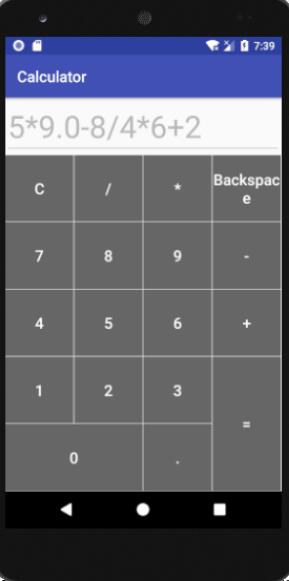
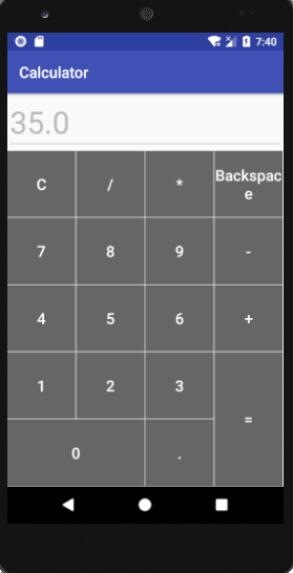
結果如下圖:
總結
這次做計算器收獲很大,首先我對Android studio中的布局有了更深刻的認識,其次在這次編程中熟悉了怎么設置斷點調試以快速的找出問題所在。當然,這次的作品也是不夠成熟的,因為沒有做有關錯誤表達式的相應處理,因為時間和精力有限,這次只能先做這么多了
注: 今天沒事又看了一下這個代碼,發現問題很多,簡直是慘不忍睹(希望沒坑到你們)。比如直接按加、減、乘、除和等號鍵及后退鍵會閃退,剛開始一直按 “0” 可以一直輸入0,同一個數中可以輸入多個小數點等等,我感到很慚愧哈,本人能力有限,不過還是抽時間又改了一下,修復了這些bug,另外也優化了一些東西,上面貼的代碼我已經更新了,GitHub上的源碼我很快也會更新的,哪里做的不好也希望大家不吝賜教哈 -2018/11/5
鏈接:源代碼下載地址
更多計算器功能實現,請點擊專題: 計算器功能匯總 進行學習
關于Android計算器功能的實現,查看專題:Android計算器 進行學習。
以上就是本文的全部內容,希望對大家的學習有所幫助,也希望大家多多支持好吧啦網。
相關文章:

 網公網安備
網公網安備