Android使用ftp方式實現文件上傳和下載功能
近期在工作上一直再維護平臺OTA在線升級項目,其中關于這個升級文件主要是存放于ftp服務器上的,然后客戶端通過走ftp協議方式下載至本地Android機進行一個系統升級操作。那么今天將對ftp實現文件上傳和下載進行一個使用總結,關于ftp這方面的理論知識如果不是太了解的各位道友,那么請移步HTTP和FTP的區別的一些理論知識 作個具體的了解或者查閱相關資料。那么先看看個人工作項目這個OTA升級效果圖吧。如下:

下面是具體的接口實現:
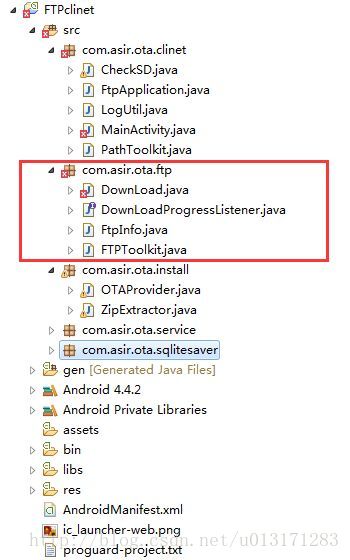
那么相關ftp的操作,已經被封裝到ota.ftp這個包下,各位童鞋可以下載示例代碼慢慢研究。另外這個要是用ftp服務我們cline端需要再項目工程導入ftp4j-1.7.2.jar包
這邊作個使用的邏輯分析:首先在我們的項目工程FtpApplication中啟動這個OtaService,其中OtaService作為一個服務運行起來,在這個服務里面拿到封裝好ftp相關接口的DownLoad.java進行ftp文件操作,關鍵代碼如下:
public void startDownload() { // TODO Auto-generated method stub mDownLoad.start(); } public void stopDownload() { mDownLoad.stop(); } public void cancel() { mDownLoad.cancel(); } public String getOldDate() { return mDownLoad.getDatabaseOldDate(); } public String getOldVersion() { return mDownLoad.getDatabaseOldVersion(); } public void checkVer(String serverRoot) { // TODO Auto-generated method stub mDownLoad = DownLoad.getInstance(); mDownLoad.setServeRoot(serverRoot); mDownLoad.setFtpInfo(mApp.mFtpInfo); mDownLoad.checkUpgrade(); }
FTPToolkit.java
package com.asir.ota.ftp;import it.sauronsoftware.ftp4j.FTPClient; import it.sauronsoftware.ftp4j.FTPFile;import java.io.File;import java.util.List;import com.asir.ota.clinet.PathToolkit;import com.asir.ota.ftp.DownLoad.MyFtpListener;/** * FTP客戶端工具 * */public final class FTPToolkit { private FTPToolkit() { } /** * 創建FTP連接 * * @param host * 主機名或IP * @param port * ftp端口 * @param username * ftp用戶名 * @param password * ftp密碼 * @return 一個客戶端 * @throws Exception */ public static FTPClient makeFtpConnection(String host, int port, String username, String password) throws Exception { FTPClient client = new FTPClient(); try { client.connect(host, port); if(username != null && password != null) { client.login(username, password); } } catch (Exception e) { throw new Exception(e); } return client; }/** * FTP下載文件到本地一個文件夾,如果本地文件夾不存在,則創建必要的目錄結構 * * @param client * FTP客戶端 * @param remoteFileName * FTP文件 * @param localPath * 存的本地文件路徑或目錄 * @throws Exception */ public static void download(FTPClient client, String remoteFileName, String localPath, long startPoint, MyFtpListener listener) throws Exception { String localfilepath = localPath; int x = isExist(client, remoteFileName); File localFile = new File(localPath); if (localFile.isDirectory()) { if (!localFile.exists()) localFile.mkdirs(); localfilepath = PathToolkit.formatPath4File(localPath + File.separator + new File(remoteFileName).getName()); } if (x == FTPFile.TYPE_FILE) { try { if (listener != null) client.download(remoteFileName, new File(localfilepath), startPoint, listener); else client.download(remoteFileName, new File(localfilepath), startPoint); } catch (Exception e) { throw new Exception(e); } } else { throw new Exception('the target ' + remoteFileName + 'not exist'); } }/** * FTP上傳本地文件到FTP的一個目錄下 * * @param client * FTP客戶端 * @param localfile * 本地文件 * @param remoteFolderPath * FTP上傳目錄 * @throws Exception */ public static void upload(FTPClient client, File localfile, String remoteFolderPath, MyFtpListener listener) throws Exception { remoteFolderPath = PathToolkit.formatPath4FTP(remoteFolderPath); try { client.changeDirectory(remoteFolderPath); if (!localfile.exists()) throw new Exception('the upload FTP file' + localfile.getPath() + 'not exist!'); if (!localfile.isFile()) throw new Exception('the upload FTP file' + localfile.getPath() + 'is a folder!'); if (listener != null) client.upload(localfile, listener); else client.upload(localfile); client.changeDirectory('/'); } catch (Exception e) { throw new Exception(e); } }/** * FTP上傳本地文件到FTP的一個目錄下 * * @param client * FTP客戶端 * @param localfilepath * 本地文件路徑 * @param remoteFolderPath * FTP上傳目錄 * @throws Exception */ public static void upload(FTPClient client, String localfilepath, String remoteFolderPath, MyFtpListener listener) throws Exception { File localfile = new File(localfilepath); upload(client, localfile, remoteFolderPath, listener); }/** * 批量上傳本地文件到FTP指定目錄上 * * @param client * FTP客戶端 * @param localFilePaths * 本地文件路徑列表 * @param remoteFolderPath * FTP上傳目錄 * @throws Exception */ public static void uploadListPath(FTPClient client, List<String> localFilePaths, String remoteFolderPath, MyFtpListener listener) throws Exception { remoteFolderPath = PathToolkit.formatPath4FTP(remoteFolderPath); try { client.changeDirectory(remoteFolderPath); for (String path : localFilePaths) { File file = new File(path); if (!file.exists()) throw new Exception('the upload FTP file' + path + 'not exist!'); if (!file.isFile()) throw new Exception('the upload FTP file' + path + 'is a folder!'); if (listener != null) client.upload(file, listener); else client.upload(file); } client.changeDirectory('/'); } catch (Exception e) { throw new Exception(e); } }/** * 批量上傳本地文件到FTP指定目錄上 * * @param client * FTP客戶端 * @param localFiles * 本地文件列表 * @param remoteFolderPath * FTP上傳目錄 * @throws Exception */ public static void uploadListFile(FTPClient client, List<File> localFiles, String remoteFolderPath, MyFtpListener listener) throws Exception { try { client.changeDirectory(remoteFolderPath); remoteFolderPath = PathToolkit.formatPath4FTP(remoteFolderPath); for (File file : localFiles) { if (!file.exists()) throw new Exception('the upload FTP file' + file.getPath() + 'not exist!'); if (!file.isFile()) throw new Exception('the upload FTP file' + file.getPath() + 'is a folder!'); if (listener != null) client.upload(file, listener); else client.upload(file); } client.changeDirectory('/'); } catch (Exception e) { throw new Exception(e); } }/** * 判斷一個FTP路徑是否存在,如果存在返回類型(FTPFile.TYPE_DIRECTORY=1、FTPFile.TYPE_FILE=0、 * FTPFile.TYPE_LINK=2) 如果文件不存在,則返回一個-1 * * @param client * FTP客戶端 * @param remotePath * FTP文件或文件夾路徑 * @return 存在時候返回類型值(文件0,文件夾1,連接2),不存在則返回-1 */ public static int isExist(FTPClient client, String remotePath) { remotePath = PathToolkit.formatPath4FTP(remotePath); FTPFile[] list = null; try { list = client.list(remotePath); } catch (Exception e) { return -1; } if (list.length > 1) return FTPFile.TYPE_DIRECTORY; else if (list.length == 1) { FTPFile f = list[0]; if (f.getType() == FTPFile.TYPE_DIRECTORY) return FTPFile.TYPE_DIRECTORY; // 假設推理判斷 String _path = remotePath + '/' + f.getName(); try { int y = client.list(_path).length; if (y == 1) return FTPFile.TYPE_DIRECTORY; else return FTPFile.TYPE_FILE; } catch (Exception e) { return FTPFile.TYPE_FILE; } } else { try { client.changeDirectory(remotePath); return FTPFile.TYPE_DIRECTORY; } catch (Exception e) { return -1; } } }public static long getFileLength(FTPClient client, String remotePath) throws Exception { String remoteFormatPath = PathToolkit.formatPath4FTP(remotePath); if(isExist(client, remotePath) == 0) { FTPFile[] files = client.list(remoteFormatPath); return files[0].getSize(); }else { throw new Exception('get remote file length error!'); } } /** * 關閉FTP連接,關閉時候像服務器發送一條關閉命令 * * @param client * FTP客戶端 * @return 關閉成功,或者鏈接已斷開,或者鏈接為null時候返回true,通過兩次關閉都失敗時候返回false */ public static boolean closeConnection(FTPClient client) { if (client == null) return true; if (client.isConnected()) { try { client.disconnect(true); return true; } catch (Exception e) { try { client.disconnect(false); } catch (Exception e1) { e1.printStackTrace(); return false; } } } return true; }}
包括登錄,開始下載,取消下載,獲取升級文件版本號和服務器版本校驗等。其它的是一些數據庫,SD卡文件相關操作,那么最后在我們下載完成之后需要對文件進行一個文件解壓再執行升級操作,這部分在ZipExtractor.java和OTAProvider.java中實現
示例代碼點擊下載
總結
到此這篇關于Android使用ftp方式實現文件上傳和下載的文章就介紹到這了,更多相關android ftp文件上傳下載內容請搜索好吧啦網以前的文章或繼續瀏覽下面的相關文章希望大家以后多多支持好吧啦網!
相關文章:
1. IntelliJ IDEA設置自動提示功能快捷鍵的方法2. 使用Python webdriver圖書館搶座自動預約的正確方法3. ASP.NET MVC使用jQuery ui的progressbar實現進度條4. 從Python的字符串中剝離所有非數字字符(“。”除外)5. 在線php代碼縮進、代碼美化工具:PHP Formatter6. PHP如何開啟Opcache功能提升程序處理效率7. Python3 json模塊之編碼解碼方法講解8. SpringBoot整合Redis的步驟9. PHP程序員簡單的開展服務治理架構操作詳解(二)10. 詳解如何使用Net將HTML簡歷導出為PDF格式
 網公網安備
網公網安備