Python基于Dlib的人臉識(shí)別系統(tǒng)的實(shí)現(xiàn)
之前已經(jīng)介紹過人臉識(shí)別的基礎(chǔ)概念,以及基于opencv的實(shí)現(xiàn)方式,今天,我們使用dlib來提取128維的人臉嵌入,并使用k臨近值方法來實(shí)現(xiàn)人臉識(shí)別。
人臉識(shí)別系統(tǒng)的實(shí)現(xiàn)流程與之前是一樣的,只是這里我們借助了dlib和face_recognition這兩個(gè)庫(kù)來實(shí)現(xiàn)。face_recognition是對(duì)dlib庫(kù)的包裝,使對(duì)dlib的使用更方便。所以首先要安裝這2個(gè)庫(kù)。
pip3 install dlibpip3 install face_recognition
然后,還要安裝imutils庫(kù)
pip3 install imutils
我們看一下項(xiàng)目的目錄結(jié)構(gòu):
.├── dataset│ ├── alan_grant [22 entries exceeds filelimit, not opening dir]│ ├── claire_dearing [53 entries exceeds filelimit, not opening dir]│ ├── ellie_sattler [31 entries exceeds filelimit, not opening dir]│ ├── ian_malcolm [41 entries exceeds filelimit, not opening dir]│ ├── john_hammond [36 entries exceeds filelimit, not opening dir]│ └── owen_grady [35 entries exceeds filelimit, not opening dir]├── examples│ ├── example_01.png│ ├── example_02.png│ └── example_03.png├── output│ ├── lunch_scene_output.avi│ └── webcam_face_recognition_output.avi├── videos│ └── lunch_scene.mp4├── encode_faces.py├── encodings.pickle├── recognize_faces_image.py├── recognize_faces_video_file.py├── recognize_faces_video.py└── search_bing_api.py 10 directories, 12 files
首先,提取128維的人臉嵌入:
命令如下:
python3 encode_faces.py --dataset dataset --encodings encodings.pickle -d hog
記住:如果你的電腦內(nèi)存不夠大,請(qǐng)使用hog模型進(jìn)行人臉檢測(cè),如果內(nèi)存夠大,可以使用cnn神經(jīng)網(wǎng)絡(luò)進(jìn)行人臉檢測(cè)。
看代碼:
# USAGE# python encode_faces.py --dataset dataset --encodings encodings.pickle # import the necessary packagesfrom imutils import pathsimport face_recognitionimport argparseimport pickleimport cv2import os # construct the argument parser and parse the argumentsap = argparse.ArgumentParser()ap.add_argument('-i', '--dataset', required=True,help='path to input directory of faces + images')ap.add_argument('-e', '--encodings', required=True,help='path to serialized db of facial encodings')ap.add_argument('-d', '--detection-method', type=str, default='hog',help='face detection model to use: either `hog` or `cnn`')args = vars(ap.parse_args()) # grab the paths to the input images in our datasetprint('[INFO] quantifying faces...')imagePaths = list(paths.list_images(args['dataset'])) # initialize the list of known encodings and known namesknownEncodings = []knownNames = [] # loop over the image pathsfor (i, imagePath) in enumerate(imagePaths):# extract the person name from the image pathprint('[INFO] processing image {}/{}'.format(i + 1,len(imagePaths)))name = imagePath.split(os.path.sep)[-2] # load the input image and convert it from RGB (OpenCV ordering)# to dlib ordering (RGB)image = cv2.imread(imagePath)rgb = cv2.cvtColor(image, cv2.COLOR_BGR2RGB) # detect the (x, y)-coordinates of the bounding boxes# corresponding to each face in the input imageboxes = face_recognition.face_locations(rgb,model=args['detection_method']) # compute the facial embedding for the faceencodings = face_recognition.face_encodings(rgb, boxes) # loop over the encodingsfor encoding in encodings:# add each encoding + name to our set of known names and# encodingsknownEncodings.append(encoding)knownNames.append(name) # dump the facial encodings + names to diskprint('[INFO] serializing encodings...')data = {'encodings': knownEncodings, 'names': knownNames}f = open(args['encodings'], 'wb')f.write(pickle.dumps(data))f.close()
輸出結(jié)果是每張圖片輸出一個(gè)人臉的128維的向量和對(duì)于的名字,并序列化到硬盤,供后續(xù)人臉識(shí)別使用。
識(shí)別圖像中的人臉:
這里使用KNN方法實(shí)現(xiàn)最終的人臉識(shí)別,而不是使用SVM進(jìn)行訓(xùn)練。
命令如下:
python3 recognize_faces_image.py --encodings encodings.pickle --image examples/example_01.png
看代碼:
# USAGE# python recognize_faces_image.py --encodings encodings.pickle --image examples/example_01.png # import the necessary packagesimport face_recognitionimport argparseimport pickleimport cv2 # construct the argument parser and parse the argumentsap = argparse.ArgumentParser()ap.add_argument('-e', '--encodings', required=True,help='path to serialized db of facial encodings')ap.add_argument('-i', '--image', required=True,help='path to input image')ap.add_argument('-d', '--detection-method', type=str, default='cnn',help='face detection model to use: either `hog` or `cnn`')args = vars(ap.parse_args()) # load the known faces and embeddingsprint('[INFO] loading encodings...')data = pickle.loads(open(args['encodings'], 'rb').read()) # load the input image and convert it from BGR to RGBimage = cv2.imread(args['image'])rgb = cv2.cvtColor(image, cv2.COLOR_BGR2RGB) # detect the (x, y)-coordinates of the bounding boxes corresponding# to each face in the input image, then compute the facial embeddings# for each faceprint('[INFO] recognizing faces...')boxes = face_recognition.face_locations(rgb,model=args['detection_method'])encodings = face_recognition.face_encodings(rgb, boxes) # initialize the list of names for each face detectednames = [] # loop over the facial embeddingsfor encoding in encodings:# attempt to match each face in the input image to our known# encodingsmatches = face_recognition.compare_faces(data['encodings'],encoding)name = 'Unknown' # check to see if we have found a matchif True in matches:# find the indexes of all matched faces then initialize a# dictionary to count the total number of times each face# was matchedmatchedIdxs = [i for (i, b) in enumerate(matches) if b]counts = {} # loop over the matched indexes and maintain a count for# each recognized face facefor i in matchedIdxs:name = data['names'][i]counts[name] = counts.get(name, 0) + 1 # determine the recognized face with the largest number of# votes (note: in the event of an unlikely tie Python will# select first entry in the dictionary)name = max(counts, key=counts.get)# update the list of namesnames.append(name) # loop over the recognized facesfor ((top, right, bottom, left), name) in zip(boxes, names):# draw the predicted face name on the imagecv2.rectangle(image, (left, top), (right, bottom), (0, 255, 0), 2)y = top - 15 if top - 15 > 15 else top + 15cv2.putText(image, name, (left, y), cv2.FONT_HERSHEY_SIMPLEX,0.75, (0, 255, 0), 2) # show the output imagecv2.imshow('Image', image)cv2.waitKey(0)
實(shí)際效果如下:
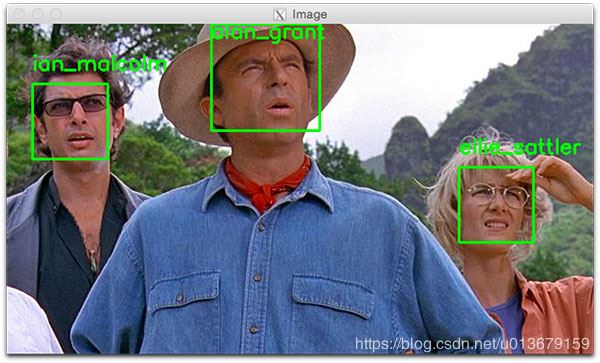
如果要詳細(xì)了解細(xì)節(jié),請(qǐng)參考:https://www.pyimagesearch.com/2018/06/18/face-recognition-with-opencv-python-and-deep-learning/
到此這篇關(guān)于Python基于Dlib的人臉識(shí)別系統(tǒng)的實(shí)現(xiàn)的文章就介紹到這了,更多相關(guān)Python Dlib人臉識(shí)別內(nèi)容請(qǐng)搜索好吧啦網(wǎng)以前的文章或繼續(xù)瀏覽下面的相關(guān)文章希望大家以后多多支持好吧啦網(wǎng)!
相關(guān)文章:
1. js實(shí)現(xiàn)碰撞檢測(cè)2. 我所理解的JavaScript中的this指向3. JS實(shí)現(xiàn)前端動(dòng)態(tài)分頁(yè)碼代碼實(shí)例4. 用Spring JMS使異步消息變得簡(jiǎn)單5. PHP驗(yàn)證碼工具-Securimage6. spring acegi security 1.0.0 發(fā)布7. 關(guān)于IDEA 2020.3 多窗口視圖丟失的問題8. javascript實(shí)現(xiàn)貪吃蛇小練習(xí)9. Vue 實(shí)現(xiàn)對(duì)quill-editor組件中的工具欄添加title10. 一文帶你徹底理解Java序列化和反序列化

 網(wǎng)公網(wǎng)安備