python實現五子棋程序
五子棋游戲相信大部分人都玩過,今天我們用python來實現一次
具體代碼可以訪問我的GitHub地址獲取
構建五子棋棋盤
from collections import namedtupleChessman = namedtuple(’Chessman’, ’Name Value Color’)Point = namedtuple(’Point’, ’X Y’)BLACK_CHESSMAN = Chessman(’黑子’, 1, (45, 45, 45))WHITE_CHESSMAN = Chessman(’白子’, 2, (219, 219, 219))offset = [(1, 0), (0, 1), (1, 1), (1, -1)]class Checkerboard: def __init__(self, line_points): self._line_points = line_points self._checkerboard = [[0] * line_points for _ in range(line_points)] def _get_checkerboard(self): return self._checkerboard checkerboard = property(_get_checkerboard) # 判斷是否可落子 def can_drop(self, point): return self._checkerboard[point.Y][point.X] == 0 def drop(self, chessman, point): ''' 落子 :param chessman: :param point:落子位置 :return:若該子落下之后即可獲勝,則返回獲勝方,否則返回 None ''' print(f’{chessman.Name} ({point.X}, {point.Y})’) self._checkerboard[point.Y][point.X] = chessman.Value if self._win(point): print(f’{chessman.Name}獲勝’) return chessman # 判斷是否贏了 def _win(self, point): cur_value = self._checkerboard[point.Y][point.X] for os in offset: if self._get_count_on_direction(point, cur_value, os[0], os[1]):return True def _get_count_on_direction(self, point, value, x_offset, y_offset): count = 1 for step in range(1, 5): x = point.X + step * x_offset y = point.Y + step * y_offset if 0 <= x < self._line_points and 0 <= y < self._line_points and self._checkerboard[y][x] == value:count += 1 else:break for step in range(1, 5): x = point.X - step * x_offset y = point.Y - step * y_offset if 0 <= x < self._line_points and 0 <= y < self._line_points and self._checkerboard[y][x] == value:count += 1 else:break return count >= 5
實現五子棋人機對戰
import sysimport randomimport pygamefrom pygame.locals import *import pygame.gfxdrawfrom checkerboard import Checkerboard, BLACK_CHESSMAN, WHITE_CHESSMAN, offset, PointSIZE = 30 # 棋盤每個點時間的間隔Line_Points = 19 # 棋盤每行/每列點數Outer_Width = 20 # 棋盤外寬度Border_Width = 4 # 邊框寬度Inside_Width = 4 # 邊框跟實際的棋盤之間的間隔Border_Length = SIZE * (Line_Points - 1) + Inside_Width * 2 + Border_Width # 邊框線的長度Start_X = Start_Y = Outer_Width + int(Border_Width / 2) + Inside_Width # 網格線起點(左上角)坐標SCREEN_HEIGHT = SIZE * (Line_Points - 1) + Outer_Width * 2 + Border_Width + Inside_Width * 2 # 游戲屏幕的高SCREEN_WIDTH = SCREEN_HEIGHT + 200 # 游戲屏幕的寬Stone_Radius = SIZE // 2 - 3 # 棋子半徑Stone_Radius2 = SIZE // 2 + 3Checkerboard_Color = (0xE3, 0x92, 0x65) # 棋盤顏色BLACK_COLOR = (0, 0, 0)WHITE_COLOR = (255, 255, 255)RED_COLOR = (200, 30, 30)BLUE_COLOR = (30, 30, 200)RIGHT_INFO_POS_X = SCREEN_HEIGHT + Stone_Radius2 * 2 + 10def print_text(screen, font, x, y, text, fcolor=(255, 255, 255)): imgText = font.render(text, True, fcolor) screen.blit(imgText, (x, y))def main(): pygame.init() screen = pygame.display.set_mode((SCREEN_WIDTH, SCREEN_HEIGHT)) pygame.display.set_caption(’五子棋’) font1 = pygame.font.SysFont(’SimHei’, 32) font2 = pygame.font.SysFont(’SimHei’, 72) fwidth, fheight = font2.size(’黑方獲勝’) checkerboard = Checkerboard(Line_Points) cur_runner = BLACK_CHESSMAN winner = None computer = AI(Line_Points, WHITE_CHESSMAN) black_win_count = 0 white_win_count = 0 while True: for event in pygame.event.get(): if event.type == QUIT:sys.exit() elif event.type == KEYDOWN:if event.key == K_RETURN: if winner is not None: winner = None cur_runner = BLACK_CHESSMAN checkerboard = Checkerboard(Line_Points) computer = AI(Line_Points, WHITE_CHESSMAN) elif event.type == MOUSEBUTTONDOWN:if winner is None: pressed_array = pygame.mouse.get_pressed() if pressed_array[0]: mouse_pos = pygame.mouse.get_pos() click_point = _get_clickpoint(mouse_pos) if click_point is not None: if checkerboard.can_drop(click_point):winner = checkerboard.drop(cur_runner, click_point)if winner is None: cur_runner = _get_next(cur_runner) computer.get_opponent_drop(click_point) AI_point = computer.AI_drop() winner = checkerboard.drop(cur_runner, AI_point) if winner is not None: white_win_count += 1 cur_runner = _get_next(cur_runner)else: black_win_count += 1 else: print(’超出棋盤區域’) # 畫棋盤 _draw_checkerboard(screen) # 畫棋盤上已有的棋子 for i, row in enumerate(checkerboard.checkerboard): for j, cell in enumerate(row):if cell == BLACK_CHESSMAN.Value: _draw_chessman(screen, Point(j, i), BLACK_CHESSMAN.Color)elif cell == WHITE_CHESSMAN.Value: _draw_chessman(screen, Point(j, i), WHITE_CHESSMAN.Color) _draw_left_info(screen, font1, cur_runner, black_win_count, white_win_count) if winner: print_text(screen, font2, (SCREEN_WIDTH - fwidth)//2, (SCREEN_HEIGHT - fheight)//2, winner.Name + ’獲勝’, RED_COLOR) pygame.display.flip()def _get_next(cur_runner): if cur_runner == BLACK_CHESSMAN: return WHITE_CHESSMAN else: return BLACK_CHESSMAN# 畫棋盤def _draw_checkerboard(screen): # 填充棋盤背景色 screen.fill(Checkerboard_Color) # 畫棋盤網格線外的邊框 pygame.draw.rect(screen, BLACK_COLOR, (Outer_Width, Outer_Width, Border_Length, Border_Length), Border_Width) # 畫網格線 for i in range(Line_Points): pygame.draw.line(screen, BLACK_COLOR, (Start_Y, Start_Y + SIZE * i), (Start_Y + SIZE * (Line_Points - 1), Start_Y + SIZE * i), 1) for j in range(Line_Points): pygame.draw.line(screen, BLACK_COLOR, (Start_X + SIZE * j, Start_X), (Start_X + SIZE * j, Start_X + SIZE * (Line_Points - 1)), 1) # 畫星位和天元 for i in (3, 9, 15): for j in (3, 9, 15): if i == j == 9:radius = 5 else:radius = 3 # pygame.draw.circle(screen, BLACK, (Start_X + SIZE * i, Start_Y + SIZE * j), radius) pygame.gfxdraw.aacircle(screen, Start_X + SIZE * i, Start_Y + SIZE * j, radius, BLACK_COLOR) pygame.gfxdraw.filled_circle(screen, Start_X + SIZE * i, Start_Y + SIZE * j, radius, BLACK_COLOR)# 畫棋子def _draw_chessman(screen, point, stone_color): # pygame.draw.circle(screen, stone_color, (Start_X + SIZE * point.X, Start_Y + SIZE * point.Y), Stone_Radius) pygame.gfxdraw.aacircle(screen, Start_X + SIZE * point.X, Start_Y + SIZE * point.Y, Stone_Radius, stone_color) pygame.gfxdraw.filled_circle(screen, Start_X + SIZE * point.X, Start_Y + SIZE * point.Y, Stone_Radius, stone_color)# 畫左側信息顯示def _draw_left_info(screen, font, cur_runner, black_win_count, white_win_count): _draw_chessman_pos(screen, (SCREEN_HEIGHT + Stone_Radius2, Start_X + Stone_Radius2), BLACK_CHESSMAN.Color) _draw_chessman_pos(screen, (SCREEN_HEIGHT + Stone_Radius2, Start_X + Stone_Radius2 * 4), WHITE_CHESSMAN.Color) print_text(screen, font, RIGHT_INFO_POS_X, Start_X + 3, ’玩家’, BLUE_COLOR) print_text(screen, font, RIGHT_INFO_POS_X, Start_X + Stone_Radius2 * 3 + 3, ’電腦’, BLUE_COLOR) print_text(screen, font, SCREEN_HEIGHT, SCREEN_HEIGHT - Stone_Radius2 * 8, ’戰況:’, BLUE_COLOR) _draw_chessman_pos(screen, (SCREEN_HEIGHT + Stone_Radius2, SCREEN_HEIGHT - int(Stone_Radius2 * 4.5)), BLACK_CHESSMAN.Color) _draw_chessman_pos(screen, (SCREEN_HEIGHT + Stone_Radius2, SCREEN_HEIGHT - Stone_Radius2 * 2), WHITE_CHESSMAN.Color) print_text(screen, font, RIGHT_INFO_POS_X, SCREEN_HEIGHT - int(Stone_Radius2 * 5.5) + 3, f’{black_win_count} 勝’, BLUE_COLOR) print_text(screen, font, RIGHT_INFO_POS_X, SCREEN_HEIGHT - Stone_Radius2 * 3 + 3, f’{white_win_count} 勝’, BLUE_COLOR)def _draw_chessman_pos(screen, pos, stone_color): pygame.gfxdraw.aacircle(screen, pos[0], pos[1], Stone_Radius2, stone_color) pygame.gfxdraw.filled_circle(screen, pos[0], pos[1], Stone_Radius2, stone_color)# 根據鼠標點擊位置,返回游戲區坐標def _get_clickpoint(click_pos): pos_x = click_pos[0] - Start_X pos_y = click_pos[1] - Start_Y if pos_x < -Inside_Width or pos_y < -Inside_Width: return None x = pos_x // SIZE y = pos_y // SIZE if pos_x % SIZE > Stone_Radius: x += 1 if pos_y % SIZE > Stone_Radius: y += 1 if x >= Line_Points or y >= Line_Points: return None return Point(x, y)class AI: def __init__(self, line_points, chessman): self._line_points = line_points self._my = chessman self._opponent = BLACK_CHESSMAN if chessman == WHITE_CHESSMAN else WHITE_CHESSMAN self._checkerboard = [[0] * line_points for _ in range(line_points)] def get_opponent_drop(self, point): self._checkerboard[point.Y][point.X] = self._opponent.Value def AI_drop(self): point = None score = 0 for i in range(self._line_points): for j in range(self._line_points):if self._checkerboard[j][i] == 0: _score = self._get_point_score(Point(i, j)) if _score > score: score = _score point = Point(i, j) elif _score == score and _score > 0: r = random.randint(0, 100) if r % 2 == 0: point = Point(i, j) self._checkerboard[point.Y][point.X] = self._my.Value return point def _get_point_score(self, point): score = 0 for os in offset: score += self._get_direction_score(point, os[0], os[1]) return score def _get_direction_score(self, point, x_offset, y_offset): count = 0 # 落子處我方連續子數 _count = 0 # 落子處對方連續子數 space = None # 我方連續子中有無空格 _space = None # 對方連續子中有無空格 both = 0 # 我方連續子兩端有無阻擋 _both = 0 # 對方連續子兩端有無阻擋 # 如果是 1 表示是邊上是我方子,2 表示敵方子 flag = self._get_stone_color(point, x_offset, y_offset, True) if flag != 0: for step in range(1, 6):x = point.X + step * x_offsety = point.Y + step * y_offsetif 0 <= x < self._line_points and 0 <= y < self._line_points: if flag == 1: if self._checkerboard[y][x] == self._my.Value: count += 1 if space is False:space = True elif self._checkerboard[y][x] == self._opponent.Value: _both += 1 break else: if space is None:space = False else:break # 遇到第二個空格退出 elif flag == 2: if self._checkerboard[y][x] == self._my.Value: _both += 1 break elif self._checkerboard[y][x] == self._opponent.Value: _count += 1 if _space is False:_space = True else: if _space is None:_space = False else:breakelse: # 遇到邊也就是阻擋 if flag == 1: both += 1 elif flag == 2: _both += 1 if space is False: space = None if _space is False: _space = None _flag = self._get_stone_color(point, -x_offset, -y_offset, True) if _flag != 0: for step in range(1, 6):x = point.X - step * x_offsety = point.Y - step * y_offsetif 0 <= x < self._line_points and 0 <= y < self._line_points: if _flag == 1: if self._checkerboard[y][x] == self._my.Value: count += 1 if space is False:space = True elif self._checkerboard[y][x] == self._opponent.Value: _both += 1 break else: if space is None:space = False else:break # 遇到第二個空格退出 elif _flag == 2: if self._checkerboard[y][x] == self._my.Value: _both += 1 break elif self._checkerboard[y][x] == self._opponent.Value: _count += 1 if _space is False:_space = True else: if _space is None:_space = False else:breakelse: # 遇到邊也就是阻擋 if _flag == 1: both += 1 elif _flag == 2: _both += 1 score = 0 if count == 4: score = 10000 elif _count == 4: score = 9000 elif count == 3: if both == 0:score = 1000 elif both == 1:score = 100 else:score = 0 elif _count == 3: if _both == 0:score = 900 elif _both == 1:score = 90 else:score = 0 elif count == 2: if both == 0:score = 100 elif both == 1:score = 10 else:score = 0 elif _count == 2: if _both == 0:score = 90 elif _both == 1:score = 9 else:score = 0 elif count == 1: score = 10 elif _count == 1: score = 9 else: score = 0 if space or _space: score /= 2 return score # 判斷指定位置處在指定方向上是我方子、對方子、空 def _get_stone_color(self, point, x_offset, y_offset, next): x = point.X + x_offset y = point.Y + y_offset if 0 <= x < self._line_points and 0 <= y < self._line_points: if self._checkerboard[y][x] == self._my.Value:return 1 elif self._checkerboard[y][x] == self._opponent.Value:return 2 else:if next: return self._get_stone_color(Point(x, y), x_offset, y_offset, False)else: return 0 else: return 0if __name__ == ’__main__’: main()
運行效果如下:
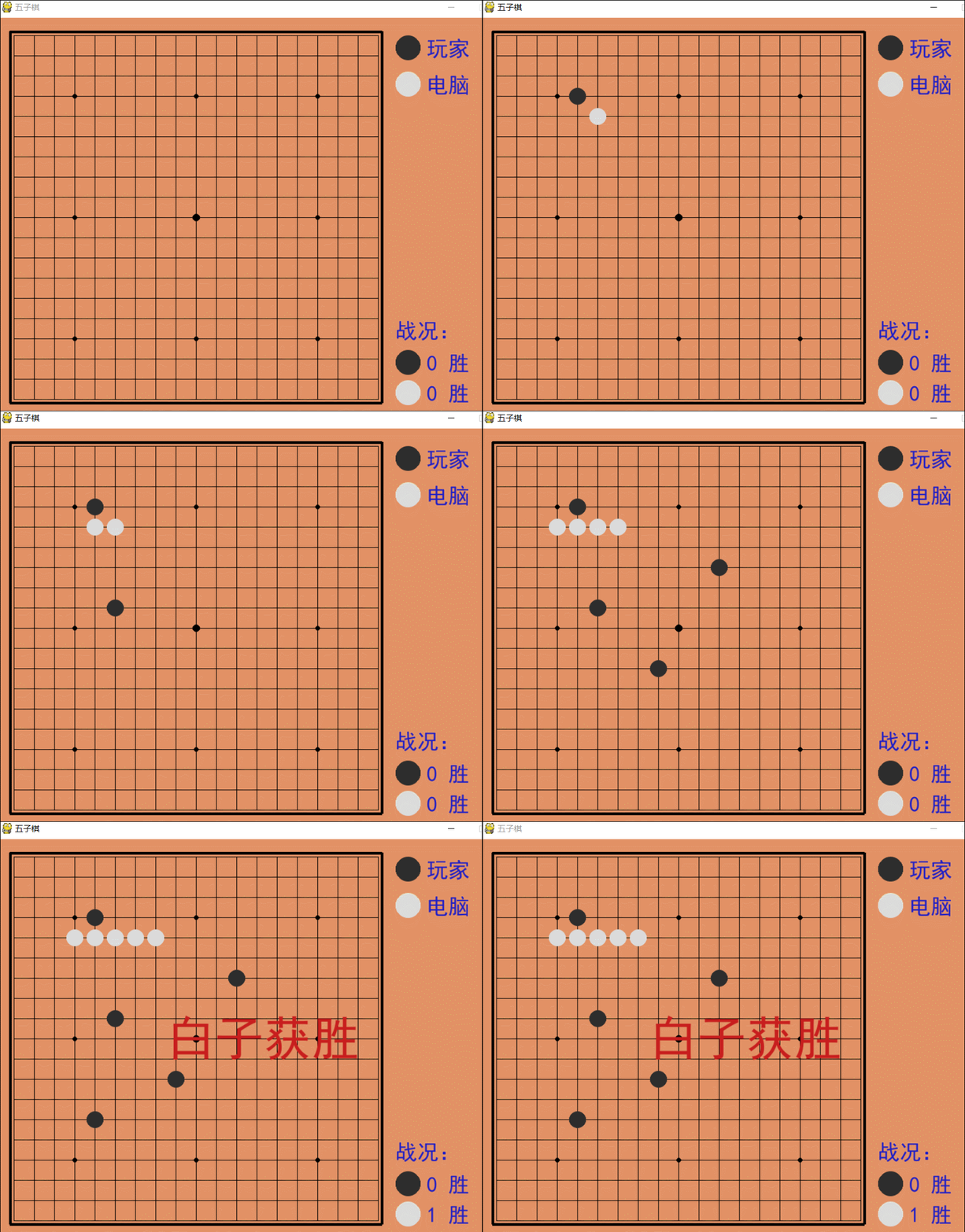
python實現五子棋人人對戰
import sysimport pygamefrom pygame.locals import *import pygame.gfxdrawfrom checkerboard import Checkerboard, BLACK_CHESSMAN, WHITE_CHESSMAN, PointSIZE = 30 # 棋盤每個點時間的間隔Line_Points = 19 # 棋盤每行/每列點數Outer_Width = 20 # 棋盤外寬度Border_Width = 4 # 邊框寬度Inside_Width = 4 # 邊框跟實際的棋盤之間的間隔Border_Length = SIZE * (Line_Points - 1) + Inside_Width * 2 + Border_Width # 邊框線的長度Start_X = Start_Y = Outer_Width + int(Border_Width / 2) + Inside_Width # 網格線起點(左上角)坐標SCREEN_HEIGHT = SIZE * (Line_Points - 1) + Outer_Width * 2 + Border_Width + Inside_Width * 2 # 游戲屏幕的高SCREEN_WIDTH = SCREEN_HEIGHT + 200 # 游戲屏幕的寬Stone_Radius = SIZE // 2 - 3 # 棋子半徑Stone_Radius2 = SIZE // 2 + 3Checkerboard_Color = (0xE3, 0x92, 0x65) # 棋盤顏色BLACK_COLOR = (0, 0, 0)WHITE_COLOR = (255, 255, 255)RED_COLOR = (200, 30, 30)BLUE_COLOR = (30, 30, 200)BLACK_STONE_COLOR = (45, 45, 45)WHITE_STONE_COLOR = (219, 219, 219)RIGHT_INFO_POS_X = SCREEN_HEIGHT + Stone_Radius2 * 2 + 10def print_text(screen, font, x, y, text, fcolor=(255, 255, 255)): imgText = font.render(text, True, fcolor) screen.blit(imgText, (x, y))def main(): pygame.init() screen = pygame.display.set_mode((SCREEN_WIDTH, SCREEN_HEIGHT)) pygame.display.set_caption(’五子棋’) font1 = pygame.font.SysFont(’SimHei’, 36) font2 = pygame.font.SysFont(’SimHei’, 72) fwidth, fheight = font2.size(’黑方獲勝’) checkerboard = Checkerboard(Line_Points) cur_runner = BLACK_CHESSMAN winner = None while True: for event in pygame.event.get(): if event.type == QUIT:sys.exit() elif event.type == KEYDOWN:if event.key == K_RETURN: if winner is not None: winner = None cur_runner = BLACK_CHESSMAN checkerboard = Checkerboard(Line_Points) elif event.type == MOUSEBUTTONDOWN:if winner is None: pressed_array = pygame.mouse.get_pressed() if pressed_array[0]: mouse_pos = pygame.mouse.get_pos() click_point = _get_clickpoint(mouse_pos) if click_point is not None: if checkerboard.can_drop(click_point):winner = checkerboard.drop(cur_runner, click_point)if cur_runner == BLACK_CHESSMAN: cur_runner = WHITE_CHESSMANelse: cur_runner = BLACK_CHESSMAN else: print(’超出棋盤區域’) # 畫棋盤 _draw_checkerboard(screen) # 畫棋盤上已有的棋子 for i, row in enumerate(checkerboard.checkerboard): for j, cell in enumerate(row):if cell == BLACK_CHESSMAN.Value: _draw_chessman(screen, Point(j, i), BLACK_CHESSMAN.Color)elif cell == WHITE_CHESSMAN.Value: _draw_chessman(screen, Point(j, i), WHITE_CHESSMAN.Color) _draw_chessman_pos(screen, (SCREEN_HEIGHT + Stone_Radius2, Start_X + 20), BLACK_STONE_COLOR) _draw_chessman_pos(screen, (SCREEN_HEIGHT + Stone_Radius2, Start_X + 20 + Stone_Radius2 * 3), WHITE_STONE_COLOR) if winner: print_text(screen, font2, (SCREEN_WIDTH - fwidth)//2, (SCREEN_HEIGHT - fheight)//2, winner.Name + ’獲勝’, RED_COLOR) if cur_runner == BLACK_CHESSMAN: print_text(screen, font1, RIGHT_INFO_POS_X, Start_X, ’獲勝’ if winner else ’落子中’, BLUE_COLOR) else: print_text(screen, font1, RIGHT_INFO_POS_X, Start_X + Stone_Radius2 * 3, ’獲勝’ if winner else ’落子中’, BLUE_COLOR) pygame.display.flip()# 畫棋盤def _draw_checkerboard(screen): # 填充棋盤背景色 screen.fill(Checkerboard_Color) # 畫棋盤網格線外的邊框 pygame.draw.rect(screen, BLACK_COLOR, (Outer_Width, Outer_Width, Border_Length, Border_Length), Border_Width) # 畫網格線 for i in range(Line_Points): pygame.draw.line(screen, BLACK_COLOR, (Start_Y, Start_Y + SIZE * i), (Start_Y + SIZE * (Line_Points - 1), Start_Y + SIZE * i), 1) for j in range(Line_Points): pygame.draw.line(screen, BLACK_COLOR, (Start_X + SIZE * j, Start_X), (Start_X + SIZE * j, Start_X + SIZE * (Line_Points - 1)), 1) # 畫星位和天元 for i in (3, 9, 15): for j in (3, 9, 15): if i == j == 9:radius = 5 else:radius = 3 # pygame.draw.circle(screen, BLACK, (Start_X + SIZE * i, Start_Y + SIZE * j), radius) pygame.gfxdraw.aacircle(screen, Start_X + SIZE * i, Start_Y + SIZE * j, radius, BLACK_COLOR) pygame.gfxdraw.filled_circle(screen, Start_X + SIZE * i, Start_Y + SIZE * j, radius, BLACK_COLOR)# 畫棋子def _draw_chessman(screen, point, stone_color): # pygame.draw.circle(screen, stone_color, (Start_X + SIZE * point.X, Start_Y + SIZE * point.Y), Stone_Radius) pygame.gfxdraw.aacircle(screen, Start_X + SIZE * point.X, Start_Y + SIZE * point.Y, Stone_Radius, stone_color) pygame.gfxdraw.filled_circle(screen, Start_X + SIZE * point.X, Start_Y + SIZE * point.Y, Stone_Radius, stone_color)def _draw_chessman_pos(screen, pos, stone_color): pygame.gfxdraw.aacircle(screen, pos[0], pos[1], Stone_Radius2, stone_color) pygame.gfxdraw.filled_circle(screen, pos[0], pos[1], Stone_Radius2, stone_color)# 根據鼠標點擊位置,返回游戲區坐標def _get_clickpoint(click_pos): pos_x = click_pos[0] - Start_X pos_y = click_pos[1] - Start_Y if pos_x < -Inside_Width or pos_y < -Inside_Width: return None x = pos_x // SIZE y = pos_y // SIZE if pos_x % SIZE > Stone_Radius: x += 1 if pos_y % SIZE > Stone_Radius: y += 1 if x >= Line_Points or y >= Line_Points: return None return Point(x, y)if __name__ == ’__main__’: main()
運行效果
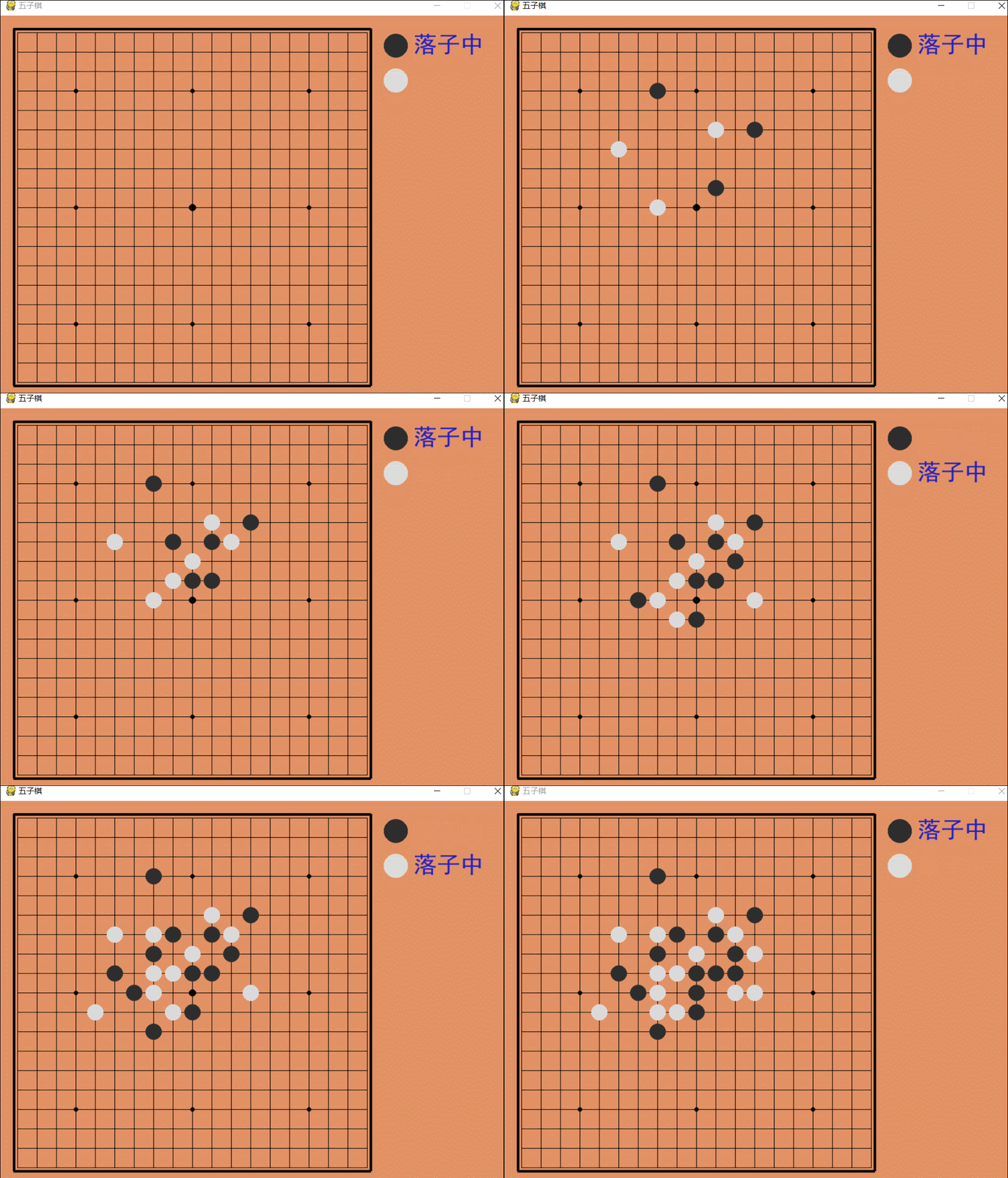
更多有趣的經典小游戲實現專題,分享給大家:
C++經典小游戲匯總
python經典小游戲匯總
python俄羅斯方塊游戲集合
JavaScript經典游戲 玩不停
java經典小游戲匯總
javascript經典小游戲匯總
以上就是本文的全部內容,希望對大家的學習有所幫助,也希望大家多多支持好吧啦網。
相關文章:

 網公網安備
網公網安備