Python自動(dòng)化xpath實(shí)現(xiàn)自動(dòng)搶票搶貨
小伙伴們,這次推文講的是‘xpath‘,掌握起來(lái)不難的哦。而且,熟悉了這套路,別說(shuō)pubmed,任何你能在瀏覽器實(shí)現(xiàn)的操作,都基本能通過(guò)selenium自動(dòng)化進(jìn)行。
總代碼:
for i in range(51,56): driver.implicitly_wait(10) ActionChains(driver).move_to_element(driver.find_element_by_xpath(’//*[@id='save-results-panel-trigger']’)).click().perform() Select(driver.find_element_by_xpath(’//*[@id='save-action-selection']’)).select_by_visible_text('All results on this page') ActionChains(driver).move_to_element(driver.find_element_by_xpath(’//*[@id='save-action-format']’)).click().perform() Select(driver.find_element_by_xpath(’/html/body/main/div[1]/div/form/div[2]/select’)).select_by_visible_text('CSV') ActionChains(driver).move_to_element(driver.find_element_by_xpath(’//*[@id='save-action-panel-form']/div[3]/button[1]’)).click().perform() target =driver.find_element_by_xpath(’//*[@id='search-results']/section/div[3]/a/span’) driver.execute_script('arguments[0].();', target) ActionChains(driver).move_to_element(driver.find_element_by_xpath(’//*[@id='search-results']/section/div[3]/a/span’)).click().perform() ActionChains(driver).move_to_element(driver.find_element_by_xpath(’//*[@id='search-page']/div[12]/div/form/button’)).click().perform() print(’第’+str(i)+’頁(yè)下載成功’) print(’跳轉(zhuǎn)第’+str(i+1)+’頁(yè)面中’)driver.quit()print(’全部下載完畢,自動(dòng)退出。’)
代碼1
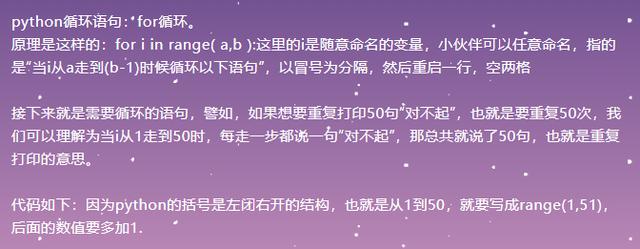
for i in range(1,50+1): printg(’我錯(cuò)了’)

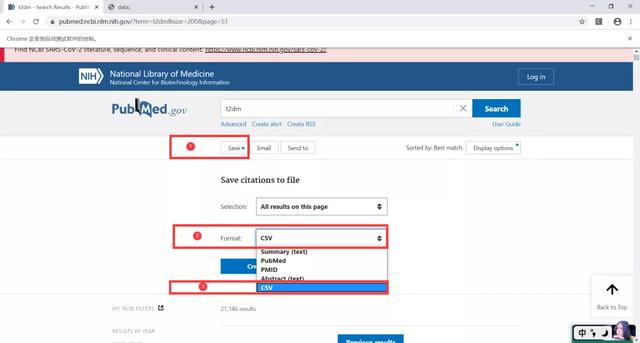
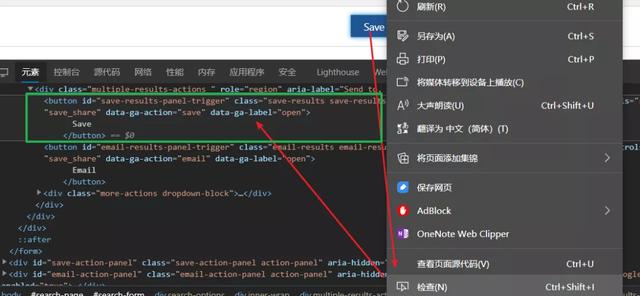
操作如下:鼠標(biāo)移動(dòng)到Save按鈕→鼠標(biāo)右擊→檢查,
可以發(fā)現(xiàn)源代碼有一塊區(qū)域亮起來(lái)了
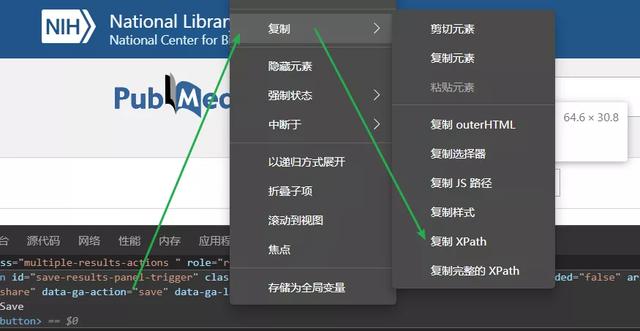
這塊區(qū)域就是Save按鈕對(duì)應(yīng)的源代碼→鼠標(biāo)移動(dòng)到該源代碼區(qū)域→右擊→復(fù)制→復(fù)制XPath,
這樣我們就復(fù)制了Save按鈕的Xpath了,接下來(lái)只需要粘貼到代碼就行.
小伙伴們是否還記得ActionChains的萬(wàn)能公式:
ActionChains(driver).move_to_element(driver.find_element_by_xpath(’xpath_content’)).click().perform()
我們只需要把剛才復(fù)制的xpath粘貼到代碼中的“xpath_content”區(qū)域就行
是不是很熟悉呢,是的,這便是我們使用ActionChains模塊實(shí)現(xiàn)的第一個(gè)操作,后續(xù)的一樣噢,只需要復(fù)制對(duì)應(yīng)的Xpath直接粘貼就行了。
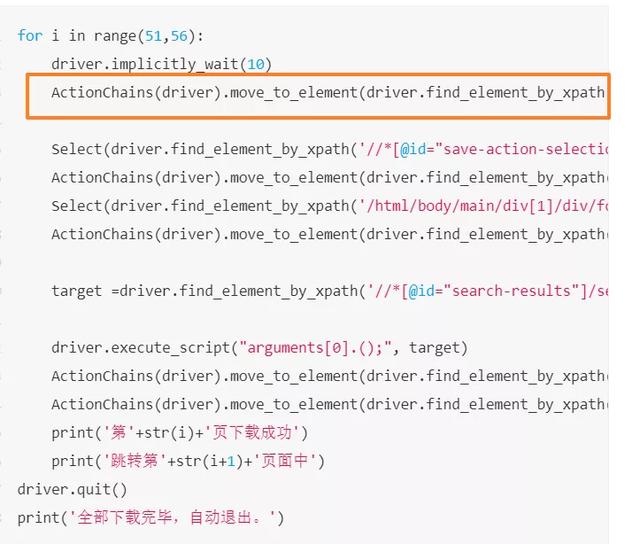
最后,因?yàn)橐陨暇茄h(huán)體的內(nèi)容,當(dāng)代碼執(zhí)行完整個(gè)循環(huán)體了,我們可以通過(guò)代碼直接關(guān)掉瀏覽器,提醒我們打印完了,代碼如下
driver.quit()print(’全部下載完畢,結(jié)束了’)
因?yàn)檫@兩句代碼已經(jīng)不是循環(huán)體的內(nèi)容了,所以無(wú)需另起一行空兩個(gè),而且,小伙伴記得噢,所有字符都是英文字符,包括括號(hào)、引號(hào)等等。
以上就是本文的全部?jī)?nèi)容,希望對(duì)大家的學(xué)習(xí)有所幫助,也希望大家多多支持好吧啦網(wǎng)。
相關(guān)文章:
1. JavaScript實(shí)現(xiàn)留言板實(shí)戰(zhàn)案例2. vscode運(yùn)行php報(bào)錯(cuò)php?not?found解決辦法3. 資深程序員:給Python軟件開(kāi)發(fā)測(cè)試的25個(gè)忠告!4. 實(shí)現(xiàn)java簡(jiǎn)單的線程池5. 如何從Python的cmd中獲得.py文件參數(shù)6. Python基于requests庫(kù)爬取網(wǎng)站信息7. 使用Blazor框架實(shí)現(xiàn)在前端瀏覽器中導(dǎo)入和導(dǎo)出Excel8. Python-openpyxl表格讀取寫(xiě)入的案例詳解9. ASP基礎(chǔ)知識(shí)Command對(duì)象講解10. 如何在python中執(zhí)行另一個(gè)py文件
 網(wǎng)公網(wǎng)安備