python實現移動木板小游戲
本文實例為大家分享了python實現移動木板小游戲的具體代碼,供大家參考,具體內容如下
一、游戲簡介
本游戲是通過python編寫的小游戲,給初學者熟悉python編程語言拋磚引玉,希望有所幫助。成型的效果圖如下:
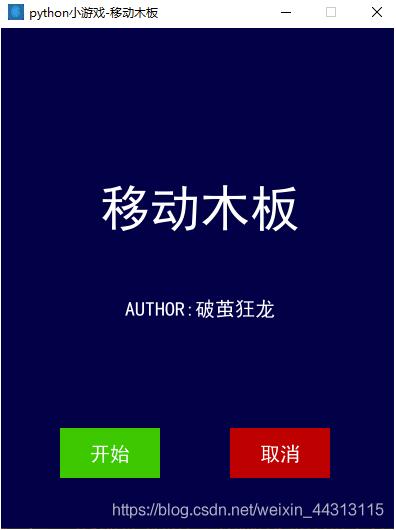
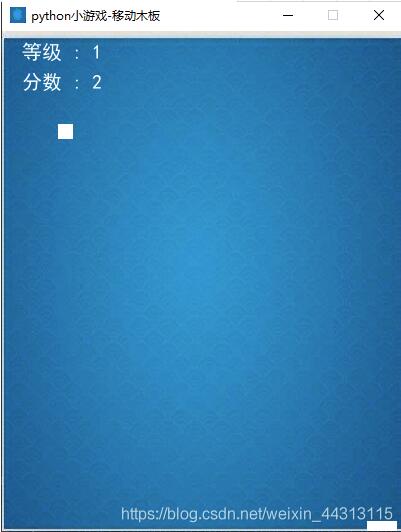
二、編寫步驟
1.引入庫
代碼如下:
###### AUTHOR:破繭狂龍 ############ DATE:20201002 ############ DESCRIPTION:移動的木板 ######import pygamefrom pygame.locals import *import sysimport timeimport random
2.初始化
代碼如下:
pygame.init()BLACK = (0, 0, 0) # 黑色WHITE = (255, 255, 255) # 白色bg_color = (0,0,70) # 背景顏色red = (200, 0, 0)green = (0, 200, 0)bright_red = (255, 0, 0)bright_green = (0, 255, 0)smallText = pygame.font.SysFont(’SimHei’, 20) #comicsansmsmidlText = pygame.font.SysFont(’SimHei’, 50)barsize = [30, 10]SCREEN_SIZE = [400, 500] # 屏幕大小BALL_SIZE = [15, 15] # 球的尺寸fontcolor = (255,255,255) # 定義字體的顏色myimg = r'imgb1.jpg'background = pygame.image.load(myimg) # 圖片位置background = pygame.transform.scale(background, SCREEN_SIZE)# ball 初始位置ball_pos_x = SCREEN_SIZE[0] // 2 - BALL_SIZE[0] / 2ball_pos_y = 0# ball 移動方向ball_dir_y = 1 # 1:downball_pos = pygame.Rect(ball_pos_x, ball_pos_y, BALL_SIZE[0], BALL_SIZE[1])clock = pygame.time.Clock() # 定時器screen = pygame.display.set_mode(SCREEN_SIZE)# 設置標題pygame.display.set_caption(’python小游戲-移動木板’)# 設置圖標image = pygame.image.load(myimg)pygame.display.set_icon(image)
3.相關自定義函數
代碼如下:
###### 自定義函數 ######def button(msg, x, y, w, h, ic, ac, action=None): mouse = pygame.mouse.get_pos() click = pygame.mouse.get_pressed() if x + w > mouse[0] > x and y + h > mouse[1] > y: pygame.draw.rect(screen, ac, (x, y, w, h)) if click[0] == 1 and action != None: action() else: pygame.draw.rect(screen, ic, (x, y, w, h)) textSurf, textRect = text_objects(msg, smallText) textRect.center = ((x + (w / 2)), (y + (h / 2))) screen.blit(textSurf, textRect)def text_objects(text, font): textSurface = font.render(text, True, fontcolor) return textSurface, textSurface.get_rect()def quitgame(): pygame.quit() quit()def message_diaplay(text): largeText = pygame.font.SysFont(’SimHei’, 115) TextSurf, TextRect = text_objects(text, largeText) TextRect.center = ((screen[0] / 2), (screen[1] / 2)) screen.blit(TextSurf, TextRect) pygame.display.update() time.sleep(2) game_loop()
4.相關自定義函數
代碼如下:
def game_first_win(): intro = True while intro: for event in pygame.event.get(): if event.type == pygame.QUIT: pygame.quit() quit() screen.fill(bg_color) ###游戲名稱 TextSurf, TextRect = text_objects(’移動木板’, midlText) TextRect.center = ((SCREEN_SIZE[0] / 2), (SCREEN_SIZE[1] / 2 - 70 )) screen.blit(TextSurf, TextRect) ###作者 TextSurf_ZZ, TextRect_ZZ = text_objects(’AUTHOR:破繭狂龍’, smallText) TextRect_ZZ.center = ((SCREEN_SIZE[0] / 2), (SCREEN_SIZE[1] / 2 + 30)) screen.blit(TextSurf_ZZ, TextRect_ZZ) button('開始', 60, 400, 100, 50, green, bright_green, game_loop) button('取消', 230, 400, 100, 50, red, bright_red, quitgame) pygame.display.update() clock.tick(15)###### 移動的木板游戲類 ######def game_loop(): pygame.mouse.set_visible(1) # 移動鼠標不可見 ###變量### score = 0 #分數 count_O = 0 #循環的次數變量1 用于統計等級 count_N = 0 #循環的次數變量2 用于統計等級 c_level = 1 #等級 x_change = 0 #移動的變量 x = SCREEN_SIZE[0] // 2 - barsize[0] // 2 y = SCREEN_SIZE[1] - barsize[1] # ball 初始位置 ball_pos_pz = ball_pos while True: bar_move_left = False bar_move_right = False ###當每次滿X分后,升級等級 if count_O != count_N and score % 5 == 0: c_level += 1 count_O = count_N ###### 獲取鍵盤輸入 ###### for event in pygame.event.get(): if event.type == QUIT: # 當按下關閉按鍵 pygame.quit() sys.exit() # 接收到退出事件后退出程序 elif event.type == KEYDOWN: ##按鍵盤Q鍵 暫停 if event.key == pygame.K_q: time.sleep(10) ##左移動 if event.key == pygame.K_LEFT: bar_move_left = True x_change = -30 else: bar_move_left = False ##右移動 if event.key == pygame.K_RIGHT: bar_move_right = True x_change = +30 else: bar_move_right = False if event.key != pygame.K_LEFT and event.key != pygame.K_RIGHT: bar_move_left = False bar_move_right = False ##木板的位置移動 if bar_move_left == True and bar_move_right == False: x += x_change if bar_move_left == False and bar_move_right == True: x += x_change ##填充背景 screen.blit(background, (0, 0)) # (0,0)代表圖片位置起點x 軸 Y軸 ##獲取最新的木板位置,并渲染在前臺 bar_pos = pygame.Rect(x, y, barsize[0], BALL_SIZE[1]) bar_pos.left = x pygame.draw.rect(screen, WHITE, bar_pos) ## 球移動,并渲染在前臺 ball_pos_pz.bottom += ball_dir_y * 3 pygame.draw.rect(screen, WHITE, ball_pos_pz) ## 判斷球是否落到板上 if bar_pos.top <= ball_pos_pz.bottom and ( bar_pos.left <= ball_pos_pz.right and bar_pos.right >= ball_pos_pz.left): score += 1 # 分數每次加1 count_N += 1 elif bar_pos.top <= ball_pos_pz.bottom and ( bar_pos.left > ball_pos_pz.right or bar_pos.right < ball_pos_pz.left): print('Game Over: ', score) return score ## 更新球下落的初始位置 if bar_pos.top <= ball_pos_pz.bottom: ball_x = random.randint(0, SCREEN_SIZE[0] - BALL_SIZE[0]) ball_pos_pz = pygame.Rect(ball_x, ball_pos_y, BALL_SIZE[0], BALL_SIZE[1]) ######### 顯示游戲等級 ######### TextSurf_lev, TextRect_lev = text_objects('等級 : ' + str(c_level), smallText) TextRect_lev.center = (60, 20) screen.blit(TextSurf_lev, TextRect_lev) ######### 顯示分數結果 ######### TextSurf_sco, TextRect_sco = text_objects('分數 : ' + str(score), smallText) TextRect_sco.center = (60, 50) screen.blit(TextSurf_sco, TextRect_sco) pygame.display.update() # 更新軟件界面顯示 clock.tick(60)
# 三、完整的代碼
代碼如下:
###### AUTHOR:破繭狂龍 ############ DATE:20201002 ############ DESCRIPTION:移動的木板 ######import pygamefrom pygame.locals import *import sysimport timeimport randompygame.init()BLACK = (0, 0, 0) # 黑色WHITE = (255, 255, 255) # 白色bg_color = (0,0,70) # 背景顏色red = (200, 0, 0)green = (0, 200, 0)bright_red = (255, 0, 0)bright_green = (0, 255, 0)smallText = pygame.font.SysFont(’SimHei’, 20) #comicsansmsmidlText = pygame.font.SysFont(’SimHei’, 50)barsize = [30, 10]SCREEN_SIZE = [400, 500] # 屏幕大小BALL_SIZE = [15, 15] # 球的尺寸fontcolor = (255,255,255) # 定義字體的顏色myimg = r'imgb1.jpg'background = pygame.image.load(myimg) # 圖片位置background = pygame.transform.scale(background, SCREEN_SIZE)# ball 初始位置ball_pos_x = SCREEN_SIZE[0] // 2 - BALL_SIZE[0] / 2ball_pos_y = 0# ball 移動方向ball_dir_y = 1 # 1:downball_pos = pygame.Rect(ball_pos_x, ball_pos_y, BALL_SIZE[0], BALL_SIZE[1])clock = pygame.time.Clock() # 定時器screen = pygame.display.set_mode(SCREEN_SIZE)# 設置標題pygame.display.set_caption(’python小游戲-移動木板’)# 設置圖標image = pygame.image.load(myimg)pygame.display.set_icon(image)###### 自定義函數 ######def button(msg, x, y, w, h, ic, ac, action=None): mouse = pygame.mouse.get_pos() click = pygame.mouse.get_pressed() if x + w > mouse[0] > x and y + h > mouse[1] > y: pygame.draw.rect(screen, ac, (x, y, w, h)) if click[0] == 1 and action != None: action() else: pygame.draw.rect(screen, ic, (x, y, w, h)) textSurf, textRect = text_objects(msg, smallText) textRect.center = ((x + (w / 2)), (y + (h / 2))) screen.blit(textSurf, textRect)def text_objects(text, font): textSurface = font.render(text, True, fontcolor) return textSurface, textSurface.get_rect()def quitgame(): pygame.quit() quit()def message_diaplay(text): largeText = pygame.font.SysFont(’SimHei’, 115) TextSurf, TextRect = text_objects(text, largeText) TextRect.center = ((screen[0] / 2), (screen[1] / 2)) screen.blit(TextSurf, TextRect) pygame.display.update() time.sleep(2) game_loop()def game_first_win(): intro = True while intro: for event in pygame.event.get(): if event.type == pygame.QUIT: pygame.quit() quit() screen.fill(bg_color) ###游戲名稱 TextSurf, TextRect = text_objects(’移動木板’, midlText) TextRect.center = ((SCREEN_SIZE[0] / 2), (SCREEN_SIZE[1] / 2 - 70 )) screen.blit(TextSurf, TextRect) ###作者 TextSurf_ZZ, TextRect_ZZ = text_objects(’AUTHOR:破繭狂龍’, smallText) TextRect_ZZ.center = ((SCREEN_SIZE[0] / 2), (SCREEN_SIZE[1] / 2 + 30)) screen.blit(TextSurf_ZZ, TextRect_ZZ) button('開始', 60, 400, 100, 50, green, bright_green, game_loop) button('取消', 230, 400, 100, 50, red, bright_red, quitgame) pygame.display.update() clock.tick(15)###### 移動的木板游戲類 ######def game_loop(): pygame.mouse.set_visible(1) # 移動鼠標不可見 ###變量### score = 0 #分數 count_O = 0 #循環的次數變量1 用于統計等級 count_N = 0 #循環的次數變量2 用于統計等級 c_level = 1 #等級 x_change = 0 #移動的變量 x = SCREEN_SIZE[0] // 2 - barsize[0] // 2 y = SCREEN_SIZE[1] - barsize[1] # ball 初始位置 ball_pos_pz = ball_pos while True: bar_move_left = False bar_move_right = False ###當每次滿X分后,升級等級 if count_O != count_N and score % 5 == 0: c_level += 1 count_O = count_N ###### 獲取鍵盤輸入 ###### for event in pygame.event.get(): if event.type == QUIT: # 當按下關閉按鍵 pygame.quit() sys.exit() # 接收到退出事件后退出程序 elif event.type == KEYDOWN: ##按鍵盤Q鍵 暫停 if event.key == pygame.K_q: time.sleep(10) ##左移動 if event.key == pygame.K_LEFT: bar_move_left = True x_change = -30 else: bar_move_left = False ##右移動 if event.key == pygame.K_RIGHT: bar_move_right = True x_change = +30 else: bar_move_right = False if event.key != pygame.K_LEFT and event.key != pygame.K_RIGHT: bar_move_left = False bar_move_right = False ##木板的位置移動 if bar_move_left == True and bar_move_right == False: x += x_change if bar_move_left == False and bar_move_right == True: x += x_change ##填充背景 screen.blit(background, (0, 0)) # (0,0)代表圖片位置起點x 軸 Y軸 ##獲取最新的木板位置,并渲染在前臺 bar_pos = pygame.Rect(x, y, barsize[0], BALL_SIZE[1]) bar_pos.left = x pygame.draw.rect(screen, WHITE, bar_pos) ## 球移動,并渲染在前臺 ball_pos_pz.bottom += ball_dir_y * 3 pygame.draw.rect(screen, WHITE, ball_pos_pz) ## 判斷球是否落到板上 if bar_pos.top <= ball_pos_pz.bottom and ( bar_pos.left <= ball_pos_pz.right and bar_pos.right >= ball_pos_pz.left): score += 1 # 分數每次加1 count_N += 1 elif bar_pos.top <= ball_pos_pz.bottom and ( bar_pos.left > ball_pos_pz.right or bar_pos.right < ball_pos_pz.left): print('Game Over: ', score) return score ## 更新球下落的初始位置 if bar_pos.top <= ball_pos_pz.bottom: ball_x = random.randint(0, SCREEN_SIZE[0] - BALL_SIZE[0]) ball_pos_pz = pygame.Rect(ball_x, ball_pos_y, BALL_SIZE[0], BALL_SIZE[1]) ######### 顯示游戲等級 ######### TextSurf_lev, TextRect_lev = text_objects('等級 : ' + str(c_level), smallText) TextRect_lev.center = (60, 20) screen.blit(TextSurf_lev, TextRect_lev) ######### 顯示分數結果 ######### TextSurf_sco, TextRect_sco = text_objects('分數 : ' + str(score), smallText) TextRect_sco.center = (60, 50) screen.blit(TextSurf_sco, TextRect_sco) pygame.display.update() # 更新軟件界面顯示 clock.tick(60)####程序執行順序######game_first_win()game_loop()pygame.quit()
以上就是本文的全部內容,希望對大家的學習有所幫助,也希望大家多多支持好吧啦網。
相關文章:
 網公網安備
網公網安備