Python使用Pygame繪制時鐘
本文實(shí)例為大家分享了Python使用Pygame繪制時鐘的具體代碼,供大家參考,具體內(nèi)容如下
前提條件:
需要安裝pygame
功能:
1.初始化界面顯示一個時鐘界面
2.根據(jù)當(dāng)前的時間實(shí)現(xiàn)時針、分針、秒針的移動
import pygame, sys, random, mathfrom datetime import datetimefrom pygame.locals import * def print_text(font, x, y, text, color=(255, 255, 255)): img_text = font.render(text, True, color) screen.blit(img_text, (x, y)) pygame.init() # 屏幕大小screen = pygame.display.set_mode((600, 500))# 標(biāo)題pygame.display.set_caption('時鐘')# 字體font1 = pygame.font.Font(None, 24)# 圓心位置pos_x = 300pos_y = 250# 圓的半徑radius = 250r = random.randint(0, 255)g = random.randint(0, 255)b = random.randint(0, 255) while True: for event in pygame.event.get(): if event.type == QUIT: sys.exit() keys = pygame.key.get_pressed() if keys[K_ESCAPE]: sys.exit() screen.fill((0, 0, 100)) color = r, g, b pygame.draw.circle(screen, color, (pos_x, pos_y), radius, 6) # 繪制數(shù)字1-12 for i in range(1, 13): angle = math.radians((360 / 12) * i - 90) x = math.cos(angle) * (radius - 20) - 10 y = math.sin(angle) * (radius - 20) - 10 print_text(font1, pos_x + x, pos_y + y, str(i)) # 繪制時針 hour = datetime.today().hour % 12 # 獲取當(dāng)前時間的小時 hour_angle = math.radians((360 / 12) * hour - 90) hour_x = math.cos(hour_angle) * (radius - 90) hour_y = math.sin(hour_angle) * (radius - 90) pygame.draw.line(screen, (255, 0, 0), (pos_x, pos_y), (pos_x + hour_x, pos_y + hour_y), 12) # 繪制分針 minutes = datetime.today().minute # 獲取當(dāng)前時間的分鐘 minutes_angle = math.radians((360 / 60) * minutes - 90) minutes_x = math.cos(minutes_angle) * (radius - 70) minutes_y = math.sin(minutes_angle) * (radius - 70) pygame.draw.line(screen, (0, 255, 0), (pos_x, pos_y), (pos_x + minutes_x, pos_y + minutes_y), 8) # 繪制秒針 seconds = datetime.today().second # 獲取當(dāng)前時間的秒數(shù) seconds_angle = math.radians((360 / 60) * seconds - 90) seconds_x = math.cos(seconds_angle) * (radius - 30) seconds_y = math.sin(seconds_angle) * (radius - 30) pygame.draw.line(screen, (0, 0, 255), (pos_x, pos_y), (pos_x + seconds_x, + pos_y + seconds_y), 4) # 覆蓋圓心 pygame.draw.circle(screen, (255, 255, 255), (pos_x, pos_y), 10) pygame.display.update()
運(yùn)行結(jié)果:
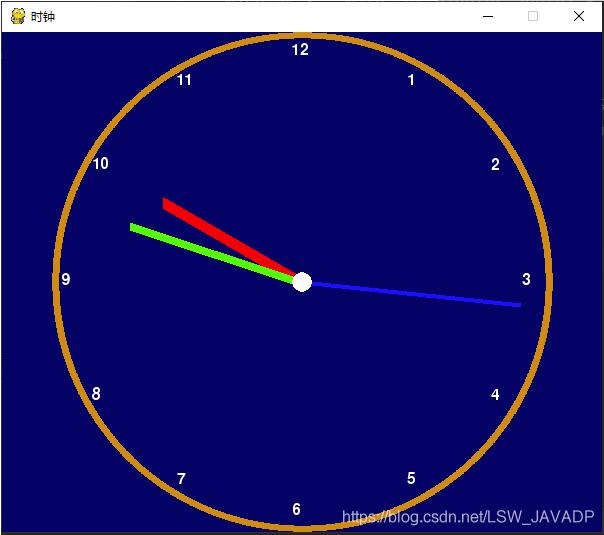
以上就是本文的全部內(nèi)容,希望對大家的學(xué)習(xí)有所幫助,也希望大家多多支持好吧啦網(wǎng)。
相關(guān)文章:
1. python中文本字符處理的簡單方法記錄2. 資深程序員:給Python軟件開發(fā)測試的25個忠告!3. Python-openpyxl表格讀取寫入的案例詳解4. PHP laravel實(shí)現(xiàn)導(dǎo)出PDF功能5. ASP基礎(chǔ)知識Command對象講解6. 使用Blazor框架實(shí)現(xiàn)在前端瀏覽器中導(dǎo)入和導(dǎo)出Excel7. JavaScript實(shí)現(xiàn)留言板實(shí)戰(zhàn)案例8. 如何在python中執(zhí)行另一個py文件9. vscode運(yùn)行php報錯php?not?found解決辦法10. 如何從Python的cmd中獲得.py文件參數(shù)
 網(wǎng)公網(wǎng)安備