python matplotlib工具欄源碼探析二之添加、刪除內(nèi)置工具項(xiàng)的案例
從matplotlib工具欄源碼探析一(禁用工具欄、默認(rèn)工具欄和工具欄管理器三種模式的差異)一文可知matplotlib內(nèi)置實(shí)現(xiàn)了多個(gè)工具項(xiàng)的實(shí)現(xiàn),而默認(rèn)工具欄中的工具項(xiàng)只是其中的一部分,有沒(méi)有方法直接管理工具欄,添加、刪除內(nèi)置工具項(xiàng)?
matplotlib內(nèi)置的工具項(xiàng)由源碼可知,matplotlib.backend_tools.default_tools變量為字典類(lèi)型,實(shí)例化了基于matplotlib.backend_tools.ToolBase類(lèi)定義的內(nèi)置工具項(xiàng)。
源碼
default_tools = {’home’: ToolHome, ’back’: ToolBack, ’forward’: ToolForward, ’zoom’: ToolZoom, ’pan’: ToolPan, ’subplots’: ’ToolConfigureSubplots’, ’save’: ’ToolSaveFigure’, ’grid’: ToolGrid, ’grid_minor’: ToolMinorGrid, ’fullscreen’: ToolFullScreen, ’quit’: ToolQuit, ’quit_all’: ToolQuitAll, ’allnav’: _ToolEnableAllNavigation, ’nav’: _ToolEnableNavigation, ’xscale’: ToolXScale, ’yscale’: ToolYScale, ’position’: ToolCursorPosition, _views_positions: ToolViewsPositions, ’cursor’: ’ToolSetCursor’, ’rubberband’: ’ToolRubberband’, ’help’: ’ToolHelp’, ’copy’: ’ToolCopyToClipboard’, }
驗(yàn)證
import matplotlib.pyplot as pltimport matplotlib as mplfrom pprint import pprintplt.rcParams[’toolbar’] = ’toolmanager’fig = plt.gcf()pprint(mpl.backend_tools.default_tools)
輸出
{’allnav’: <class ’matplotlib.backend_tools._ToolEnableAllNavigation’>, ’back’: <class ’matplotlib.backend_tools.ToolBack’>, ’copy’: ’ToolCopyToClipboard’, ’cursor’: ’ToolSetCursor’, ’forward’: <class ’matplotlib.backend_tools.ToolForward’>, ’fullscreen’: <class ’matplotlib.backend_tools.ToolFullScreen’>, ’grid’: <class ’matplotlib.backend_tools.ToolGrid’>, ’grid_minor’: <class ’matplotlib.backend_tools.ToolMinorGrid’>, ’help’: ’ToolHelp’, ’home’: <class ’matplotlib.backend_tools.ToolHome’>, ’nav’: <class ’matplotlib.backend_tools._ToolEnableNavigation’>, ’pan’: <class ’matplotlib.backend_tools.ToolPan’>, ’position’: <class ’matplotlib.backend_tools.ToolCursorPosition’>, ’quit’: <class ’matplotlib.backend_tools.ToolQuit’>, ’quit_all’: <class ’matplotlib.backend_tools.ToolQuitAll’>, ’rubberband’: ’ToolRubberband’, ’save’: ’ToolSaveFigure’, ’subplots’: ’ToolConfigureSubplots’, ’viewpos’: <class ’matplotlib.backend_tools.ToolViewsPositions’>, ’xscale’: <class ’matplotlib.backend_tools.ToolXScale’>, ’yscale’: <class ’matplotlib.backend_tools.ToolYScale’>, ’zoom’: <class ’matplotlib.backend_tools.ToolZoom’>}
使用工具欄管理器管理內(nèi)置工具項(xiàng)
由源碼可知默認(rèn)工具欄模式toolbar2模式?jīng)]有提供添加、刪除工具項(xiàng)的接口。因此,管理工具欄需要使用工具欄管理器模式toolmanager,與該模式相關(guān)的重要定義有:
matplotlib.backend_bases.ToolContainerBase(toolmanager)類(lèi):工具欄容器的基類(lèi),定義了工具欄編輯的方法。構(gòu)造函數(shù)參數(shù)為toolmanager,表示工具欄容器容納的工具欄。 matplotlib.backend_managers.ToolManager(figure=None)類(lèi):管理用戶(hù)觸發(fā)工具欄工具項(xiàng)按鈕而產(chǎn)生的動(dòng)作。matplotlib.backend_tools.ToolBase類(lèi):所有工具欄工具項(xiàng)的基類(lèi),所有工具項(xiàng)均由matplotlib.backend_managers.ToolManager實(shí)例化。 matplotlib.backend_tools.default_tools變量:字典類(lèi)型,實(shí)例化基于matplotlib.backend_tools.ToolBase類(lèi)定義的內(nèi)置工具項(xiàng)。 matplotlib.backend_tools.default_toolbar_tools變量:嵌套列表,以類(lèi)似格式[[分組1, [工具1, 工具2 ...]], [分組2, [...]]]定義工具欄布局。 matplotlib.backend_tools.add_tools_to_container函數(shù):設(shè)置toolbarmanager模式默認(rèn)工具欄。使用系統(tǒng)函數(shù)實(shí)現(xiàn)添加工具項(xiàng)根據(jù)源碼可知,matplotlib.backend_tools.add_tools_to_container函數(shù)可以設(shè)置toolbarmanager模式默認(rèn)工具欄。
案例
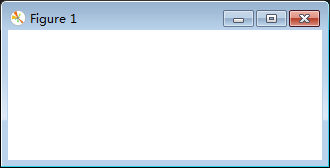
案例說(shuō)明:為工具欄添加全屏切換工具項(xiàng)。
import matplotlib.pyplot as pltimport matplotlib as mplplt.rcParams[’toolbar’] = ’toolmanager’fig = plt.gcf()# 通過(guò)mpl.backend_tools.add_tools_to_container函數(shù)添加工具項(xiàng)mpl.backend_tools.add_tools_to_container(fig.canvas.manager.toolbar, tools=[[’foo’, [ ’fullscreen’]]])plt.show()
案例解析:add_tools_to_container函數(shù)有兩個(gè)參數(shù)container和tools,由源碼可知container參數(shù)的值應(yīng)為fig.canvas.manager.toolbar,tools參數(shù)按照[[分組1, [工具1, 工具2 ...]], [分組2, [...]]]格式取值。
根據(jù)源碼可知:
添加內(nèi)置工具項(xiàng)有兩種方法
toolbar對(duì)象可以通過(guò)add_tool方法添加內(nèi)置工具項(xiàng),參數(shù)為name和tool,name為工具項(xiàng)的名稱(chēng),tool為添加的工具項(xiàng)對(duì)應(yīng)的類(lèi)或者字符串。 toolbar對(duì)象可以通過(guò)add_toolitem方法添加內(nèi)置工具項(xiàng),參數(shù)為name、group、 position、 image_file、 description和 toggle,name為工具項(xiàng)的名稱(chēng),group為工具項(xiàng)所在組,position為工具項(xiàng)在組中的位置,取值為列表索引,一般取-1即在所在組末尾追加,設(shè)置為0即在所在組的首位,image_file為工具項(xiàng)圖像,值為字符串,description為工具項(xiàng)描述, toggle為是否為切換式工具項(xiàng),布爾值。 刪除內(nèi)置工具項(xiàng)有兩種方法 toolbar對(duì)象可以通過(guò)remove_toolitem方法刪除內(nèi)置工具項(xiàng),參數(shù)為name,即工具項(xiàng)的名稱(chēng)。 toolmanager對(duì)象可以通過(guò)remove_tool方法刪除內(nèi)置工具項(xiàng),參數(shù)為name,即工具項(xiàng)的名稱(chēng)。案例案例說(shuō)明:刪除向前工具項(xiàng),添加全屏切換工具項(xiàng)。
import matplotlib.pyplot as pltimport matplotlib as mplplt.rcParams[’toolbar’] = ’toolmanager’fig = plt.gcf()fig.canvas.manager.toolmanager.remove_tool(’forward’)fig.canvas.manager.toolbar.remove_toolitem(’back’)fig.canvas.manager.toolbar.add_tool(’quit’, ’foo’)fig.canvas.manager.toolbar.add_toolitem(’fullscreen’, ’foo’, -1,’fullscreen’,’fullscreen’,False) plt.show()
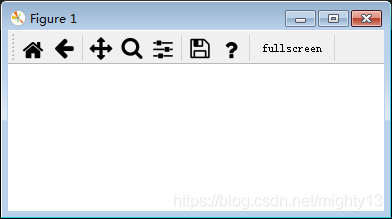
通過(guò)工具欄管理器添加、刪除內(nèi)置工具項(xiàng)的方法很多種,需要注意調(diào)用對(duì)象、方法、參數(shù),閱讀下面的matplotlib源碼可能會(huì)有所啟發(fā)。
相關(guān)源碼matplotlib.backends.backend_qt5模塊
class FigureManagerQT(FigureManagerBase): self.toolbar = self._get_toolbar(self.canvas, self.window) if self.toolmanager: backend_tools.add_tools_to_manager(self.toolmanager) if self.toolbar: backend_tools.add_tools_to_container(self.toolbar) if self.toolbar: self.window.addToolBar(self.toolbar) tbs_height = self.toolbar.sizeHint().height() else: tbs_height = 0
def _get_toolbar(self, canvas, parent): # must be inited after the window, drawingArea and figure # attrs are set if matplotlib.rcParams[’toolbar’] == ’toolbar2’: toolbar = NavigationToolbar2QT(canvas, parent, True) elif matplotlib.rcParams[’toolbar’] == ’toolmanager’: toolbar = ToolbarQt(self.toolmanager, self.window) else: toolbar = None return toolbar
class ToolbarQt(ToolContainerBase, QtWidgets.QToolBar): def __init__(self, toolmanager, parent): ToolContainerBase.__init__(self, toolmanager) QtWidgets.QToolBar.__init__(self, parent) self.setAllowedAreas( QtCore.Qt.TopToolBarArea | QtCore.Qt.BottomToolBarArea) message_label = QtWidgets.QLabel('') message_label.setAlignment( QtCore.Qt.AlignRight | QtCore.Qt.AlignVCenter) message_label.setSizePolicy( QtWidgets.QSizePolicy(QtWidgets.QSizePolicy.Expanding, QtWidgets.QSizePolicy.Ignored)) self._message_action = self.addWidget(message_label) self._toolitems = {} self._groups = {} def add_toolitem( self, name, group, position, image_file, description, toggle): button = QtWidgets.QToolButton(self) if image_file: button.setIcon(NavigationToolbar2QT._icon(self, image_file)) button.setText(name) if description: button.setToolTip(description) def handler(): self.trigger_tool(name) if toggle: button.setCheckable(True) button.toggled.connect(handler) else: button.clicked.connect(handler) self._toolitems.setdefault(name, []) self._add_to_group(group, name, button, position) self._toolitems[name].append((button, handler)) def _add_to_group(self, group, name, button, position): gr = self._groups.get(group, []) if not gr: sep = self.insertSeparator(self._message_action) gr.append(sep) before = gr[position] widget = self.insertWidget(before, button) gr.insert(position, widget) self._groups[group] = gr def toggle_toolitem(self, name, toggled): if name not in self._toolitems: return for button, handler in self._toolitems[name]: button.toggled.disconnect(handler) button.setChecked(toggled) button.toggled.connect(handler) def remove_toolitem(self, name): for button, handler in self._toolitems[name]: button.setParent(None) del self._toolitems[name] def set_message(self, s): self.widgetForAction(self._message_action).setText(s
matplotlib.backend_tools模塊
def add_tools_to_container(container, tools=default_toolbar_tools): ''' Add multiple tools to the container. Parameters ---------- container : Container `backend_bases.ToolContainerBase` object that will get the tools added. tools : list, optional List in the form ``[[group1, [tool1, tool2 ...]], [group2, [...]]]`` where the tools ``[tool1, tool2, ...]`` will display in group1. See `add_tool` for details. ''' for group, grouptools in tools: for position, tool in enumerate(grouptools): container.add_tool(tool, group, position)
def add_tools_to_manager(toolmanager, tools=default_tools): ''' Add multiple tools to a `.ToolManager`. Parameters ---------- toolmanager : `.backend_managers.ToolManager` Manager to which the tools are added. tools : {str: class_like}, optional The tools to add in a {name: tool} dict, see `add_tool` for more info. ''' for name, tool in tools.items(): toolmanager.add_tool(name, tool)
到此這篇關(guān)于python matplotlib工具欄源碼探析二之添加、刪除內(nèi)置工具項(xiàng)的案例的文章就介紹到這了,更多相關(guān)python matplotlib內(nèi)置工具項(xiàng)內(nèi)容請(qǐng)搜索好吧啦網(wǎng)以前的文章或繼續(xù)瀏覽下面的相關(guān)文章希望大家以后多多支持好吧啦網(wǎng)!
相關(guān)文章:
1. Python基于requests庫(kù)爬取網(wǎng)站信息2. vscode運(yùn)行php報(bào)錯(cuò)php?not?found解決辦法3. Python使用Selenium自動(dòng)進(jìn)行百度搜索的實(shí)現(xiàn)4. Java commons-httpclient如果實(shí)現(xiàn)get及post請(qǐng)求5. 一文帶你徹底理解Java序列化和反序列化6. 微信小程序?qū)崿F(xiàn)商品分類(lèi)頁(yè)過(guò)程結(jié)束7. PHP laravel實(shí)現(xiàn)導(dǎo)出PDF功能8. JS中6個(gè)對(duì)象數(shù)組去重的方法9. 資深程序員:給Python軟件開(kāi)發(fā)測(cè)試的25個(gè)忠告!10. python中文本字符處理的簡(jiǎn)單方法記錄
 網(wǎng)公網(wǎng)安備