python 實(shí)現(xiàn)docx與doc文件的互相轉(zhuǎn)換
因文件格式要求,需要將docx 與doc文件相互轉(zhuǎn)換,特尋找python代碼,與大家共分享
from win32com import client#轉(zhuǎn)換doc為docxdef doc2docx(fn): word = client.Dispatch('Word.Application') # 打開(kāi)word應(yīng)用程序 #for file in files: doc = word.Documents.Open(fn) #打開(kāi)word文件 doc.SaveAs('{}x'.format(fn), 12)#另存為后綴為'.docx'的文件,其中參數(shù)12或16指docx文件 doc.Close() #關(guān)閉原來(lái)word文件 word.Quit()#轉(zhuǎn)換docx為docdef docx2doc(fn): word = client.Dispatch('Word.Application') # 打開(kāi)word應(yīng)用程序 #for file in files: doc = word.Documents.Open(fn) #打開(kāi)word文件 doc.SaveAs('{}'.format(fn[:-1]), 0)#另存為后綴為'.docx'的文件,其中參數(shù)0指doc doc.Close() #關(guān)閉原來(lái)word文件 word.Quit()docx2doc(u'd:python1.docx')
如果想轉(zhuǎn)換為其他格式文件,需要在format文件名內(nèi)修改,并用如下save as 參數(shù)
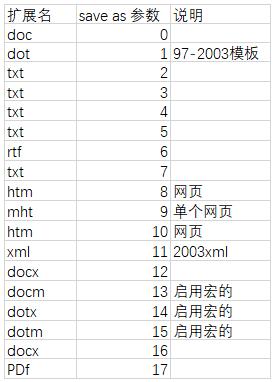
doc.SaveAs('{}.pdf'.format(fn[:-5]), 17)
需要說(shuō)明的是:
要安裝OFFICE,如果是使用金山WPS的,則還不能應(yīng)用
補(bǔ)充:python批量將文件夾內(nèi)所有doc轉(zhuǎn)成docx
doc轉(zhuǎn)docx函數(shù)import osfrom win32com import client def doc_to_docx(path): if os.path.splitext(path)[1] == '.doc': word = client.Dispatch(’Word.Application’) doc = word.Documents.Open(path) # 目標(biāo)路徑下的文件 doc.SaveAs(os.path.splitext(path)[0]+'.docx', 16) # 轉(zhuǎn)化后路徑下的文件 doc.Close() word.Quit() path = ''#填寫(xiě)文件夾路徑doc_to_docx(path)獲取文件夾下的所有文件的絕對(duì)路徑
import os def find_file(path, ext, file_list=[]): dir = os.listdir(path) for i in dir: i = os.path.join(path, i) if os.path.isdir(i): find_file(i, ext, file_list) else: if ext == os.path.splitext(i)[1]:file_list.append(i) return file_list dir_path = ''ext = '.doc'file_list = find_file(dir_path, ext)源碼
import osfrom win32com import client def doc_to_docx(path): if os.path.splitext(path)[1] == '.doc': word = client.Dispatch(’Word.Application’) doc = word.Documents.Open(path) # 目標(biāo)路徑下的文件 doc.SaveAs(os.path.splitext(path)[0]+'.docx', 16) # 轉(zhuǎn)化后路徑下的文件 doc.Close() word.Quit() def find_file(path, ext, file_list=[]): dir = os.listdir(path) for i in dir: i = os.path.join(path, i) if os.path.isdir(i): find_file(i, ext, file_list) else: if ext == os.path.splitext(i)[1]:file_list.append(i) return file_list dir_path = 'C:Userspython'#批量轉(zhuǎn)換文件夾ext = '.doc'file_list = find_file(dir_path, ext)for file in file_list: doc_to_docx(file)
以上為個(gè)人經(jīng)驗(yàn),希望能給大家一個(gè)參考,也希望大家多多支持好吧啦網(wǎng)。如有錯(cuò)誤或未考慮完全的地方,望不吝賜教。
相關(guān)文章:
1. PHP使用Swagger生成好看的API文檔2. ASP.NET MVC使用jQuery ui的progressbar實(shí)現(xiàn)進(jìn)度條3. Python3 json模塊之編碼解碼方法講解4. Python 制作查詢(xún)商品歷史價(jià)格的小工具5. Python 如何調(diào)試程序崩潰錯(cuò)誤6. Python 利用Entrez庫(kù)篩選下載PubMed文獻(xiàn)摘要的示例7. ASP基礎(chǔ)知識(shí)VBScript基本元素講解8. python使用jenkins發(fā)送企業(yè)微信通知的實(shí)現(xiàn)9. Python sublime安裝及配置過(guò)程詳解10. Python 合并拼接字符串的方法
 網(wǎng)公網(wǎng)安備