vue添加錨點(diǎn),實(shí)現(xiàn)滾動(dòng)頁(yè)面時(shí)錨點(diǎn)添加相應(yīng)的class操作
第一步,給vue頁(yè)面添加錨點(diǎn)
.orange{ color: #f97910;}
<template> <div ref='content'> <div class='tabbar'> <div @click.prevent='tabclick(index)' v-for='(item,index) in productTile' :key='index' :class='{orange:index==current}'>{{item}}</div></div> <div id='0'>...</div> <div id='1'>...</div> <div id='2'>...</div> </div><template>
tabclick(index){ this.current=index; let anchorElement = document.getElementById(index); if(anchorElement) { anchorElement.scrollIntoView(); } },
第二步:給class為productDetail的<div>部分加height:100%;overflow-y: scroll;
.productDetail { width: 100%; height: 100%; display: flex; flex-direction: column; overflow-y: scroll;}
第三步,添加監(jiān)聽事件
document.getElementsByClassName(’productDetail’)[0]; vue中同理于:this.$refs.contentmethods:{ handleScroll(el) { this.scrollTop = this.$refs.content.scrollTop; if (this.scrollTop >= 460) { this.current = 2 } else if (this.scrollTop < 460 && this.scrollTop >= 360) { this.current = 1 } else { this.current = 0 } },},mounted() { //scoll滾動(dòng)事件監(jiān)聽 var pro_detail_page = document.getElementsByClassName(’productDetail’)[0]; pro_detail_page.addEventListener(’scroll’, this.handleScroll);},
注:給最外層div添加height:100%后,mint-ui的輪播圖就會(huì)展示不出來(lái)。我們可以修改mint-ui的默認(rèn)overflow屬性,改為:overflow:visible
補(bǔ)充知識(shí):使用Vuepress自動(dòng)生成markdown的目錄時(shí),一旦標(biāo)題有數(shù)字時(shí)便無(wú)法跳轉(zhuǎn)的問(wèn)題解決
問(wèn)題描述
最近在用vuepress寫網(wǎng)頁(yè)文檔的時(shí)候發(fā)現(xiàn)了一個(gè)問(wèn)題,就是我用markdown書寫的標(biāo)題中如果有類似 1.2 XXX 的標(biāo)題時(shí),當(dāng)使用官方文檔給出的:
[[toc]]
自動(dòng)生成目錄時(shí),最終生成的網(wǎng)頁(yè),含有數(shù)字的標(biāo)題是無(wú)法跳轉(zhuǎn)到相應(yīng)位置的。
問(wèn)題分析
查看官方開發(fā)文檔后發(fā)現(xiàn),這跟vuepress的默認(rèn)配置有關(guān),從如圖1所示markdown.slugify函數(shù)可以看到,我們需要修改其配置。
markdown.slugify函數(shù)
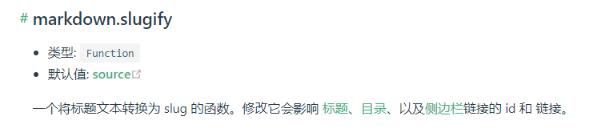
圖1 markdown.slugify函數(shù)
點(diǎn)擊圖中的source,跳轉(zhuǎn)到GitHub的工程頁(yè)面,可以看到如下的代碼段:
// string.js slugify drops non ascii chars so we have to// use a custom implementation here// @ts-ignoreimport { remove as removeDiacritics } from ’diacritics’ // eslint-disable-next-line no-control-regexconst rControl = /[u0000-u001f]/gconst rSpecial = /[s~`!@#$%^&*()-_+=[]{}|;:'’<>,.?/]+/g export = function slugify (str: string): string { return removeDiacritics(str) // Remove control characters .replace(rControl, ’’) // Replace special characters .replace(rSpecial, ’-’) // Remove continous separators .replace(/-{2,}/g, ’-’) // Remove prefixing and trailing separtors .replace(/^-+|-+$/g, ’’) // ensure it doesn’t start with a number (#121) .replace(/^(d)/, ’_$1’) // lowercase .toLowerCase()}
看到了其中有一句ensure it doesn’t start with a number (#121),可以知道這就是問(wèn)題所在:
// ensure it doesn’t start with a number (#121)
.replace(/^(d)/, ’_$1’)
我們的標(biāo)題數(shù)字被這句代碼替換掉了,導(dǎo)致最終的鏈接根本沒(méi)有指向標(biāo)題,故無(wú)法跳轉(zhuǎn)。
問(wèn)題解決
根據(jù)GitHub頁(yè)面上的配置路徑,找到自己安裝的vuepress模塊的配置路徑,我的路徑是:
D:my_programnodejsnode_globalnode_modulesvuepressnode_modules@vuepressshared-utilslibslugify.js
打開 slugify.js 文件,并將上述的代碼段注釋掉,問(wèn)題即可解決。
以上這篇vue添加錨點(diǎn),實(shí)現(xiàn)滾動(dòng)頁(yè)面時(shí)錨點(diǎn)添加相應(yīng)的class操作就是小編分享給大家的全部?jī)?nèi)容了,希望能給大家一個(gè)參考,也希望大家多多支持好吧啦網(wǎng)。

 網(wǎng)公網(wǎng)安備