html - css3中多列高度 統一
問題描述
<!DOCTYPE html><html lang='zh-cmn-Hans'><head><meta charset='utf-8' /><title>column-fill_CSS參考手冊_web前端開發參考手冊系列</title><meta name='author' content='Joy Du(飄零霧雨), dooyoe@gmail.com, www.doyoe.com' /><style>body{font:14px/1.5 georgia,serif,sans-serif;}p{margin:0;padding:5px 10px;background:#eee;}h1{margin:10px 0;font-size:16px;}.test{ width:700px; border:10px solid #000; -moz-column-count:2; -moz-column-gap:20px; -moz-column-rule:3px solid #090; -moz-column-fill:balance; -webkit-column-count:2; -webkit-column-gap:20px; -webkit-column-rule:3px solid #090; -webkit-column-fill:balance; column-count:2; column-gap:20px; column-rule:3px solid #090; column-fill:balance;}.test p{ -moz-column-break-before:always; -webkit-column-break-before:always; column-break-before:always;}</style></head><body><h1>column-fill:balance</h1><p class='test'> <p>This module describes multi-column layout in CSS. By using functionality described in this document, style sheets can declare that the content of an element is to be laid out in multiple columns.</p> <p>This module describes multi-column layout in CSS. By using functionality described in this document</p></p></body></html>
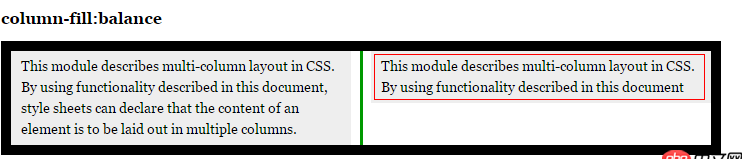
怎么使第2個p段落高度跟第一個一致,我這里已經加了column-fill:balance;屬性。求高手分析下,謝謝!
問題解答
回答1:display: block;再設置寬高不好?
回答2:<!DOCTYPE html><html lang='zh-cmn-Hans'><head><meta charset='utf-8' /><title>column-fill_CSS參考手冊_web前端開發參考手冊系列</title><meta name='author' content='Joy Du(飄零霧雨), dooyoe@gmail.com, www.doyoe.com' /><style>body{font:14px/1.5 georgia,serif,sans-serif;}p{margin:0;padding:5px 10px;background:#eee;}h1{margin:10px 0;font-size:16px;}.test{ width:700px; border:10px solid #000; -moz-column-count:2; -moz-column-gap:20px; -moz-column-rule:3px solid #090; -moz-column-fill:balance; -webkit-column-count:2; -webkit-column-gap:20px; -webkit-column-rule:3px solid #090; -webkit-column-fill:balance; column-count:2; column-gap:20px; column-rule:3px solid #090; column-fill:balance;}</style></head><body><h1>column-fill:balance</h1><p class='test'> 這個是column要解決的CSS問題,也算是column真正使用的領域;這個是column要解決的CSS問題,也算是column真正使用的領域;這個是column要解決的CSS問題,也算是column真正使用的領域;這個是column要解決的CSS問題,也算是column真正使用的領域;這個是column要解決的CSS問題,也算是column真正使用的領域;這個是column要解決的CSS問題,也算是column真正使用的領域;這個是column要解決的CSS問題,也算是column真正使用的領域;這個是column要解決的CSS問題,也算是column真正使用的領域;這個是column要解決的CSS問題,也算是column真正使用的領域;這個是column要解決的CSS問題,也算是column真正使用的領域;這個是column要解決的CSS問題,也算是column真正使用的領域;</p></body></html>
應對您的解決方案:
<!DOCTYPE html><html lang='zh-cmn-Hans'><head><meta charset='utf-8' /><title>column-fill_CSS參考手冊_web前端開發參考手冊系列</title><meta name='author' content='Joy Du(飄零霧雨), dooyoe@gmail.com, www.doyoe.com' /><style>body{font:14px/1.5 georgia,serif,sans-serif;}p{margin:0;padding:5px 10px;background:#eee;}h1{margin:10px 0;font-size:16px;}.test{ width:700px; border:10px solid #000; -moz-column-count:2; -moz-column-gap:20px; -moz-column-rule:3px solid #090; -moz-column-fill:balance; -webkit-column-count:2; -webkit-column-gap:20px; -webkit-column-rule:3px solid #090; -webkit-column-fill:balance; column-count:2; column-gap:20px; column-rule:3px solid #090; column-fill:balance;}.test p{ -moz-column-break-before:always; -webkit-column-break-before:always; column-break-before:always; min-height:6em;}</style></head><body><h1>column-fill:balance</h1><p class='test'> <p>This module describes multi-column layout in CSS. By using functionality described in this document, style sheets can declare that the content of an element is to be laid out in multiple columns.</p> <p>This module describes multi-column layout in CSS. By using functionality described in this document</p></p></body></html>
覺得建議您先想一下column的出現時為了解決什么問題的;起碼不是替代float之類的老標準的;如果像您這樣使用也算一種自找苦吃;
相關文章:
1. javascript - sublime快鍵鍵問題2. javascript - immutable配合react提升性能?3. css - 寫頁面遇到個布局問題,求大佬們幫解答,在線等,急!~4. javascript - nodejs關于進程間發送句柄的一點疑問5. Apache 已經把網站根目錄的改為allow from all了,但是服務器還是不能訪問?6. 實現bing搜索工具urlAPI提交7. 配置Apache時,添加對PHP的支持時語法錯誤8. vue.js - Vue 如何像Angular.js watch 一樣監聽數據變化9. javascript - 移動端上不能實現拖拽布局嗎?10. phpstudy8.1支持win11系統嗎?

 網公網安備
網公網安備