android - 安卓app實現(xiàn)與藍牙模塊的數(shù)據(jù)通信,當藍牙模塊離開有效距離時與手機app斷開連接,app想在斷開連接時有所提示,要怎么實現(xiàn)
問題描述
/**
簡化藍牙操作的工具類*/
public class BluetoothUtils {
public static final int ENABLE_BLUETOOTH = 0; // 發(fā)現(xiàn)藍牙未開啟發(fā)送的開啟藍牙消息public static final int DEVICE_SCAN_STARTED = 1; // 掃描設備開始時發(fā)送的消息public static final int DEVICE_SCAN_STOPPED = 2; // 掃描終止時發(fā)送的消息public static final int DEVICE_SCAN_COMPLETED = 3; // 掃描設備完成時發(fā)送的消息public static final int DEVICE_CONNECTED = 4; // 連接上設備時發(fā)送的消息public static final int DATA_SENDED = 5; // 發(fā)送數(shù)據(jù)后發(fā)送清除edittext內容的消息public static final int DATA_READED = 6; // 讀取到數(shù)據(jù)后發(fā)送使適配器更新的消息public static final int CHARACTERISTIC_ACCESSIBLE = 7; // 可操作特征值時發(fā)送的消息private boolean mScanning; // 設備掃描狀態(tài)的標志private byte[] readedData; // 讀取到的字節(jié)數(shù)組數(shù)據(jù)private Context context;private Handler handler;private BluetoothAdapter mBleAdapter;private BluetoothGatt mBluetoothGatt;private BluetoothGattCharacteristic mCharacteristic;private DeviceListAdapter mDeviceListAdapter;private DataBuffer dataBuffer;public BluetoothUtils(Context context, Handler handler) { this.context = context; this.handler = handler;dataBuffer = new DataBuffer(4096); }public void initialize() { BluetoothManager manager = (BluetoothManager) context.getSystemService(Context.BLUETOOTH_SERVICE); mBleAdapter = manager.getAdapter(); mDeviceListAdapter = new DeviceListAdapter(context);}/** * 檢測藍牙開啟狀態(tài),若未開啟則發(fā)送開啟藍牙消息 */public void checkBluetoothEnabled() { if (mBleAdapter == null || !mBleAdapter.isEnabled()) {Message message = new Message();message.what = ENABLE_BLUETOOTH;handler.sendMessage(message); }}/** * 檢測當前設備掃描的狀態(tài),若在掃描中則停止掃描 */public void checkDeviceScanning() { if (mScanning) {scanBleDevice(false); }}/** * 檢測藍牙連接狀態(tài),若已連接則斷開并關閉連接 */public void checkGattConnected() { if (mBluetoothGatt != null) {if (mBluetoothGatt.connect()) { mBluetoothGatt.disconnect(); mBluetoothGatt.close();} }}/** * 掃描設備的方法,掃描按鈕點擊后調用,掃描持續(xù)3秒 * * @param enable 掃描方法的使能標志 */public void scanBleDevice(boolean enable) { if (enable) {handler.postDelayed(new Runnable() { @Override public void run() {mScanning = false;mBleAdapter.stopLeScan(mLeScanCallback);Message message = new Message();message.what = DEVICE_SCAN_COMPLETED;handler.sendMessage(message); }}, 5000);mScanning = true; //mBleAdapter.startLeScan(new UUID[] {UUID.fromString('0000F445-0000-1000-8000-00805F9B34FB'),UUID.fromString('0000FEE0-0000-1000-8000-00805F9B34FB')},mLeScanCallback);mBleAdapter.startLeScan(mLeScanCallback);Message message = new Message();message.what = DEVICE_SCAN_STARTED;handler.sendMessage(message); } else {mScanning = false;mBleAdapter.stopLeScan(mLeScanCallback);Message message = new Message();message.what = DEVICE_SCAN_STOPPED;handler.sendMessage(message); }}/** * 往特征值里寫入數(shù)據(jù)的方法 * * @param data 字節(jié)數(shù)組類型的數(shù)據(jù) */public void writeData(byte[] data) { if (mBluetoothGatt != null) {if (mBluetoothGatt.connect() && mCharacteristic != null &&data != null) { mCharacteristic.setValue(data); mBluetoothGatt.writeCharacteristic(mCharacteristic);} }}/** * 創(chuàng)建一個新的設備列表對話框 */public void creatDeviceListDialog() { if (mDeviceListAdapter.getCount() > 0) {new AlertDialog.Builder(context).setCancelable(true) .setAdapter(mDeviceListAdapter, new DialogInterface.OnClickListener() {@Overridepublic void onClick(DialogInterface dialog, int which) { BluetoothDevice device = mDeviceListAdapter.getDevice(which); mBluetoothGatt = device.connectGatt(context, false, mGattCallback);} }).show(); }}/** * 開啟特征值的notification,然后才能讀取數(shù)據(jù) */public void setCharacteristicNotification() { String clientUuid = '00002902-0000-1000-8000-00805f9b34fb'; mBluetoothGatt.setCharacteristicNotification(mCharacteristic, true); BluetoothGattDescriptor descriptor = mCharacteristic. getDescriptor(UUID.fromString(clientUuid)); descriptor.setValue(BluetoothGattDescriptor.ENABLE_NOTIFICATION_VALUE); mBluetoothGatt.writeDescriptor(descriptor);}/** * 字節(jié)數(shù)組轉化為標準的16進制字符串 * * @param bytes 字節(jié)數(shù)組數(shù)據(jù) * @return 字符串 */public String bytesToString(byte[] bytes) { final char[] hexArray = '0123456789ABCDEF'.toCharArray(); char[] hexChars = new char[bytes.length * 2]; StringBuilder sb = new StringBuilder(); for (int i = 0; i < bytes.length; i++) {int v = bytes[i] & 0xFF;hexChars[i * 2] = hexArray[v >>> 4];hexChars[i * 2 + 1] = hexArray[v & 0x0F];sb.append(hexChars[i * 2]);sb.append(hexChars[i * 2 + 1]);sb.append(’ ’); } return sb.toString();}/** * 將字符串轉為16進制值的字節(jié)數(shù)組 * * @param s 字符串數(shù)據(jù) * @return buf 字節(jié)數(shù)組 */public byte[] stringToBytes(String s) { byte[] buf = new byte[s.length() / 2]; for (int i = 0; i < buf.length; i++) {try { buf[i] = (byte) Integer.parseInt(s.substring(i * 2, i * 2 + 2), 16);} catch (NumberFormatException e) { e.printStackTrace();} } return buf;}/** * Ascii編碼的字節(jié)數(shù)組轉化為對應的字符串 * * @param bytes 字節(jié)數(shù)組 * @return 字符串 */public String asciiToString(byte[] bytes) { char[] buf = new char[bytes.length]; StringBuilder sb = new StringBuilder(); for (int i = 0; i < buf.length; i++) {buf[i] = (char) bytes[i];sb.append(buf[i]); } return sb.toString();}/** * 變換文本的方法,有動畫效果 * * @param textView 目標文本view對象 * @param convertTextId 變換后的文本resId */public void convertText(final TextView textView, final int convertTextId) { final Animation scaleIn = AnimationUtils.loadAnimation(context, R.anim.text_scale_in); Animation scaleOut = AnimationUtils.loadAnimation(context, R.anim.text_scale_out); scaleOut.setAnimationListener(new Animation.AnimationListener() {@Overridepublic void onAnimationStart(Animation animation) {}@Overridepublic void onAnimationEnd(Animation animation) { textView.setText(convertTextId); textView.startAnimation(scaleIn);}@Overridepublic void onAnimationRepeat(Animation animation) {} }); textView.startAnimation(scaleOut);}/** * 獲取已連接設備的設備名 * * @return 字符串形式的設備名 */public String getDeviceName() { return mBluetoothGatt.getDevice().getName();}/** * 獲取已讀取的數(shù)據(jù) * * @return 字節(jié)數(shù)組數(shù)據(jù) */public byte[] getReadedData() { return readedData;}/** * 獲取已讀取的數(shù)據(jù)長度 * * @return */public int getDataLen() { return dataBuffer.getSize();}/** * 獲取已讀取的數(shù)據(jù) * * @return */public int getData(byte[] data_out,int len) { return dataBuffer.dequeue(data_out, len);}
/** * 連接Gatt之后的回調 */private BluetoothGattCallback mGattCallback =new BluetoothGattCallback() { @Override public void onConnectionStateChange(BluetoothGatt gatt, int status,int newState) {if (newState == BluetoothProfile.STATE_CONNECTED) { Message message = new Message(); message.what = DEVICE_CONNECTED; handler.sendMessage(message); mDeviceListAdapter.clear(); gatt.discoverServices();} } @Override public void onCharacteristicChanged(BluetoothGatt gatt, BluetoothGattCharacteristic characteristic) {if (characteristic != null) { dataBuffer.enqueue(characteristic.getValue(), characteristic.getValue().length); Message message = new Message(); message.what = DATA_READED; handler.sendMessage(message);} } @Override public void onCharacteristicWrite(BluetoothGatt gatt, BluetoothGattCharacteristic characteristic, int status) {if (status == BluetoothGatt.GATT_SUCCESS) { Message message = new Message(); message.what = DATA_SENDED; handler.sendMessage(message);} } @Override public void onServicesDiscovered(BluetoothGatt gatt, int status) {if (status == BluetoothGatt.GATT_SUCCESS) { // 得到目標特征值 String serviceUuid = '0000fee0-0000-1000-8000-00805f9b34fb'; String characterUuid = '0000fee1-0000-1000-8000-00805f9b34fb'; BluetoothGattService service = gatt.getService(UUID .fromString(serviceUuid)); mCharacteristic = service.getCharacteristic(UUID .fromString(characterUuid)); //開啟通知 setCharacteristicNotification(); Message message = new Message(); message.what = CHARACTERISTIC_ACCESSIBLE; handler.sendMessage(message);} } };/** * 藍牙掃描時的回調 */private BluetoothAdapter.LeScanCallback mLeScanCallback =new BluetoothAdapter.LeScanCallback() { @Override public void onLeScan(BluetoothDevice device, int rssi, byte[] scanRecord) {String buf = bytesToString(scanRecord);System.out.println('BluetoothUtils.enclosing_method():'+device.getName()+'nscanRecord'+buf+'rssi:'+rssi);//if ('E0 FE'.equals(buf.substring(0, buf.length()))) { mDeviceListAdapter.addDevice(device); mDeviceListAdapter.notifyDataSetChanged();} }};
}如上是藍牙操作的工具類,想在藍牙模塊與app斷開連接時,app那邊有提示大概怎么實現(xiàn)
列表項目
問題解答
回答1: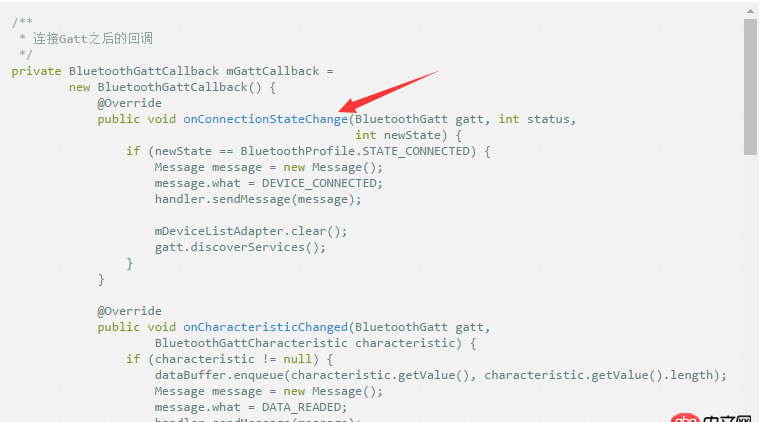 這里不就是連接狀態(tài)的回調嗎?
else if (newState == BluetoothProfile.STATE_DISCONNECTED) { TODO 這里做斷開以后的邏輯}
 網(wǎng)公網(wǎng)安備